Home
›
Community Cases
›
Why Same Areas? Exploring Equal Areas in Triangles and Trapezoids
Why Same Areas? Exploring Equal Areas in Triangles and Trapezoids
2016-03-17 21:00
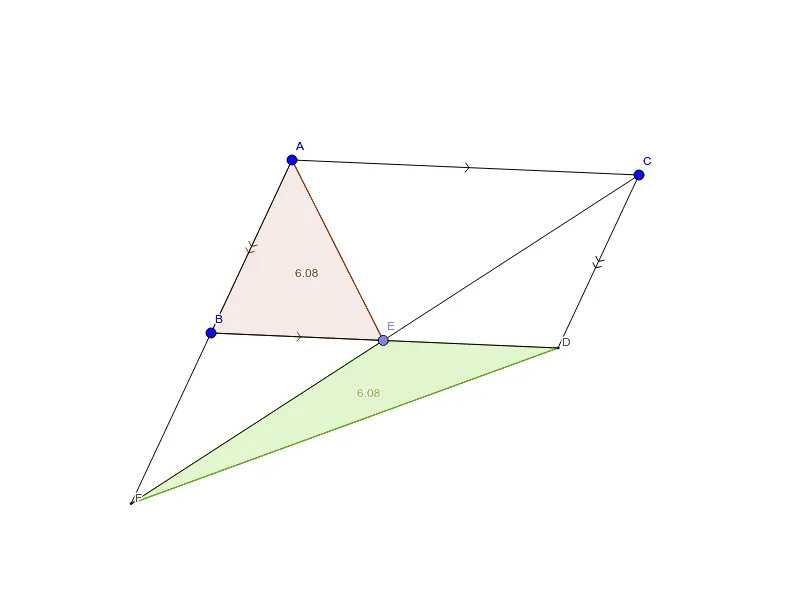
This applet explores a fascinating geometric question: why do certain constructed polygons have equal areas? It investigates the concept of area-preserving transformations in plane geometry through the construction of a scalene triangle and a trapezoid. Using dynamic geometric tools such as lines, rays, and reflections, the applet visually demonstrates the underlying principles that guarantee equal areas across different shapes.
Users interact with the applet by manipulating points, drawing lines, and applying geometric transformations to observe how the configuration changes while maintaining equal area relationships. Through dragging and adjusting elements, learners can see firsthand that even though the shapes may appear different, their areas remain identical due to specific geometric properties. The interactive nature of the applet encourages exploration and hypothesis testing, as students can create new configurations and verify whether the area equality holds.
The mathematical concepts addressed include the calculation of polygon areas, the properties of triangles and trapezoids, and the effects of reflections and other rigid transformations on area. The applet highlights the key insight that area is preserved under certain transformations, providing an intuitive foundation for understanding why seemingly different figures can share the same area. This connects to broader topics such as the formula for the area of a triangle, the relationship between triangles sharing the same base and height, and the decomposition and rearrangement of geometric figures.
Students benefit from this applet by developing a deeper, visual understanding of area-preserving transformations rather than relying solely on memorized formulas. The dynamic manipulation allows them to build geometric intuition, see the connections between different area formulas, and develop problem-solving skills applicable to plane geometry proofs and calculations. The applet is particularly suited for learners studying Euclidean geometry, offering an engaging, hands-on experience that bridges the gap between abstract geometric theorems and concrete visual understanding.
☆
Favorite
0
Loading the math board and drawing, please wait…
<?xml version="1.0" encoding="utf-8"?>
<geogebra format="5.0" version="5.0.214.0" id="929B0424-9D15-4DB2-83E2-0722D5BF0075"  xsi:noNamespaceSchemaLocation="http://www.geogebra.org/ggb.xsd" xmlns="" xmlns:xsi="http://www.w3.org/2001/XMLSchema-instance" >
<gui>
	<window width="800" height="600" />
	<perspectives>
	</perspectives>
	<labelingStyle  val="0"/>
	<font  size="12"/>
</gui>
<euclidianView>
	<viewNumber viewNo="1"/>
	<size  width="798" height="598"/>
	<coordSystem xZero="-108.99999999999999" yZero="283.99999999999966" scale="49.99999999999995" yscale="49.99999999999995"/>
	<evSettings axes="false" grid="false" gridIsBold="false" pointCapturing="3" rightAngleStyle="1" checkboxSize="26" gridType="0"/>
	<bgColor r="255" g="255" b="255"/>
	<axesColor r="0" g="0" b="0"/>
	<gridColor r="192" g="192" b="192"/>
	<lineStyle axes="1" grid="0"/>
	<axis id="0" show="false" label="" unitLabel="" tickStyle="1" showNumbers="true"/>
	<axis id="1" show="false" label="" unitLabel="" tickStyle="1" showNumbers="true"/>
</euclidianView>
<kernel>
	<continuous val="false"/>
	<usePathAndRegionParameters val="true"/>
	<decimals val="2"/>
	<angleUnit val="degree"/>
	<algebraStyle val="0" spreadsheet="0"/>
	<coordStyle val="0"/>
	<angleFromInvTrig val="false"/>
</kernel>
<scripting blocked="false" disabled="false"/>
<construction title="" author="" date="">
<element type="point" label="A">
	<show object="true" label="true"/>
	<objColor r="0" g="0" b="255" alpha="0"/>
	<layer val="0"/>
	<labelMode val="0"/>
	<animation step="1" speed="1" type="1" playing="false"/>
	<coords x="8.02" y="2.48" z="1"/>
	<pointSize val="5"/>
	<pointStyle val="0"/>
</element>
<element type="point" label="B">
	<show object="true" label="true"/>
	<objColor r="0" g="0" b="255" alpha="0"/>
	<layer val="0"/>
	<labelMode val="0"/>
	<animation step="1" speed="1" type="1" playing="false"/>
	<coords x="6.4" y="-0.98" z="1"/>
	<pointSize val="5"/>
	<pointStyle val="0"/>
</element>
<command name="Ray">
	<input a0="A" a1="B"/>
	<output a0="a"/>
</command>
<element type="ray" label="a">
	<show object="false" label="false"/>
	<objColor r="0" g="0" b="0" alpha="0"/>
	<layer val="0"/>
	<labelMode val="0"/>
	<coords x="3.46" y="-1.6199999999999992" z="-23.7316"/>
	<lineStyle thickness="2" type="0" typeHidden="1"/>
	<outlyingIntersections val="false"/>
	<keepTypeOnTransform val="true"/>
</element>
<element type="point" label="C">
	<show object="true" label="true"/>
	<objColor r="0" g="0" b="255" alpha="0"/>
	<layer val="0"/>
	<labelMode val="0"/>
	<animation step="1" speed="1" type="1" playing="false"/>
	<coords x="14.96" y="2.18" z="1"/>
	<pointSize val="5"/>
	<pointStyle val="0"/>
</element>
<command name="Line">
	<input a0="C" a1="a"/>
	<output a0="b"/>
</command>
<element type="line" label="b">
	<show object="false" label="false"/>
	<objColor r="0" g="0" b="0" alpha="0"/>
	<layer val="0"/>
	<labelMode val="0"/>
	<coords x="3.46" y="-1.6199999999999992" z="-48.230000000000004"/>
	<lineStyle thickness="2" type="0" typeHidden="1"/>
	<eqnStyle style="implicit"/>
</element>
<command name="Segment">
	<input a0="A" a1="C"/>
	<output a0="c"/>
</command>
<element type="segment" label="c">
	<show object="true" label="false"/>
	<objColor r="0" g="0" b="0" alpha="0"/>
	<layer val="0"/>
	<labelMode val="0"/>
	<decoration type="4"/>
	<coords x="0.2999999999999998" y="6.940000000000001" z="-19.6172"/>
	<lineStyle thickness="2" type="0" typeHidden="1"/>
	<outlyingIntersections val="false"/>
	<keepTypeOnTransform val="true"/>
</element>
<command name="Line">
	<input a0="B" a1="c"/>
	<output a0="d"/>
</command>
<element type="line" label="d">
	<show object="false" label="false"/>
	<objColor r="0" g="0" b="0" alpha="0"/>
	<layer val="0"/>
	<labelMode val="0"/>
	<coords x="0.2999999999999998" y="6.940000000000001" z="4.881200000000002"/>
	<lineStyle thickness="2" type="0" typeHidden="1"/>
	<eqnStyle style="implicit"/>
</element>
<command name="Intersect">
	<input a0="d" a1="b"/>
	<output a0="D"/>
</command>
<element type="point" label="D">
	<show object="true" label="true"/>
	<objColor r="68" g="68" b="68" alpha="0"/>
	<layer val="0"/>
	<labelMode val="0"/>
	<coords x="326.8086560000001" y="-31.357951999999997" z="24.498400000000004"/>
	<pointSize val="1"/>
	<pointStyle val="0"/>
</element>
<command name="Point">
	<input a0="d"/>
	<output a0="E"/>
</command>
<element type="point" label="E">
	<show object="true" label="true"/>
	<objColor r="125" g="125" b="255" alpha="0"/>
	<layer val="0"/>
	<labelMode val="0"/>
	<animation step="1" speed="1" type="1" playing="false"/>
	<coords x="9.845665069549215" y="-1.1289480577614932" z="1"/>
	<pointSize val="5"/>
	<pointStyle val="0"/>
</element>
<command name="Ray">
	<input a0="C" a1="E"/>
	<output a0="e"/>
</command>
<element type="ray" label="e">
	<show object="false" label="false"/>
	<objColor r="0" g="0" b="0" alpha="0"/>
	<layer val="0"/>
	<labelMode val="0"/>
	<coords x="3.3089480577614934" y="-5.114334930450786" z="-38.35261279572923"/>
	<lineStyle thickness="2" type="0" typeHidden="1"/>
	<outlyingIntersections val="false"/>
	<keepTypeOnTransform val="true"/>
</element>
<command name="Intersect">
	<input a0="a" a1="e"/>
	<output a0="F"/>
</command>
<element type="point" label="F">
	<show object="true" label="true"/>
	<objColor r="68" g="68" b="68" alpha="0"/>
	<layer val="0"/>
	<labelMode val="0"/>
	<coords x="59.240118106404566" y="-54.17340854565046" z="12.335103005786102"/>
	<pointSize val="1"/>
	<pointStyle val="0"/>
</element>
<command name="Segment">
	<input a0="A" a1="E"/>
	<output a0="f"/>
</command>
<element type="segment" label="f">
	<show object="true" label="false"/>
	<objColor r="0" g="0" b="0" alpha="0"/>
	<layer val="0"/>
	<labelMode val="0"/>
	<coords x="3.608948057761493" y="1.8256650695492151" z="-33.47141279572923"/>
	<lineStyle thickness="2" type="0" typeHidden="1"/>
	<outlyingIntersections val="false"/>
	<keepTypeOnTransform val="true"/>
</element>
<command name="Segment">
	<input a0="F" a1="D"/>
	<output a0="g"/>
</command>
<element type="segment" label="g">
	<show object="true" label="false"/>
	<objColor r="0" g="0" b="0" alpha="0"/>
	<layer val="0"/>
	<labelMode val="0"/>
	<coords x="-3.111808363516625" y="8.537436285808361" z="52.43944201514649"/>
	<lineStyle thickness="2" type="0" typeHidden="1"/>
	<outlyingIntersections val="false"/>
	<keepTypeOnTransform val="true"/>
</element>
<command name="Polygon">
	<input a0="A" a1="B" a2="E"/>
	<output a0="poly1" a1="e_1" a2="a_1" a3="b_1"/>
</command>
<element type="polygon" label="poly1">
	<lineStyle thickness="2" type="0" typeHidden="1"/>
	<show object="true" label="true"/>
	<objColor r="153" g="51" b="0" alpha="0.10000000149011612"/>
	<layer val="0"/>
	<labelMode val="2"/>
</element>
<element type="segment" label="e_1">
	<show object="true" label="false"/>
	<objColor r="153" g="51" b="0" alpha="0"/>
	<layer val="0"/>
	<labelMode val="0"/>
	<decoration type="5"/>
	<auxiliary val="false"/>
	<coords x="3.46" y="-1.6199999999999992" z="-23.7316"/>
	<lineStyle thickness="2" type="0" typeHidden="1"/>
	<outlyingIntersections val="false"/>
	<keepTypeOnTransform val="true"/>
</element>
<element type="segment" label="a_1">
	<show object="true" label="false"/>
	<objColor r="153" g="51" b="0" alpha="0"/>
	<layer val="0"/>
	<labelMode val="0"/>
	<decoration type="4"/>
	<auxiliary val="false"/>
	<coords x="0.14894805776149322" y="3.4456650695492144" z="2.4234841984846742"/>
	<lineStyle thickness="2" type="0" typeHidden="1"/>
	<outlyingIntersections val="false"/>
	<keepTypeOnTransform val="true"/>
</element>
<element type="segment" label="b_1">
	<show object="true" label="false"/>
	<objColor r="153" g="51" b="0" alpha="0"/>
	<layer val="0"/>
	<labelMode val="0"/>
	<auxiliary val="false"/>
	<coords x="-3.608948057761493" y="-1.8256650695492151" z="33.47141279572923"/>
	<lineStyle thickness="2" type="0" typeHidden="1"/>
	<outlyingIntersections val="false"/>
	<keepTypeOnTransform val="true"/>
</element>
<command name="Polygon">
	<input a0="E" a1="F" a2="D"/>
	<output a0="poly2" a1="d_1" a2="e_2" a3="f_1"/>
</command>
<element type="polygon" label="poly2">
	<lineStyle thickness="2" type="0" typeHidden="1"/>
	<show object="true" label="true"/>
	<objColor r="102" g="204" b="0" alpha="0.19"/>
	<layer val="0"/>
	<labelMode val="2"/>
</element>
<element type="segment" label="d_1">
	<show object="true" label="false"/>
	<objColor r="102" g="204" b="0" alpha="0"/>
	<layer val="0"/>
	<labelMode val="0"/>
	<auxiliary val="false"/>
	<coords x="3.2628603057551318" y="-5.0431013553575745" z="-37.818429219417254"/>
	<lineStyle thickness="2" type="0" typeHidden="1"/>
	<outlyingIntersections val="false"/>
	<keepTypeOnTransform val="true"/>
</element>
<element type="segment" label="e_2">
	<show object="true" label="false"/>
	<objColor r="102" g="204" b="0" alpha="0"/>
	<layer val="0"/>
	<labelMode val="0"/>
	<auxiliary val="false"/>
	<coords x="-3.111808363516625" y="8.537436285808361" z="52.43944201514649"/>
	<lineStyle thickness="2" type="0" typeHidden="1"/>
	<outlyingIntersections val="false"/>
	<keepTypeOnTransform val="true"/>
</element>
<element type="segment" label="f_1">
	<show object="true" label="false"/>
	<objColor r="102" g="204" b="0" alpha="0"/>
	<layer val="0"/>
	<labelMode val="0"/>
	<auxiliary val="false"/>
	<coords x="-0.1510519422385066" y="-3.494334930450787" z="-2.457715801515329"/>
	<lineStyle thickness="2" type="0" typeHidden="1"/>
	<outlyingIntersections val="false"/>
	<keepTypeOnTransform val="true"/>
</element>
<command name="Segment">
	<input a0="C" a1="D"/>
	<output a0="h"/>
</command>
<element type="segment" label="h">
	<show object="true" label="false"/>
	<objColor r="0" g="0" b="0" alpha="0"/>
	<layer val="0"/>
	<labelMode val="0"/>
	<decoration type="5"/>
	<coords x="3.46" y="-1.6199999999999992" z="-48.230000000000004"/>
	<lineStyle thickness="2" type="0" typeHidden="1"/>
	<outlyingIntersections val="false"/>
	<keepTypeOnTransform val="true"/>
</element>
<command name="Segment">
	<input a0="B" a1="D"/>
	<output a0="i"/>
</command>
<element type="segment" label="i">
	<show object="true" label="false"/>
	<objColor r="0" g="0" b="0" alpha="0"/>
	<layer val="0"/>
	<labelMode val="0"/>
	<coords x="0.2999999999999998" y="6.940000000000001" z="4.881200000000003"/>
	<lineStyle thickness="2" type="0" typeHidden="1"/>
	<outlyingIntersections val="false"/>
	<keepTypeOnTransform val="true"/>
</element>
<command name="Segment">
	<input a0="C" a1="F"/>
	<output a0="j"/>
</command>
<element type="segment" label="j">
	<show object="true" label="false"/>
	<objColor r="0" g="0" b="0" alpha="0"/>
	<layer val="0"/>
	<labelMode val="0"/>
	<coords x="6.571808363516626" y="-10.15743628580836" z="-76.1710420151465"/>
	<lineStyle thickness="2" type="0" typeHidden="1"/>
	<outlyingIntersections val="false"/>
	<keepTypeOnTransform val="true"/>
</element>
<command name="Segment">
	<input a0="A" a1="F"/>
	<output a0="k"/>
</command>
<element type="segment" label="k">
	<show object="true" label="false"/>
	<objColor r="0" g="0" b="0" alpha="0"/>
	<layer val="0"/>
	<labelMode val="0"/>
	<coords x="6.8718083635166245" y="-3.2174362858083594" z="-47.1326610865986"/>
	<lineStyle thickness="2" type="0" typeHidden="1"/>
	<outlyingIntersections val="false"/>
	<keepTypeOnTransform val="true"/>
</element>
</construction>
</geogebra>