
Interactive Rectangle Drawing and Geometric Transformation
2016-02-17 18:15
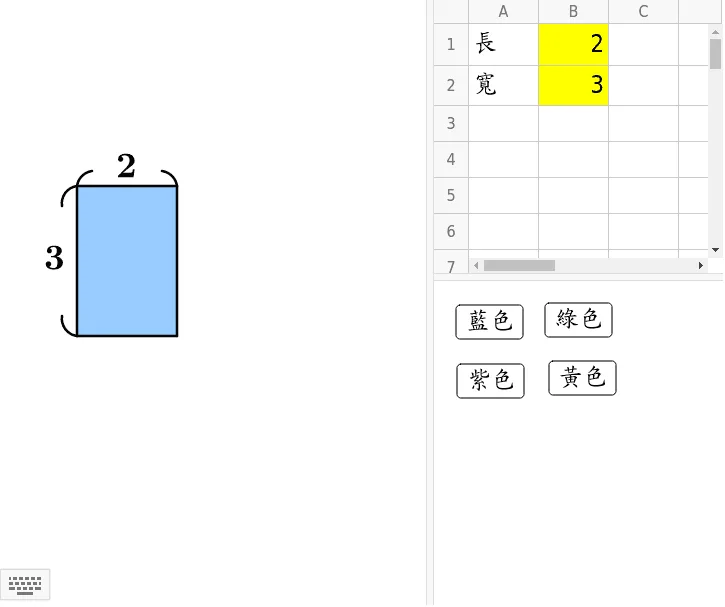
This applet provides an interactive tool for drawing and exploring rectangles through dynamic geometric construction and transformation. Users can customize the length and width of a rectangle by inputting numerical parameters, allowing them to create rectangles of any desired proportion. Additionally, users can freely choose the fill color of the rectangle, adding a visual customization element that enhances engagement and helps distinguish between different geometric figures on the canvas.
Beyond simple rectangle construction, this applet leverages several powerful GeoGebra geometric construction commands to create a rich, multi-layered demonstration. The Polygon command is used to define the rectangle as a formal geometric object, enabling further mathematical operations. The CircumcircleArc command generates arcs related to the rectangle's vertices, illustrating the relationship between rectangles and their circumscribed circles. The Mirror command performs reflective transformations, producing symmetric copies of the rectangle and its associated geometric elements across a chosen axis of symmetry.
Through these interactive features, the applet demonstrates key mathematical concepts including the fundamental properties of rectangles such as equal opposite sides and right angles, the relationship between rectangles and circumscribed circles, and the principles of reflective symmetry and geometric transformations. Students can observe in real time how changing the dimensions of the original rectangle affects all constructed elements, including the arcs and mirrored copies, reinforcing their understanding of how geometric properties are preserved under transformation.
This applet is particularly well suited for classroom teaching demonstrations of basic geometric construction and graphic transformations. It allows educators to visually illustrate abstract concepts in an accessible, hands-on manner. Students benefit from the ability to experiment with different parameter values and immediately see the geometric consequences, fostering deeper intuition about symmetry, proportion, and the interconnected nature of geometric figures. By combining parameter input, color customization, and multiple geometric construction techniques, this applet serves as a versatile educational resource for learners exploring foundational topics in Euclidean geometry. Whether used for individual exploration or guided instruction, it provides a concrete, visual pathway to understanding how basic shapes can be constructed, analyzed, and transformed within a rigorous mathematical framework.
Loading the math board and drawing, please wait…
<?xml version="1.0" encoding="utf-8"?>
<geogebra format="5.0" version="5.0.205.0" id="167bc19c-6c67-4913-b1df-328d1ac59dbe" xsi:noNamespaceSchemaLocation="http://www.geogebra.org/ggb.xsd" xmlns="" xmlns:xsi="http://www.w3.org/2001/XMLSchema-instance" >
<gui>
<window width="725" height="704" />
<perspectives>
<perspective id="tmp">
<panes>
<pane location="" divider="0.5875862068965517" orientation="1" />
<pane location="1" divider="0.3877840909090909" orientation="0" />
</panes>
<views>
<view id="4097" visible="false" inframe="true" stylebar="true" location="1,1,1,1" size="400" window="610,237,700,550" />
<view id="512" toolbar="0 | 1 501 5 19 , 67 | 2 15 45 18 , 7 37 | 514 3 9 , 13 44 , 47 | 16 | 551 550 11 , 20 22 21 23 , 55 56 57 , 12 | 69 | 510 511 , 512 513 | 533 531 , 534 532 , 522 523 , 537 536 , 535 | 521 520 | 36 , 38 49 560 | 571 30 29 570 31 33 | 17 | 540 40 41 42 , 27 28 35 , 6 , 502" visible="false" inframe="false" stylebar="false" location="1,1,1" size="500" window="100,100,600,400" />
<view id="4" toolbar="0 || 2020 , 2021 , 2022 , 66 || 2001 , 2003 , 2002 , 2004 , 2005 || 2040 , 2041 , 2042 , 2044 , 2043" visible="true" inframe="false" stylebar="true" location="1,0" size="273" window="100,100,600,400" />
<view id="8" toolbar="1001 | 1002 | 1003 || 1005 | 1004 || 1006 | 1007 | 1010 || 1008 1009 || 66 68 || 6" visible="false" inframe="false" stylebar="false" location="1,3" size="300" window="100,100,600,400" />
<view id="16" visible="true" inframe="false" stylebar="false" location="1,2" size="204" window="50,50,500,500" />
<view id="1" visible="true" inframe="false" stylebar="false" location="3" size="426" window="100,100,600,400" />
<view id="2" visible="false" inframe="false" stylebar="false" location="3" size="200" window="100,100,250,400" />
<view id="32" visible="false" inframe="false" stylebar="true" location="1" size="150" window="50,50,500,500" />
<view id="64" visible="false" inframe="true" stylebar="true" location="1" size="150" window="50,50,500,500" />
<view id="70" visible="false" inframe="true" stylebar="true" location="1" size="150" window="50,50,500,500" />
</views>
<toolbar show="true" items="0 39 | 1 501 67 , 5 19 , 72 | 2 15 45 , 18 65 , 7 37 | 4 3 8 9 , 13 44 , 58 , 47 | 16 51 64 , 70 | 10 34 53 11 , 24 20 22 , 21 23 | 55 56 57 , 12 | 36 46 , 38 49 50 , 71 | 30 29 54 32 31 33 | 17 26 62 73 , 14 68 | 25 52 60 61 | 40 41 42 , 27 28 35 , 6" position="1" help="false" />
<input show="true" cmd="true" top="algebra" />
<dockBar show="true" east="true" />
</perspective>
</perspectives>
<labelingStyle val="0"/>
<font size="24"/>
</gui>
<euclidianView>
<viewNumber viewNo="1"/>
<size width="426" height="443"/>
<coordSystem xZero="76.99999999999997" yZero="336.00000000000006" scale="49.99999999999998" yscale="50.00000000000002"/>
<evSettings axes="false" grid="false" gridIsBold="false" pointCapturing="3" rightAngleStyle="1" checkboxSize="26" gridType="0"/>
<bgColor r="255" g="255" b="255"/>
<axesColor r="0" g="0" b="0"/>
<gridColor r="192" g="192" b="192"/>
<lineStyle axes="1" grid="0"/>
<axis id="0" show="false" label="" unitLabel="" tickStyle="1" showNumbers="true"/>
<axis id="1" show="false" label="" unitLabel="" tickStyle="1" showNumbers="true"/>
</euclidianView>
<euclidianView>
<viewNumber viewNo="2"/>
<size width="261" height="165"/>
<coordSystem xZero="215.00000000000017" yZero="314.99999999999983" scale="50.00000000000004" yscale="49.999999999999986"/>
<evSettings axes="false" grid="false" gridIsBold="false" pointCapturing="3" rightAngleStyle="1" checkboxSize="26" gridType="0"/>
<bgColor r="255" g="255" b="255"/>
<axesColor r="0" g="0" b="0"/>
<gridColor r="192" g="192" b="192"/>
<lineStyle axes="1" grid="0"/>
<axis id="0" show="false" label="" unitLabel="" tickStyle="1" showNumbers="true"/>
<axis id="1" show="false" label="" unitLabel="" tickStyle="1" showNumbers="true"/>
</euclidianView>
<spreadsheetView>
<spreadsheetRow id="0" height="42"/>
<spreadsheetRow id="1" height="40"/>
<spreadsheetCellFormat formatMap="1,1,c,-256:1,0,c,-256"/>
</spreadsheetView>
<kernel>
<continuous val="false"/>
<usePathAndRegionParameters val="true"/>
<decimals val="2"/>
<angleUnit val="degree"/>
<algebraStyle val="0" spreadsheet="0"/>
<coordStyle val="0"/>
<angleFromInvTrig val="false"/>
</kernel>
<scripting blocked="false" disabled="false"/>
<euclidianView3D>
<coordSystem xZero="0.0" yZero="0.0" zZero="-1.5" scale="50.0" xAngle="20.0" zAngle="-60.0"/>
<evSettings axes="true" grid="false" gridIsBold="false" pointCapturing="3" rightAngleStyle="1" gridType="0"/>
<axis id="0" show="true" label="" unitLabel="" tickStyle="1" showNumbers="true"/>
<axis id="1" show="true" label="" unitLabel="" tickStyle="1" showNumbers="true"/>
<axis id="2" show="true" label="" unitLabel="" tickStyle="1" showNumbers="true"/>
<plate show="true"/>
<bgColor r="255" g="255" b="255"/>
<clipping use="true" show="true" size="1"/>
<projection type="0"/>
</euclidianView3D>
<construction title="" author="" date="">
<expression label="A1" exp=""長""/>
<element type="text" label="A1">
<show object="false" label="true" ev="8"/>
<objColor r="0" g="0" b="0" alpha="0.0"/>
<layer val="0"/>
<labelMode val="0"/>
</element>
<expression label="A2" exp=""寬""/>
<element type="text" label="A2">
<show object="false" label="true" ev="8"/>
<objColor r="0" g="0" b="0" alpha="0.0"/>
<layer val="0"/>
<labelMode val="0"/>
</element>
<expression label ="B1" exp="2"/>
<element type="numeric" label="B1">
<value val="2.0"/>
<show object="false" label="true"/>
<objColor r="0" g="0" b="0" alpha="0.1"/>
<layer val="0"/>
<labelMode val="1"/>
<animation step="1" speed="1" type="0" playing="false"/>
<auxiliary val="true"/>
</element>
<expression label ="B2" exp="3"/>
<element type="numeric" label="B2">
<value val="3.0"/>
<show object="false" label="true"/>
<objColor r="0" g="0" b="0" alpha="0.1"/>
<layer val="0"/>
<labelMode val="1"/>
<animation step="1" speed="1" type="0" playing="false"/>
<auxiliary val="true"/>
</element>
<expression label ="A" exp="(0, 0)" type="point"/>
<element type="point" label="A">
<show object="false" label="true" ev="4"/>
<objColor r="0" g="0" b="255" alpha="0.0"/>
<layer val="0"/>
<labelMode val="0"/>
<animation step="1" speed="1" type="1" playing="false"/>
<coords x="0.0" y="0.0" z="1.0"/>
<pointSize val="5"/>
<pointStyle val="0"/>
</element>
<expression label="B" exp="(B1, 0)" type="point" />
<element type="point" label="B">
<show object="false" label="true" ev="4"/>
<objColor r="68" g="68" b="68" alpha="0.0"/>
<layer val="0"/>
<labelMode val="0"/>
<coords x="2.0" y="0.0" z="1.0"/>
<pointSize val="3"/>
<pointStyle val="0"/>
</element>
<expression label="C" exp="(B1, B2)" type="point" />
<element type="point" label="C">
<show object="false" label="true" ev="4"/>
<objColor r="68" g="68" b="68" alpha="0.0"/>
<layer val="0"/>
<labelMode val="0"/>
<coords x="2.0" y="3.0" z="1.0"/>
<pointSize val="3"/>
<pointStyle val="0"/>
</element>
<expression label="D" exp="(0, B2)" type="point" />
<element type="point" label="D">
<show object="false" label="true" ev="4"/>
<objColor r="68" g="68" b="68" alpha="0.0"/>
<layer val="0"/>
<labelMode val="0"/>
<coords x="0.0" y="3.0" z="1.0"/>
<pointSize val="3"/>
<pointStyle val="0"/>
</element>
<command name="Polygon">
<input a0="A" a1="B" a2="C" a3="D"/>
<output a0="poly1" a1="a" a2="b" a3="c" a4="d"/>
</command>
<element type="polygon" label="poly1">
<lineStyle thickness="5" type="0" typeHidden="1"/>
<show object="true" label="false" ev="4"/>
<condition showObject="e"/>
<objColor r="153" g="204" b="255" alpha="1.0"/>
<layer val="0"/>
<labelMode val="0"/>
</element>
<element type="segment" label="a">
<show object="true" label="false" ev="8"/>
<objColor r="0" g="0" b="0" alpha="0.0"/>
<layer val="0"/>
<labelMode val="0"/>
<auxiliary val="false"/>
<coords x="0.0" y="2.0" z="0.0"/>
<lineStyle thickness="5" type="0" typeHidden="1"/>
<outlyingIntersections val="false"/>
<keepTypeOnTransform val="true"/>
</element>
<element type="segment" label="b">
<show object="true" label="false" ev="8"/>
<objColor r="0" g="0" b="0" alpha="0.0"/>
<layer val="0"/>
<labelMode val="0"/>
<auxiliary val="false"/>
<coords x="-3.0" y="0.0" z="6.0"/>
<lineStyle thickness="5" type="0" typeHidden="1"/>
<outlyingIntersections val="false"/>
<keepTypeOnTransform val="true"/>
</element>
<element type="segment" label="c">
<show object="true" label="false" ev="8"/>
<objColor r="0" g="0" b="0" alpha="0.0"/>
<layer val="0"/>
<labelMode val="0"/>
<auxiliary val="false"/>
<coords x="0.0" y="-2.0" z="6.0"/>
<lineStyle thickness="5" type="0" typeHidden="1"/>
<outlyingIntersections val="false"/>
<keepTypeOnTransform val="true"/>
</element>
<element type="segment" label="d">
<show object="true" label="false" ev="8"/>
<objColor r="0" g="0" b="0" alpha="0.0"/>
<layer val="0"/>
<labelMode val="0"/>
<auxiliary val="false"/>
<coords x="3.0" y="0.0" z="0.0"/>
<lineStyle thickness="5" type="0" typeHidden="1"/>
<outlyingIntersections val="false"/>
<keepTypeOnTransform val="true"/>
</element>
<element type="button" label="button1">
<show object="true" label="true" ev="3"/>
<objColor r="0" g="0" b="0" alpha="0.0"/>
<layer val="0"/>
<labelOffset x="22" y="24"/>
<labelMode val="0"/>
<fixed val="true"/>
<auxiliary val="true"/>
<ggbscript val="e=true f=false g=false h=false SetColor[a,"Black"] SetColor[b,"Black"] SetColor[c,"Black"] SetColor[d,"Black"]"/>
<font serif="false" sizeM="2.0" size="24" style="0"/>
<caption val="藍色"/>
</element>
<expression label ="e" exp="true"/>
<element type="boolean" label="e">
<value val="true"/>
<show object="false" label="true" ev="3"/>
<objColor r="0" g="0" b="0" alpha="0.0"/>
<layer val="0"/>
<labelOffset x="49" y="110"/>
<labelMode val="0"/>
<checkbox fixed="true"/>
<caption val="藍"/>
</element>
<expression label ="f" exp="false"/>
<element type="boolean" label="f">
<value val="false"/>
<show object="false" label="true" ev="3"/>
<objColor r="0" g="0" b="0" alpha="0.0"/>
<layer val="0"/>
<labelOffset x="129" y="107"/>
<labelMode val="0"/>
<checkbox fixed="true"/>
<caption val="黃"/>
</element>
<expression label ="g" exp="false"/>
<element type="boolean" label="g">
<value val="false"/>
<show object="false" label="true" ev="3"/>
<objColor r="0" g="0" b="0" alpha="0.0"/>
<layer val="0"/>
<labelOffset x="206" y="104"/>
<labelMode val="0"/>
<checkbox fixed="true"/>
<caption val="紫"/>
</element>
<expression label ="h" exp="false"/>
<element type="boolean" label="h">
<value val="false"/>
<show object="false" label="true" ev="3"/>
<objColor r="0" g="0" b="0" alpha="0.0"/>
<layer val="0"/>
<labelOffset x="283" y="103"/>
<labelMode val="0"/>
<checkbox fixed="true"/>
<caption val="綠"/>
</element>
<command name="Polygon">
<input a0="A" a1="B" a2="C" a3="D"/>
<output a0="poly2" a1="a_1" a2="b_1" a3="c_1" a4="d_1"/>
</command>
<element type="polygon" label="poly2">
<lineStyle thickness="2" type="0" typeHidden="1"/>
<show object="true" label="false" ev="4"/>
<condition showObject="h"/>
<objColor r="0" g="255" b="0" alpha="1.0"/>
<layer val="0"/>
<labelMode val="0"/>
</element>
<element type="segment" label="a_1">
<show object="false" label="true" ev="9"/>
<objColor r="0" g="255" b="0" alpha="0.0"/>
<layer val="0"/>
<labelMode val="0"/>
<auxiliary val="false"/>
<coords x="0.0" y="2.0" z="0.0"/>
<lineStyle thickness="2" type="0" typeHidden="1"/>
<outlyingIntersections val="false"/>
<keepTypeOnTransform val="true"/>
</element>
<element type="segment" label="b_1">
<show object="false" label="true" ev="9"/>
<objColor r="0" g="255" b="0" alpha="0.0"/>
<layer val="0"/>
<labelMode val="0"/>
<auxiliary val="false"/>
<coords x="-3.0" y="0.0" z="6.0"/>
<lineStyle thickness="2" type="0" typeHidden="1"/>
<outlyingIntersections val="false"/>
<keepTypeOnTransform val="true"/>
</element>
<element type="segment" label="c_1">
<show object="false" label="true" ev="9"/>
<objColor r="0" g="255" b="0" alpha="0.0"/>
<layer val="0"/>
<labelMode val="0"/>
<auxiliary val="false"/>
<coords x="0.0" y="-2.0" z="6.0"/>
<lineStyle thickness="2" type="0" typeHidden="1"/>
<outlyingIntersections val="false"/>
<keepTypeOnTransform val="true"/>
</element>
<element type="segment" label="d_1">
<show object="false" label="true" ev="9"/>
<objColor r="0" g="255" b="0" alpha="0.0"/>
<layer val="0"/>
<labelMode val="0"/>
<auxiliary val="false"/>
<coords x="3.0" y="0.0" z="0.0"/>
<lineStyle thickness="2" type="0" typeHidden="1"/>
<outlyingIntersections val="false"/>
<keepTypeOnTransform val="true"/>
</element>
<element type="button" label="button2">
<show object="true" label="true" ev="3"/>
<objColor r="0" g="0" b="0" alpha="0.0"/>
<layer val="0"/>
<labelOffset x="111" y="22"/>
<labelMode val="0"/>
<fixed val="true"/>
<auxiliary val="true"/>
<ggbscript val="e=false f=false g=false h=true SetColor[a,"Black"] SetColor[b,"Black"] SetColor[c,"Black"] SetColor[d,"Black"]"/>
<font serif="false" sizeM="2.0" size="24" style="0"/>
<caption val="綠色"/>
</element>
<command name="Polygon">
<input a0="A" a1="B" a2="C" a3="D"/>
<output a0="poly3" a1="a_2" a2="b_2" a3="c_2" a4="d_2"/>
</command>
<element type="polygon" label="poly3">
<lineStyle thickness="2" type="0" typeHidden="1"/>
<show object="true" label="false" ev="8"/>
<condition showObject="g"/>
<objColor r="224" g="176" b="255" alpha="1.0"/>
<layer val="0"/>
<labelMode val="0"/>
</element>
<element type="segment" label="a_2">
<show object="false" label="true" ev="9"/>
<objColor r="224" g="176" b="255" alpha="0.0"/>
<layer val="0"/>
<labelMode val="0"/>
<auxiliary val="false"/>
<coords x="0.0" y="2.0" z="0.0"/>
<lineStyle thickness="2" type="0" typeHidden="1"/>
<outlyingIntersections val="false"/>
<keepTypeOnTransform val="true"/>
</element>
<element type="segment" label="b_2">
<show object="false" label="true" ev="9"/>
<objColor r="224" g="176" b="255" alpha="0.0"/>
<layer val="0"/>
<labelMode val="0"/>
<auxiliary val="false"/>
<coords x="-3.0" y="0.0" z="6.0"/>
<lineStyle thickness="2" type="0" typeHidden="1"/>
<outlyingIntersections val="false"/>
<keepTypeOnTransform val="true"/>
</element>
<element type="segment" label="c_2">
<show object="false" label="true" ev="9"/>
<objColor r="224" g="176" b="255" alpha="0.0"/>
<layer val="0"/>
<labelMode val="0"/>
<auxiliary val="false"/>
<coords x="0.0" y="-2.0" z="6.0"/>
<lineStyle thickness="2" type="0" typeHidden="1"/>
<outlyingIntersections val="false"/>
<keepTypeOnTransform val="true"/>
</element>
<element type="segment" label="d_2">
<show object="false" label="true" ev="9"/>
<objColor r="224" g="176" b="255" alpha="0.0"/>
<layer val="0"/>
<labelMode val="0"/>
<auxiliary val="false"/>
<coords x="3.0" y="0.0" z="0.0"/>
<lineStyle thickness="2" type="0" typeHidden="1"/>
<outlyingIntersections val="false"/>
<keepTypeOnTransform val="true"/>
</element>
<element type="button" label="button3">
<show object="true" label="true" ev="3"/>
<objColor r="0" g="0" b="0" alpha="0.0"/>
<layer val="0"/>
<labelOffset x="23" y="83"/>
<labelMode val="0"/>
<animation step="1" speed="1" type="0" playing="false"/>
<auxiliary val="true"/>
<ggbscript val="e=false f=false g=true h=false SetColor[a,"Black"] SetColor[b,"Black"] SetColor[c,"Black"] SetColor[d,"Black"]"/>
<font serif="false" sizeM="2.0" size="24" style="0"/>
<caption val="紫色"/>
</element>
<command name="Polygon">
<input a0="A" a1="B" a2="C" a3="D"/>
<output a0="poly4" a1="a_3" a2="b_3" a3="c_3" a4="d_3"/>
</command>
<element type="polygon" label="poly4">
<lineStyle thickness="2" type="0" typeHidden="1"/>
<show object="true" label="false" ev="8"/>
<condition showObject="f"/>
<objColor r="255" g="255" b="153" alpha="1.0"/>
<layer val="0"/>
<labelMode val="0"/>
</element>
<element type="segment" label="a_3">
<show object="false" label="true" ev="9"/>
<objColor r="255" g="255" b="153" alpha="0.0"/>
<layer val="0"/>
<labelMode val="0"/>
<auxiliary val="false"/>
<coords x="0.0" y="2.0" z="0.0"/>
<lineStyle thickness="2" type="0" typeHidden="1"/>
<outlyingIntersections val="false"/>
<keepTypeOnTransform val="true"/>
</element>
<element type="segment" label="b_3">
<show object="false" label="true" ev="9"/>
<objColor r="255" g="255" b="153" alpha="0.0"/>
<layer val="0"/>
<labelMode val="0"/>
<auxiliary val="false"/>
<coords x="-3.0" y="0.0" z="6.0"/>
<lineStyle thickness="2" type="0" typeHidden="1"/>
<outlyingIntersections val="false"/>
<keepTypeOnTransform val="true"/>
</element>
<element type="segment" label="c_3">
<show object="false" label="true" ev="9"/>
<objColor r="255" g="255" b="153" alpha="0.0"/>
<layer val="0"/>
<labelMode val="0"/>
<auxiliary val="false"/>
<coords x="0.0" y="-2.0" z="6.0"/>
<lineStyle thickness="2" type="0" typeHidden="1"/>
<outlyingIntersections val="false"/>
<keepTypeOnTransform val="true"/>
</element>
<element type="segment" label="d_3">
<show object="false" label="true" ev="9"/>
<objColor r="255" g="255" b="153" alpha="0.0"/>
<layer val="0"/>
<labelMode val="0"/>
<auxiliary val="false"/>
<coords x="3.0" y="0.0" z="0.0"/>
<lineStyle thickness="2" type="0" typeHidden="1"/>
<outlyingIntersections val="false"/>
<keepTypeOnTransform val="true"/>
</element>
<element type="button" label="button4">
<show object="true" label="true" ev="3"/>
<objColor r="0" g="0" b="0" alpha="0.0"/>
<layer val="0"/>
<labelOffset x="115" y="80"/>
<labelMode val="0"/>
<animation step="1" speed="1" type="0" playing="false"/>
<auxiliary val="true"/>
<ggbscript val="e=false f=true g=false h=false SetColor[a,"Black"] SetColor[b,"Black"] SetColor[c,"Black"] SetColor[d,"Black"]"/>
<font serif="false" sizeM="2.0" size="24" style="0"/>
<caption val="黃色"/>
</element>
<command name="CircumcircleArc">
<input a0="A + (-0.3, 0.4)" a1="A + (-0.2, 0.1)" a2="A"/>
<output a0="k"/>
</command>
<element type="conicpart" label="k">
<show object="true" label="false" ev="4"/>
<objColor r="0" g="0" b="0" alpha="0.0"/>
<layer val="0"/>
<labelMode val="0"/>
<lineStyle thickness="5" type="0" typeHidden="1"/>
<eigenvectors x0="1.0" y0="0.0" z0="1.0" x1="-0.0" y1="1.0" z1="1.0"/>
<matrix A0="1.0" A1="1.0" A2="-4.163336342344337E-17" A3="0.0" A4="-0.049999999999999975" A5="-0.35"/>
<eqnStyle style="implicit"/>
<outlyingIntersections val="false"/>
<keepTypeOnTransform val="true"/>
</element>
<command name="CircumcircleArc">
<input a0="D + (0.3, 0.3)" a1="D + (0.1, 0.2)" a2="D"/>
<output a0="p"/>
</command>
<element type="conicpart" label="p">
<show object="true" label="false" ev="4"/>
<objColor r="0" g="0" b="0" alpha="0.0"/>
<layer val="0"/>
<labelMode val="0"/>
<lineStyle thickness="5" type="0" typeHidden="1"/>
<eigenvectors x0="1.0" y0="0.0" z0="1.0" x1="-0.0" y1="1.0" z1="1.0"/>
<matrix A0="1.0" A1="1.0" A2="8.700000000000005" A3="0.0" A4="-0.34999999999999903" A5="-2.9500000000000006"/>
<eqnStyle style="implicit"/>
<outlyingIntersections val="false"/>
<keepTypeOnTransform val="true"/>
</element>
<expression label="i" exp="x = B1 / 2" type="line" />
<element type="line" label="i">
<show object="false" label="true" ev="4"/>
<objColor r="0" g="0" b="0" alpha="0.0"/>
<layer val="0"/>
<labelMode val="0"/>
<coords x="1.0" y="0.0" z="-1.0"/>
<lineStyle thickness="2" type="0" typeHidden="1"/>
<eqnStyle style="implicit"/>
</element>
<command name="Mirror">
<input a0="p" a1="i"/>
<output a0="p'"/>
</command>
<element type="conicpart" label="p'">
<show object="true" label="false" ev="4"/>
<objColor r="0" g="0" b="0" alpha="0.0"/>
<layer val="0"/>
<labelMode val="0"/>
<lineStyle thickness="5" type="0" typeHidden="1"/>
<eigenvectors x0="-1.0" y0="-1.2246467991473532E-16" z0="1.0" x1="-1.2246467991473532E-16" y1="1.0" z1="1.0"/>
<matrix A0="1.0" A1="1.0" A2="11.300000000000008" A3="0.0" A4="-1.6500000000000008" A5="-2.9500000000000006"/>
<eqnStyle style="implicit"/>
<outlyingIntersections val="false"/>
<keepTypeOnTransform val="true"/>
</element>
<expression label="j" exp="y = B2 / 2" type="line" />
<element type="line" label="j">
<show object="false" label="true" ev="4"/>
<objColor r="0" g="0" b="0" alpha="0.0"/>
<layer val="0"/>
<labelMode val="0"/>
<coords x="0.0" y="1.0" z="-1.5"/>
<lineStyle thickness="2" type="0" typeHidden="1"/>
<eqnStyle style="explicit"/>
</element>
<command name="Mirror">
<input a0="k" a1="j"/>
<output a0="k'"/>
</command>
<element type="conicpart" label="k'">
<show object="true" label="false" ev="4"/>
<objColor r="0" g="0" b="0" alpha="0.0"/>
<layer val="0"/>
<labelMode val="0"/>
<lineStyle thickness="5" type="0" typeHidden="1"/>
<eigenvectors x0="1.0" y0="-0.0" z0="1.0" x1="-0.0" y1="-1.0" z1="1.0"/>
<matrix A0="1.0" A1="1.0" A2="6.8999999999999995" A3="-0.0" A4="-0.049999999999999975" A5="-2.65"/>
<eqnStyle style="implicit"/>
<outlyingIntersections val="false"/>
<keepTypeOnTransform val="true"/>
</element>
<expression label="text1" exp=""" + (LaTeX[B1]) + """ />
<element type="text" label="text1">
<show object="true" label="true" ev="40"/>
<objColor r="0" g="0" b="0" alpha="0.0"/>
<layer val="0"/>
<labelMode val="0"/>
<isLaTeX val="true"/>
<font serif="true" sizeM="1.4" size="10" style="1"/>
<startPoint exp="(C + D) / 2"/>
<labelOffset x="-18" y="-44"/>
</element>
<expression label="text2" exp=""" + (LaTeX[B2]) + """ />
<element type="text" label="text2">
<show object="true" label="true" ev="40"/>
<objColor r="0" g="0" b="0" alpha="0.0"/>
<layer val="0"/>
<labelMode val="0"/>
<isLaTeX val="true"/>
<font serif="true" sizeM="1.4" size="10" style="1"/>
<startPoint exp="(A + D) / 2"/>
<labelOffset x="-40" y="-27"/>
</element>
</construction>
</geogebra>