
Geometric Construction of an Inscribed Square
2020-08-18 13:54
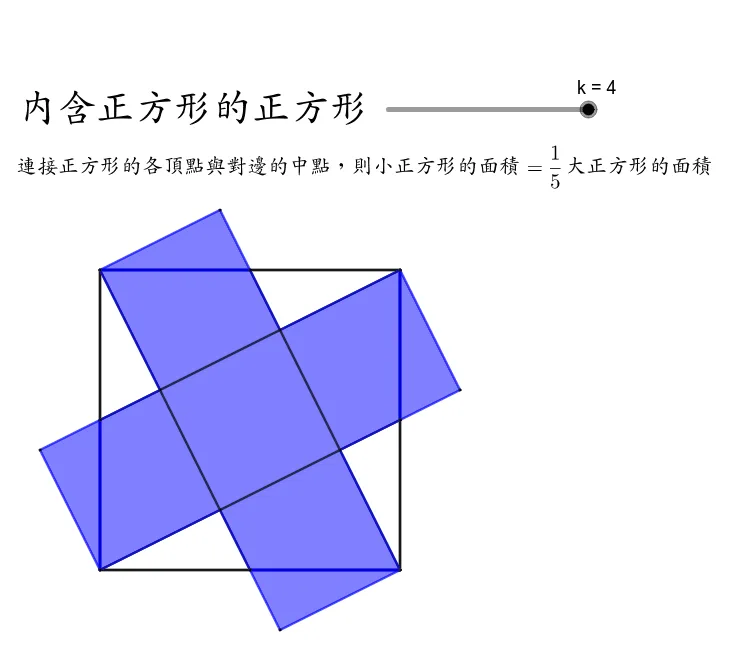
This GeoGebra applet demonstrates the geometric construction of a square inscribed within another square. Through step-by-step manipulation, the applet shows how the vertices of the inner square depend on carefully chosen points along the sides of the outer square, creating a precise and elegant relationship between the two figures. Using GeoGebra commands such as Point, Polygon, Midpoint, Segment, Intersection, and Rotate, the construction illustrates multiple geometric principles simultaneously. Students can drag individual points or observe auto-generated constructions to see how the inscribed square maintains its shape and properties regardless of the outer square's orientation or size. The applet highlights key concepts including rotational symmetry, since rotating the inner square's vertices by 90 degrees around the center produces a congruent configuration, and side-length and area relationships, where learners can observe that the ratio of the inscribed square's area to the outer square's area depends on the placement of the construction points. By animating or adjusting parameters interactively, students gain an intuitive grasp of how geometric invariants persist through transformations. This makes the applet particularly valuable for plane geometry education, supporting visual understanding of polygon properties, rigid motions, and the connections between algebraic ratios and geometric figures. It is well-suited for classroom instruction or independent exploration, helping learners build a deeper appreciation for the elegance and structure inherent in classical geometric constructions.
Loading the math board and drawing, please wait…
<?xml version="1.0" encoding="utf-8"?>
<geogebra format="5.0" version="5.0.599.0" app="classic" platform="d" id="8557bc42-ba2f-4e46-9566-791953a8b43a" xsi:noNamespaceSchemaLocation="http://www.geogebra.org/apps/xsd/ggb.xsd" xmlns="" xmlns:xsi="http://www.w3.org/2001/XMLSchema-instance" >
<gui>
<window width="766" height="876" />
<perspectives>
<perspective id="tmp">
<panes>
<pane location="" divider="0.391644908616188" orientation="1" />
</panes>
<views>
<view id="512" toolbar="0 | 1 501 5 19 , 67 | 2 15 45 18 , 7 37 | 514 3 9 , 13 44 , 47 | 16 51 | 551 550 11 , 20 22 21 23 , 55 56 57 , 12 | 69 | 510 511 , 512 513 | 533 531 , 534 532 , 522 523 , 537 536 , 535 , 538 | 521 520 | 36 , 38 49 560 | 571 30 29 570 31 33 | 17 | 540 40 41 42 , 27 28 35 , 6 , 502" visible="false" inframe="false" stylebar="false" location="1,1,1" size="500" window="100,100,600,400" />
<view id="4" toolbar="0 || 2020 , 2021 , 2022 , 66 || 2001 , 2003 , 2002 , 2004 , 2005 || 2040 , 2041 , 2042 , 2044 , 2043" visible="false" inframe="false" stylebar="false" location="1,1" size="300" window="100,100,600,400" />
<view id="8" toolbar="1001 | 1002 | 1003 || 1005 | 1004 || 1006 | 1007 | 1010 || 1008 1009 || 66 68 || 6" visible="false" inframe="false" stylebar="false" location="1,3" size="300" window="100,100,600,400" />
<view id="4097" visible="false" inframe="false" stylebar="true" location="1,1" size="346" window="100,100,700,550" />
<view id="1" visible="true" inframe="false" stylebar="true" location="1" size="733" window="100,100,600,400" />
<view id="2" visible="false" inframe="false" stylebar="true" location="3" size="300" window="100,100,600,400" />
<view id="16" visible="false" inframe="false" stylebar="false" location="1" size="150" window="50,50,500,500" />
<view id="32" visible="false" inframe="false" stylebar="true" location="1" size="150" window="50,50,500,500" />
<view id="64" toolbar="0" visible="false" inframe="false" stylebar="false" location="1" size="150" window="50,50,500,500" />
<view id="70" toolbar="0 || 2020 || 2021 || 2022" visible="false" inframe="false" stylebar="true" location="1" size="150" window="50,50,500,500" />
</views>
<toolbar show="true" items="0 39 73 62 | 1 501 67 , 5 19 , 72 75 76 | 2 15 45 , 18 65 , 7 37 | 4 3 8 9 , 13 44 , 58 , 47 | 16 51 64 , 70 | 10 34 53 11 , 24 20 22 , 21 23 | 55 56 57 , 12 | 36 46 , 38 49 50 , 71 14 68 | 30 29 54 32 31 33 | 25 17 26 60 52 61 | 40 41 42 , 27 28 35 , 6" position="1" help="false" />
<input show="true" cmd="true" top="algebra" />
<dockBar show="true" east="true" />
</perspective>
</perspectives>
<labelingStyle val="3"/>
<font size="18"/>
</gui>
<euclidianView>
<viewNumber viewNo="1"/>
<size width="733" height="654"/>
<coordSystem xZero="100.00000000000001" yZero="570.0000000000001" scale="50.00000000000002" yscale="49.999999999999986"/>
<evSettings axes="false" grid="false" gridIsBold="false" pointCapturing="3" rightAngleStyle="1" checkboxSize="26" gridType="3"/>
<bgColor r="255" g="255" b="255"/>
<axesColor r="0" g="0" b="0"/>
<gridColor r="192" g="192" b="192"/>
<lineStyle axes="1" grid="0"/>
<axis id="0" show="false" label="" unitLabel="" tickStyle="1" showNumbers="true"/>
<axis id="1" show="false" label="" unitLabel="" tickStyle="1" showNumbers="true"/>
</euclidianView>
<algebraView>
<mode val="1"/>
</algebraView>
<kernel>
<continuous val="false"/>
<usePathAndRegionParameters val="true"/>
<decimals val="2"/>
<angleUnit val="degree"/>
<algebraStyle val="0" spreadsheet="0"/>
<coordStyle val="0"/>
</kernel>
<tableview min="-2.0" max="2.0" step="1.0"/>
<scripting blocked="false" disabled="false"/>
<construction title="" author="" date="">
<element type="numeric" label="k">
<value val="4.0"/>
<show object="true" label="true"/>
<objColor r="0" g="0" b="0" alpha="0.10000000149011612"/>
<layer val="0"/>
<labelMode val="1"/>
<slider min="0" max="4" absoluteScreenLocation="true" width="200.0" x="388.0" y="110.0" fixed="false" horizontal="true" showAlgebra="true"/>
<lineStyle thickness="10" type="0" typeHidden="1"/>
<animation speed="1" type="0" playing="false"/>
<ggbscript onUpdate=""/>
</element>
<expression label="f" exp="f(x) = (abs(x - k) - abs(x - k + 1) + 1) / 2" />
<element type="function" label="f">
<show object="false" label="true" ev="4"/>
<objColor r="0" g="100" b="0" alpha="0.0"/>
<layer val="0"/>
<labelMode val="0"/>
<fixed val="true"/>
<lineStyle thickness="5" type="0" typeHidden="1" opacity="178"/>
</element>
<expression label="k1" exp="f(0)" />
<element type="numeric" label="k1">
<value val="1.0"/>
<objColor r="0" g="0" b="0" alpha="0.10000000149011612"/>
</element>
<expression label="k2" exp="f(1)" />
<element type="numeric" label="k2">
<value val="1.0"/>
<objColor r="0" g="0" b="0" alpha="0.10000000149011612"/>
</element>
<expression label="k3" exp="f(2)" />
<element type="numeric" label="k3">
<value val="1.0"/>
<objColor r="0" g="0" b="0" alpha="0.10000000149011612"/>
</element>
<expression label="k4" exp="f(3)" />
<element type="numeric" label="k4">
<value val="1.0"/>
<objColor r="0" g="0" b="0" alpha="0.10000000149011612"/>
</element>
<command name="Point">
<input a0="xAxis"/>
<output a0="A"/>
</command>
<element type="point" label="A">
<show object="true" label="false" ev="4"/>
<objColor r="125" g="125" b="255" alpha="0.0"/>
<layer val="0"/>
<labelMode val="0"/>
<animation step="0.1" speed="1" type="1" playing="false"/>
<coords x="0.0" y="0.0" z="1.0"/>
<pointSize val="1"/>
<pointStyle val="0"/>
</element>
<element type="point" label="B">
<show object="true" label="false" ev="4"/>
<objColor r="77" g="77" b="255" alpha="0.0"/>
<layer val="0"/>
<labelMode val="0"/>
<animation step="0.1" speed="1" type="1" playing="false"/>
<coords x="6.0" y="0.0" z="1.0"/>
<pointSize val="1"/>
<pointStyle val="0"/>
</element>
<command name="Polygon">
<input a0="A" a1="B" a2="4"/>
<output a0="poly1" a1="g" a2="h" a3="i" a4="j" a5="C" a6="D"/>
</command>
<element type="polygon" label="poly1">
<lineStyle thickness="5" type="0" typeHidden="1" opacity="178"/>
<show object="true" label="false" ev="4"/>
<objColor r="0" g="0" b="0" alpha="0.0"/>
<layer val="0"/>
<labelMode val="0"/>
</element>
<element type="segment" label="g">
<show object="true" label="false" ev="4"/>
<objColor r="0" g="0" b="0" alpha="0.0"/>
<layer val="0"/>
<labelMode val="0"/>
<auxiliary val="false"/>
<coords x="0.0" y="6.0" z="0.0"/>
<lineStyle thickness="5" type="0" typeHidden="1" opacity="178"/>
<outlyingIntersections val="false"/>
<keepTypeOnTransform val="true"/>
</element>
<element type="segment" label="h">
<show object="true" label="false" ev="4"/>
<objColor r="0" g="0" b="0" alpha="0.0"/>
<layer val="0"/>
<labelMode val="0"/>
<auxiliary val="true"/>
<coords x="-5.999999999999998" y="0.0" z="35.999999999999986"/>
<lineStyle thickness="5" type="0" typeHidden="1" opacity="178"/>
<outlyingIntersections val="false"/>
<keepTypeOnTransform val="true"/>
</element>
<element type="segment" label="i">
<show object="true" label="false" ev="4"/>
<objColor r="0" g="0" b="0" alpha="0.0"/>
<layer val="0"/>
<labelMode val="0"/>
<auxiliary val="true"/>
<coords x="-1.7763568394002505E-15" y="-5.999999999999999" z="35.99999999999999"/>
<lineStyle thickness="5" type="0" typeHidden="1" opacity="178"/>
<outlyingIntersections val="false"/>
<keepTypeOnTransform val="true"/>
</element>
<element type="segment" label="j">
<show object="true" label="false" ev="4"/>
<objColor r="0" g="0" b="0" alpha="0.0"/>
<layer val="0"/>
<labelMode val="0"/>
<auxiliary val="true"/>
<coords x="6.0" y="-8.881784197001252E-16" z="0.0"/>
<lineStyle thickness="5" type="0" typeHidden="1" opacity="178"/>
<outlyingIntersections val="false"/>
<keepTypeOnTransform val="true"/>
</element>
<element type="point" label="C">
<show object="true" label="false" ev="4"/>
<objColor r="68" g="68" b="68" alpha="0.0"/>
<layer val="0"/>
<labelMode val="0"/>
<auxiliary val="true"/>
<coords x="6.0" y="5.999999999999998" z="1.0"/>
<pointSize val="1"/>
<pointStyle val="0"/>
</element>
<element type="point" label="D">
<show object="true" label="false" ev="4"/>
<objColor r="68" g="68" b="68" alpha="0.0"/>
<layer val="0"/>
<labelMode val="0"/>
<auxiliary val="true"/>
<coords x="8.881784197001252E-16" y="6.0" z="1.0"/>
<pointSize val="1"/>
<pointStyle val="0"/>
</element>
<command name="Midpoint">
<input a0="A" a1="B"/>
<output a0="E"/>
</command>
<element type="point" label="E">
<show object="true" label="false" ev="4"/>
<objColor r="68" g="68" b="68" alpha="0.0"/>
<layer val="0"/>
<labelMode val="0"/>
<coords x="3.0" y="0.0" z="1.0"/>
<pointSize val="1"/>
<pointStyle val="0"/>
</element>
<command name="Midpoint">
<input a0="B" a1="C"/>
<output a0="F"/>
</command>
<element type="point" label="F">
<show object="true" label="false" ev="4"/>
<objColor r="68" g="68" b="68" alpha="0.0"/>
<layer val="0"/>
<labelMode val="0"/>
<coords x="6.0" y="2.999999999999999" z="1.0"/>
<pointSize val="1"/>
<pointStyle val="0"/>
</element>
<command name="Midpoint">
<input a0="C" a1="D"/>
<output a0="G"/>
</command>
<element type="point" label="G">
<show object="true" label="false" ev="4"/>
<objColor r="68" g="68" b="68" alpha="0.0"/>
<layer val="0"/>
<labelMode val="0"/>
<coords x="3.0000000000000004" y="5.999999999999999" z="1.0"/>
<pointSize val="1"/>
<pointStyle val="0"/>
</element>
<command name="Midpoint">
<input a0="D" a1="A"/>
<output a0="H"/>
</command>
<element type="point" label="H">
<show object="true" label="false" ev="4"/>
<objColor r="68" g="68" b="68" alpha="0.0"/>
<layer val="0"/>
<labelMode val="0"/>
<coords x="4.440892098500626E-16" y="3.0" z="1.0"/>
<pointSize val="1"/>
<pointStyle val="0"/>
</element>
<command name="Segment">
<input a0="A" a1="F"/>
<output a0="l"/>
</command>
<element type="segment" label="l">
<show object="true" label="false" ev="4"/>
<objColor r="0" g="0" b="0" alpha="0.0"/>
<layer val="0"/>
<labelMode val="0"/>
<coords x="-2.999999999999999" y="6.0" z="0.0"/>
<lineStyle thickness="5" type="0" typeHidden="1" opacity="178"/>
<outlyingIntersections val="false"/>
<keepTypeOnTransform val="true"/>
</element>
<command name="Segment">
<input a0="H" a1="C"/>
<output a0="m"/>
</command>
<element type="segment" label="m">
<show object="true" label="false" ev="4"/>
<objColor r="0" g="0" b="0" alpha="0.0"/>
<layer val="0"/>
<labelMode val="0"/>
<coords x="-2.9999999999999982" y="6.0" z="-17.999999999999996"/>
<lineStyle thickness="5" type="0" typeHidden="1" opacity="178"/>
<outlyingIntersections val="false"/>
<keepTypeOnTransform val="true"/>
</element>
<command name="Segment">
<input a0="G" a1="B"/>
<output a0="n"/>
</command>
<element type="segment" label="n">
<show object="true" label="false" ev="4"/>
<objColor r="0" g="0" b="0" alpha="0.0"/>
<layer val="0"/>
<labelMode val="0"/>
<coords x="5.999999999999999" y="2.9999999999999996" z="-35.99999999999999"/>
<lineStyle thickness="5" type="0" typeHidden="1" opacity="178"/>
<outlyingIntersections val="false"/>
<keepTypeOnTransform val="true"/>
</element>
<command name="Segment">
<input a0="D" a1="E"/>
<output a0="p"/>
</command>
<element type="segment" label="p">
<show object="true" label="false" ev="4"/>
<objColor r="0" g="0" b="0" alpha="0.0"/>
<layer val="0"/>
<labelMode val="0"/>
<coords x="6.0" y="2.999999999999999" z="-18.0"/>
<lineStyle thickness="5" type="0" typeHidden="1" opacity="178"/>
<outlyingIntersections val="false"/>
<keepTypeOnTransform val="true"/>
</element>
<command name="Intersect">
<input a0="n" a1="l"/>
<output a0="I"/>
</command>
<element type="point" label="I">
<show object="true" label="false" ev="4"/>
<objColor r="68" g="68" b="68" alpha="0.0"/>
<layer val="0"/>
<labelMode val="0"/>
<coords x="215.99999999999994" y="107.99999999999994" z="44.999999999999986"/>
<pointSize val="1"/>
<pointStyle val="0"/>
</element>
<command name="Intersect">
<input a0="m" a1="n"/>
<output a0="J"/>
</command>
<element type="point" label="J">
<show object="true" label="false" ev="4"/>
<objColor r="68" g="68" b="68" alpha="0.0"/>
<layer val="0"/>
<labelMode val="0"/>
<coords x="161.99999999999997" y="215.9999999999999" z="44.999999999999986"/>
<pointSize val="1"/>
<pointStyle val="0"/>
</element>
<command name="Intersect">
<input a0="p" a1="m"/>
<output a0="K"/>
</command>
<element type="point" label="K">
<show object="true" label="false" ev="4"/>
<objColor r="68" g="68" b="68" alpha="0.0"/>
<layer val="0"/>
<labelMode val="0"/>
<coords x="54.00000000000003" y="161.99999999999994" z="44.99999999999999"/>
<pointSize val="1"/>
<pointStyle val="0"/>
</element>
<command name="Intersect">
<input a0="l" a1="p"/>
<output a0="L"/>
</command>
<element type="point" label="L">
<show object="true" label="false" ev="4"/>
<objColor r="68" g="68" b="68" alpha="0.0"/>
<layer val="0"/>
<labelMode val="0"/>
<coords x="108.0" y="53.999999999999986" z="44.99999999999999"/>
<pointSize val="1"/>
<pointStyle val="0"/>
</element>
<command name="Polygon">
<input a0="B" a1="I" a2="F"/>
<output a0="t1" a1="f_1" a2="b" a3="i_1"/>
</command>
<element type="polygon" label="t1">
<lineStyle thickness="5" type="0" typeHidden="1" opacity="178"/>
<show object="false" label="false" ev="4"/>
<objColor r="153" g="51" b="0" alpha="0.10000000149011612"/>
<layer val="0"/>
<labelMode val="0"/>
</element>
<element type="segment" label="f_1">
<show object="false" label="false"/>
<objColor r="153" g="51" b="0" alpha="0.0"/>
<layer val="0"/>
<labelMode val="0"/>
<auxiliary val="false"/>
<coords x="-2.3999999999999995" y="-1.2000000000000002" z="14.399999999999997"/>
<lineStyle thickness="5" type="0" typeHidden="1" opacity="178"/>
<outlyingIntersections val="false"/>
<keepTypeOnTransform val="true"/>
</element>
<element type="segment" label="b">
<show object="false" label="false"/>
<objColor r="153" g="51" b="0" alpha="0.0"/>
<layer val="0"/>
<labelMode val="0"/>
<auxiliary val="false"/>
<coords x="-0.5999999999999996" y="1.2000000000000002" z="-1.7763568394002505E-15"/>
<lineStyle thickness="5" type="0" typeHidden="1" opacity="178"/>
<outlyingIntersections val="false"/>
<keepTypeOnTransform val="true"/>
</element>
<element type="segment" label="i_1">
<show object="false" label="false"/>
<objColor r="153" g="51" b="0" alpha="0.0"/>
<layer val="0"/>
<labelMode val="0"/>
<auxiliary val="false"/>
<coords x="2.999999999999999" y="0.0" z="-17.999999999999993"/>
<lineStyle thickness="5" type="0" typeHidden="1" opacity="178"/>
<outlyingIntersections val="false"/>
<keepTypeOnTransform val="true"/>
</element>
<command name="Polygon">
<input a0="C" a1="J" a2="G"/>
<output a0="t2" a1="g_1" a2="c" a3="j_1"/>
</command>
<element type="polygon" label="t2">
<lineStyle thickness="5" type="0" typeHidden="1" opacity="178"/>
<show object="false" label="false" ev="4"/>
<objColor r="153" g="51" b="0" alpha="0.10000000149011612"/>
<layer val="0"/>
<labelMode val="0"/>
</element>
<element type="segment" label="g_1">
<show object="false" label="false"/>
<objColor r="153" g="51" b="0" alpha="0.0"/>
<layer val="0"/>
<labelMode val="0"/>
<auxiliary val="false"/>
<coords x="1.1999999999999993" y="-2.3999999999999995" z="7.199999999999996"/>
<lineStyle thickness="5" type="0" typeHidden="1" opacity="178"/>
<outlyingIntersections val="false"/>
<keepTypeOnTransform val="true"/>
</element>
<element type="segment" label="c">
<show object="false" label="false"/>
<objColor r="153" g="51" b="0" alpha="0.0"/>
<layer val="0"/>
<labelMode val="0"/>
<auxiliary val="false"/>
<coords x="-1.2000000000000002" y="-0.6000000000000001" z="7.200000000000003"/>
<lineStyle thickness="5" type="0" typeHidden="1" opacity="178"/>
<outlyingIntersections val="false"/>
<keepTypeOnTransform val="true"/>
</element>
<element type="segment" label="j_1">
<show object="false" label="false"/>
<objColor r="153" g="51" b="0" alpha="0.0"/>
<layer val="0"/>
<labelMode val="0"/>
<auxiliary val="false"/>
<coords x="8.881784197001252E-16" y="2.9999999999999996" z="-17.999999999999996"/>
<lineStyle thickness="5" type="0" typeHidden="1" opacity="178"/>
<outlyingIntersections val="false"/>
<keepTypeOnTransform val="true"/>
</element>
<command name="Polygon">
<input a0="D" a1="K" a2="H"/>
<output a0="t3" a1="h_1" a2="d" a3="k_1"/>
</command>
<element type="polygon" label="t3">
<lineStyle thickness="5" type="0" typeHidden="1" opacity="178"/>
<show object="false" label="false" ev="4"/>
<objColor r="153" g="51" b="0" alpha="0.10000000149011612"/>
<layer val="0"/>
<labelMode val="0"/>
</element>
<element type="segment" label="h_1">
<show object="false" label="false"/>
<objColor r="153" g="51" b="0" alpha="0.0"/>
<layer val="0"/>
<labelMode val="0"/>
<auxiliary val="false"/>
<coords x="2.400000000000001" y="1.2" z="-7.200000000000001"/>
<lineStyle thickness="5" type="0" typeHidden="1" opacity="178"/>
<outlyingIntersections val="false"/>
<keepTypeOnTransform val="true"/>
</element>
<element type="segment" label="d">
<show object="false" label="false"/>
<objColor r="153" g="51" b="0" alpha="0.0"/>
<layer val="0"/>
<labelMode val="0"/>
<auxiliary val="false"/>
<coords x="0.5999999999999992" y="-1.2000000000000004" z="3.6000000000000005"/>
<lineStyle thickness="5" type="0" typeHidden="1" opacity="178"/>
<outlyingIntersections val="false"/>
<keepTypeOnTransform val="true"/>
</element>
<element type="segment" label="k_1">
<show object="false" label="false"/>
<objColor r="153" g="51" b="0" alpha="0.0"/>
<layer val="0"/>
<labelMode val="0"/>
<auxiliary val="false"/>
<coords x="-3.0" y="4.440892098500626E-16" z="0.0"/>
<lineStyle thickness="5" type="0" typeHidden="1" opacity="178"/>
<outlyingIntersections val="false"/>
<keepTypeOnTransform val="true"/>
</element>
<command name="Polygon">
<input a0="A" a1="L" a2="E"/>
<output a0="t4" a1="e" a2="a" a3="l_1"/>
</command>
<element type="polygon" label="t4">
<lineStyle thickness="5" type="0" typeHidden="1" opacity="178"/>
<show object="false" label="false" ev="4"/>
<objColor r="153" g="51" b="0" alpha="0.10000000149011612"/>
<layer val="0"/>
<labelMode val="0"/>
</element>
<element type="segment" label="e">
<show object="false" label="false"/>
<objColor r="153" g="51" b="0" alpha="0.0"/>
<layer val="0"/>
<labelMode val="0"/>
<auxiliary val="false"/>
<coords x="-1.2" y="2.4000000000000004" z="0.0"/>
<lineStyle thickness="5" type="0" typeHidden="1" opacity="178"/>
<outlyingIntersections val="false"/>
<keepTypeOnTransform val="true"/>
</element>
<element type="segment" label="a">
<show object="false" label="false"/>
<objColor r="153" g="51" b="0" alpha="0.0"/>
<layer val="0"/>
<labelMode val="0"/>
<auxiliary val="false"/>
<coords x="1.2" y="0.5999999999999996" z="-3.5999999999999996"/>
<lineStyle thickness="5" type="0" typeHidden="1" opacity="178"/>
<outlyingIntersections val="false"/>
<keepTypeOnTransform val="true"/>
</element>
<element type="segment" label="l_1">
<show object="false" label="false"/>
<objColor r="153" g="51" b="0" alpha="0.0"/>
<layer val="0"/>
<labelMode val="0"/>
<auxiliary val="false"/>
<coords x="0.0" y="-3.0" z="0.0"/>
<lineStyle thickness="5" type="0" typeHidden="1" opacity="178"/>
<outlyingIntersections val="false"/>
<keepTypeOnTransform val="true"/>
</element>
<command name="Rotate">
<input a0="B" a1="(f(0) * π)" a2="F"/>
<output a0="B'"/>
</command>
<element type="point" label="B'">
<show object="true" label="false" ev="4"/>
<objColor r="77" g="77" b="255" alpha="0.0"/>
<layer val="0"/>
<labelMode val="0"/>
<coords x="6.0" y="5.999999999999998" z="1.0"/>
<pointSize val="1"/>
<pointStyle val="0"/>
</element>
<command name="Rotate">
<input a0="I" a1="(f(0) * π)" a2="F"/>
<output a0="I'"/>
</command>
<element type="point" label="I'">
<show object="true" label="false" ev="4"/>
<objColor r="68" g="68" b="68" alpha="0.0"/>
<layer val="0"/>
<labelMode val="0"/>
<coords x="323.99999999999983" y="161.9999999999999" z="44.999999999999986"/>
<pointSize val="1"/>
<pointStyle val="0"/>
</element>
<command name="Rotate">
<input a0="F" a1="(f(0) * π)" a2="F"/>
<output a0="F'"/>
</command>
<element type="point" label="F'">
<show object="true" label="false" ev="4"/>
<objColor r="68" g="68" b="68" alpha="0.0"/>
<layer val="0"/>
<labelMode val="0"/>
<coords x="6.0" y="2.999999999999999" z="1.0"/>
<pointSize val="1"/>
<pointStyle val="0"/>
</element>
<command name="Polygon">
<input a0="B'" a1="I'" a2="F'"/>
<output a0="t1'" a1="f'" a2="b'" a3="i'"/>
</command>
<element type="polygon" label="t1'">
<lineStyle thickness="5" type="0" typeHidden="1" opacity="178"/>
<show object="true" label="false" ev="4"/>
<objColor r="0" g="0" b="255" alpha="0.5"/>
<layer val="0"/>
<labelMode val="0"/>
</element>
<element type="segment" label="f'">
<show object="true" label="false"/>
<objColor r="0" g="0" b="255" alpha="0.0"/>
<layer val="0"/>
<labelMode val="0"/>
<auxiliary val="false"/>
<coords x="2.3999999999999995" y="1.1999999999999984" z="-21.59999999999998"/>
<lineStyle thickness="5" type="0" typeHidden="1" opacity="178"/>
<outlyingIntersections val="false"/>
<keepTypeOnTransform val="true"/>
</element>
<element type="segment" label="b'">
<show object="true" label="false"/>
<objColor r="0" g="0" b="255" alpha="0.0"/>
<layer val="0"/>
<labelMode val="0"/>
<auxiliary val="false"/>
<coords x="0.5999999999999996" y="-1.1999999999999984" z="-7.105427357601002E-15"/>
<lineStyle thickness="5" type="0" typeHidden="1" opacity="178"/>
<outlyingIntersections val="false"/>
<keepTypeOnTransform val="true"/>
</element>
<element type="segment" label="i'">
<show object="true" label="false"/>
<objColor r="0" g="0" b="255" alpha="0.0"/>
<layer val="0"/>
<labelMode val="0"/>
<auxiliary val="false"/>
<coords x="-2.999999999999999" y="0.0" z="17.999999999999993"/>
<lineStyle thickness="5" type="0" typeHidden="1" opacity="178"/>
<outlyingIntersections val="false"/>
<keepTypeOnTransform val="true"/>
</element>
<command name="Rotate">
<input a0="C" a1="(f(1) * π)" a2="G"/>
<output a0="C'"/>
</command>
<element type="point" label="C'">
<show object="true" label="false" ev="4"/>
<objColor r="68" g="68" b="68" alpha="0.0"/>
<layer val="0"/>
<labelMode val="0"/>
<auxiliary val="true"/>
<coords x="8.881784197001252E-16" y="6.0" z="1.0"/>
<pointSize val="1"/>
<pointStyle val="0"/>
</element>
<command name="Rotate">
<input a0="J" a1="(f(1) * π)" a2="G"/>
<output a0="J'"/>
</command>
<element type="point" label="J'">
<show object="true" label="false" ev="4"/>
<objColor r="68" g="68" b="68" alpha="0.0"/>
<layer val="0"/>
<labelMode val="0"/>
<coords x="107.99999999999997" y="323.9999999999999" z="44.999999999999986"/>
<pointSize val="1"/>
<pointStyle val="0"/>
</element>
<command name="Rotate">
<input a0="G" a1="(f(1) * π)" a2="G"/>
<output a0="G'"/>
</command>
<element type="point" label="G'">
<show object="true" label="false" ev="4"/>
<objColor r="68" g="68" b="68" alpha="0.0"/>
<layer val="0"/>
<labelMode val="0"/>
<coords x="3.0000000000000004" y="5.999999999999999" z="1.0"/>
<pointSize val="1"/>
<pointStyle val="0"/>
</element>
<command name="Polygon">
<input a0="C'" a1="J'" a2="G'"/>
<output a0="t2'" a1="g'" a2="c'" a3="j'"/>
</command>
<element type="polygon" label="t2'">
<lineStyle thickness="5" type="0" typeHidden="1" opacity="178"/>
<show object="true" label="false" ev="4"/>
<objColor r="0" g="0" b="255" alpha="0.5"/>
<layer val="0"/>
<labelMode val="0"/>
</element>
<element type="segment" label="g'">
<show object="true" label="false"/>
<objColor r="0" g="0" b="255" alpha="0.0"/>
<layer val="0"/>
<labelMode val="0"/>
<auxiliary val="false"/>
<coords x="-1.2000000000000002" y="2.399999999999999" z="-14.399999999999991"/>
<lineStyle thickness="5" type="0" typeHidden="1" opacity="178"/>
<outlyingIntersections val="false"/>
<keepTypeOnTransform val="true"/>
</element>
<element type="segment" label="c'">
<show object="true" label="false" ev="4"/>
<objColor r="0" g="0" b="255" alpha="0.0"/>
<layer val="0"/>
<labelMode val="0"/>
<auxiliary val="false"/>
<coords x="1.200000000000001" y="0.6000000000000005" z="-7.200000000000008"/>
<lineStyle thickness="5" type="0" typeHidden="1" opacity="178"/>
<outlyingIntersections val="false"/>
<keepTypeOnTransform val="true"/>
</element>
<element type="segment" label="j'">
<show object="true" label="false"/>
<objColor r="0" g="0" b="255" alpha="0.0"/>
<layer val="0"/>
<labelMode val="0"/>
<auxiliary val="false"/>
<coords x="-8.881784197001252E-16" y="-2.9999999999999996" z="18.0"/>
<lineStyle thickness="5" type="0" typeHidden="1" opacity="178"/>
<outlyingIntersections val="false"/>
<keepTypeOnTransform val="true"/>
</element>
<command name="Rotate">
<input a0="D" a1="(f(2) * π)" a2="H"/>
<output a0="D'"/>
</command>
<element type="point" label="D'">
<show object="true" label="false" ev="4"/>
<objColor r="68" g="68" b="68" alpha="0.0"/>
<layer val="0"/>
<labelMode val="0"/>
<auxiliary val="true"/>
<coords x="-3.6739403974420594E-16" y="0.0" z="1.0"/>
<pointSize val="1"/>
<pointStyle val="0"/>
</element>
<command name="Rotate">
<input a0="K" a1="(f(2) * π)" a2="H"/>
<output a0="K'"/>
</command>
<element type="point" label="K'">
<show object="true" label="false" ev="4"/>
<objColor r="68" g="68" b="68" alpha="0.0"/>
<layer val="0"/>
<labelMode val="0"/>
<coords x="-53.999999999999986" y="108.0" z="44.99999999999999"/>
<pointSize val="1"/>
<pointStyle val="0"/>
</element>
<command name="Rotate">
<input a0="H" a1="(f(2) * π)" a2="H"/>
<output a0="H'"/>
</command>
<element type="point" label="H'">
<show object="true" label="false" ev="4"/>
<objColor r="68" g="68" b="68" alpha="0.0"/>
<layer val="0"/>
<labelMode val="0"/>
<coords x="4.440892098500626E-16" y="3.0" z="1.0"/>
<pointSize val="1"/>
<pointStyle val="0"/>
</element>
<command name="Polygon">
<input a0="D'" a1="K'" a2="H'"/>
<output a0="t3'" a1="h'" a2="d'" a3="k'"/>
</command>
<element type="polygon" label="t3'">
<lineStyle thickness="5" type="0" typeHidden="1" opacity="178"/>
<show object="true" label="false" ev="4"/>
<objColor r="0" g="0" b="255" alpha="0.5"/>
<layer val="0"/>
<labelMode val="0"/>
</element>
<element type="segment" label="h'">
<show object="true" label="false"/>
<objColor r="0" g="0" b="255" alpha="0.0"/>
<layer val="0"/>
<labelMode val="0"/>
<auxiliary val="false"/>
<coords x="-2.4000000000000004" y="-1.1999999999999995" z="-8.817456953860944E-16"/>
<lineStyle thickness="5" type="0" typeHidden="1" opacity="178"/>
<outlyingIntersections val="false"/>
<keepTypeOnTransform val="true"/>
</element>
<element type="segment" label="d'">
<show object="true" label="false"/>
<objColor r="0" g="0" b="255" alpha="0.0"/>
<layer val="0"/>
<labelMode val="0"/>
<auxiliary val="false"/>
<coords x="-0.5999999999999996" y="1.2000000000000004" z="-3.6000000000000005"/>
<lineStyle thickness="5" type="0" typeHidden="1" opacity="178"/>
<outlyingIntersections val="false"/>
<keepTypeOnTransform val="true"/>
</element>
<element type="segment" label="k'">
<show object="true" label="false"/>
<objColor r="0" g="0" b="255" alpha="0.0"/>
<layer val="0"/>
<labelMode val="0"/>
<auxiliary val="false"/>
<coords x="3.0" y="-8.114832495942686E-16" z="1.102182119232618E-15"/>
<lineStyle thickness="5" type="0" typeHidden="1" opacity="178"/>
<outlyingIntersections val="false"/>
<keepTypeOnTransform val="true"/>
</element>
<command name="Rotate">
<input a0="A" a1="(f(3) * π)" a2="E"/>
<output a0="A'"/>
</command>
<element type="point" label="A'">
<show object="true" label="false" ev="4"/>
<objColor r="125" g="125" b="255" alpha="0.0"/>
<layer val="0"/>
<labelMode val="0"/>
<coords x="6.0" y="-3.6739403974420594E-16" z="1.0"/>
<pointSize val="1"/>
<pointStyle val="0"/>
</element>
<command name="Rotate">
<input a0="L" a1="(f(3) * π)" a2="E"/>
<output a0="L'"/>
</command>
<element type="point" label="L'">
<show object="true" label="false" ev="4"/>
<objColor r="68" g="68" b="68" alpha="0.0"/>
<layer val="0"/>
<labelMode val="0"/>
<coords x="161.99999999999994" y="-53.999999999999986" z="44.99999999999999"/>
<pointSize val="1"/>
<pointStyle val="0"/>
</element>
<command name="Rotate">
<input a0="E" a1="(f(3) * π)" a2="E"/>
<output a0="E'"/>
</command>
<element type="point" label="E'">
<show object="true" label="false" ev="4"/>
<objColor r="68" g="68" b="68" alpha="0.0"/>
<layer val="0"/>
<labelMode val="0"/>
<coords x="3.0" y="0.0" z="1.0"/>
<pointSize val="1"/>
<pointStyle val="0"/>
</element>
<command name="Polygon">
<input a0="A'" a1="L'" a2="E'"/>
<output a0="t4'" a1="e'" a2="a'" a3="l'"/>
</command>
<element type="polygon" label="t4'">
<lineStyle thickness="5" type="0" typeHidden="1" opacity="178"/>
<show object="true" label="false" ev="4"/>
<objColor r="0" g="0" b="255" alpha="0.5"/>
<layer val="0"/>
<labelMode val="0"/>
</element>
<element type="segment" label="e'">
<show object="true" label="false"/>
<objColor r="0" g="0" b="255" alpha="0.0"/>
<layer val="0"/>
<labelMode val="0"/>
<auxiliary val="false"/>
<coords x="1.1999999999999995" y="-2.400000000000001" z="-7.199999999999998"/>
<lineStyle thickness="5" type="0" typeHidden="1" opacity="178"/>
<outlyingIntersections val="false"/>
<keepTypeOnTransform val="true"/>
</element>
<element type="segment" label="a'">
<show object="true" label="false"/>
<objColor r="0" g="0" b="255" alpha="0.0"/>
<layer val="0"/>
<labelMode val="0"/>
<auxiliary val="false"/>
<coords x="-1.2" y="-0.5999999999999992" z="3.5999999999999996"/>
<lineStyle thickness="5" type="0" typeHidden="1" opacity="178"/>
<outlyingIntersections val="false"/>
<keepTypeOnTransform val="true"/>
</element>
<element type="segment" label="l'">
<show object="true" label="false"/>
<objColor r="0" g="0" b="255" alpha="0.0"/>
<layer val="0"/>
<labelMode val="0"/>
<auxiliary val="false"/>
<coords x="3.6739403974420594E-16" y="3.0" z="-1.102182119232618E-15"/>
<lineStyle thickness="5" type="0" typeHidden="1" opacity="178"/>
<outlyingIntersections val="false"/>
<keepTypeOnTransform val="true"/>
</element>
<command name="Polygon">
<input a0="B" a1="I" a2="F" a3="C" a4="J" a5="G" a6="D" a7="K" a8="H" a9="A" a10="L" a11="E"/>
<output a0="poly2" a1="b_1" a2="i_2" a3="f_2" a4="c_1" a5="j_2" a6="g_2" a7="d_1" a8="k_2" a9="h_2" a10="a_1" a11="l_2" a12="e_1"/>
</command>
<element type="polygon" label="poly2">
<lineStyle thickness="5" type="0" typeHidden="1" opacity="178"/>
<show object="true" label="false" ev="4"/>
<objColor r="0" g="0" b="255" alpha="0.5"/>
<layer val="0"/>
<labelMode val="0"/>
</element>
<element type="segment" label="b_1">
<show object="true" label="false"/>
<objColor r="0" g="0" b="255" alpha="0.0"/>
<layer val="0"/>
<labelMode val="0"/>
<auxiliary val="false"/>
<coords x="-2.3999999999999995" y="-1.2000000000000002" z="14.399999999999997"/>
<lineStyle thickness="5" type="0" typeHidden="1" opacity="178"/>
<outlyingIntersections val="false"/>
<keepTypeOnTransform val="true"/>
</element>
<element type="segment" label="i_2">
<show object="true" label="false"/>
<objColor r="0" g="0" b="255" alpha="0.0"/>
<layer val="0"/>
<labelMode val="0"/>
<auxiliary val="false"/>
<coords x="-0.5999999999999996" y="1.2000000000000002" z="-1.7763568394002505E-15"/>
<lineStyle thickness="5" type="0" typeHidden="1" opacity="178"/>
<outlyingIntersections val="false"/>
<keepTypeOnTransform val="true"/>
</element>
<element type="segment" label="f_2">
<show object="true" label="false"/>
<objColor r="0" g="0" b="255" alpha="0.0"/>
<layer val="0"/>
<labelMode val="0"/>
<auxiliary val="false"/>
<coords x="-2.999999999999999" y="0.0" z="17.999999999999993"/>
<lineStyle thickness="5" type="0" typeHidden="1" opacity="178"/>
<outlyingIntersections val="false"/>
<keepTypeOnTransform val="true"/>
</element>
<element type="segment" label="c_1">
<show object="true" label="false"/>
<objColor r="0" g="0" b="255" alpha="0.0"/>
<layer val="0"/>
<labelMode val="0"/>
<auxiliary val="false"/>
<coords x="1.1999999999999993" y="-2.3999999999999995" z="7.199999999999996"/>
<lineStyle thickness="5" type="0" typeHidden="1" opacity="178"/>
<outlyingIntersections val="false"/>
<keepTypeOnTransform val="true"/>
</element>
<element type="segment" label="j_2">
<show object="true" label="false"/>
<objColor r="0" g="0" b="255" alpha="0.0"/>
<layer val="0"/>
<labelMode val="0"/>
<auxiliary val="false"/>
<coords x="-1.2000000000000002" y="-0.6000000000000001" z="7.200000000000003"/>
<lineStyle thickness="5" type="0" typeHidden="1" opacity="178"/>
<outlyingIntersections val="false"/>
<keepTypeOnTransform val="true"/>
</element>
<element type="segment" label="g_2">
<show object="true" label="false"/>
<objColor r="0" g="0" b="255" alpha="0.0"/>
<layer val="0"/>
<labelMode val="0"/>
<auxiliary val="false"/>
<coords x="-8.881784197001252E-16" y="-2.9999999999999996" z="18.0"/>
<lineStyle thickness="5" type="0" typeHidden="1" opacity="178"/>
<outlyingIntersections val="false"/>
<keepTypeOnTransform val="true"/>
</element>
<element type="segment" label="d_1">
<show object="true" label="false"/>
<objColor r="0" g="0" b="255" alpha="0.0"/>
<layer val="0"/>
<labelMode val="0"/>
<auxiliary val="false"/>
<coords x="2.400000000000001" y="1.2" z="-7.200000000000001"/>
<lineStyle thickness="5" type="0" typeHidden="1" opacity="178"/>
<outlyingIntersections val="false"/>
<keepTypeOnTransform val="true"/>
</element>
<element type="segment" label="k_2">
<show object="true" label="false"/>
<objColor r="0" g="0" b="255" alpha="0.0"/>
<layer val="0"/>
<labelMode val="0"/>
<auxiliary val="false"/>
<coords x="0.5999999999999992" y="-1.2000000000000004" z="3.6000000000000005"/>
<lineStyle thickness="5" type="0" typeHidden="1" opacity="178"/>
<outlyingIntersections val="false"/>
<keepTypeOnTransform val="true"/>
</element>
<element type="segment" label="h_2">
<show object="true" label="false"/>
<objColor r="0" g="0" b="255" alpha="0.0"/>
<layer val="0"/>
<labelMode val="0"/>
<auxiliary val="false"/>
<coords x="3.0" y="-4.440892098500626E-16" z="0.0"/>
<lineStyle thickness="5" type="0" typeHidden="1" opacity="178"/>
<outlyingIntersections val="false"/>
<keepTypeOnTransform val="true"/>
</element>
<element type="segment" label="a_1">
<show object="true" label="false"/>
<objColor r="0" g="0" b="255" alpha="0.0"/>
<layer val="0"/>
<labelMode val="0"/>
<auxiliary val="false"/>
<coords x="-1.2" y="2.4000000000000004" z="0.0"/>
<lineStyle thickness="5" type="0" typeHidden="1" opacity="178"/>
<outlyingIntersections val="false"/>
<keepTypeOnTransform val="true"/>
</element>
<element type="segment" label="l_2">
<show object="true" label="false"/>
<objColor r="0" g="0" b="255" alpha="0.0"/>
<layer val="0"/>
<labelMode val="0"/>
<auxiliary val="false"/>
<coords x="1.2" y="0.5999999999999996" z="-3.5999999999999996"/>
<lineStyle thickness="5" type="0" typeHidden="1" opacity="178"/>
<outlyingIntersections val="false"/>
<keepTypeOnTransform val="true"/>
</element>
<element type="segment" label="e_1">
<show object="true" label="false"/>
<objColor r="0" g="0" b="255" alpha="0.0"/>
<layer val="0"/>
<labelMode val="0"/>
<auxiliary val="false"/>
<coords x="0.0" y="3.0" z="0.0"/>
<lineStyle thickness="5" type="0" typeHidden="1" opacity="178"/>
<outlyingIntersections val="false"/>
<keepTypeOnTransform val="true"/>
</element>
<expression label="text1" exp=""內含正方形的正方形""/>
<element type="text" label="text1">
<show object="true" label="false" ev="40"/>
<objColor r="0" g="0" b="0" alpha="0.0"/>
<layer val="0"/>
<labelMode val="0"/>
<isLaTeX val="true"/>
<font serif="true" sizeM="2.0" size="18" style="0"/>
<startPoint x="-1.7999999999999994" y="9.880000000000003" z="1.0"/>
</element>
<expression label="text2" exp=""連接正方形的各頂點與對邊的中點,則小正方形的面積=\frac{1}{5}大正方形的面積""/>
<element type="text" label="text2">
<show object="true" label="false" ev="40"/>
<objColor r="0" g="0" b="0" alpha="0.0"/>
<layer val="0"/>
<labelMode val="0"/>
<isLaTeX val="true"/>
<font serif="true" sizeM="1.0" size="0" style="0"/>
<startPoint x="-1.7599999999999985" y="8.560000000000006" z="1.0"/>
</element>
</construction>
</geogebra>