
Area of Rectangles and Squares (Questions A-E)
2016-04-25 17:07
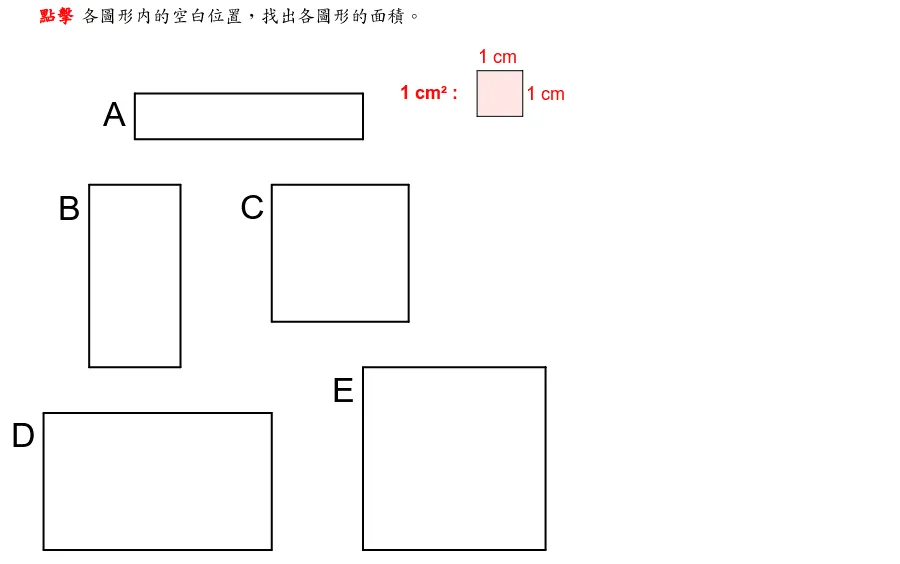
This GeoGebra applet demonstrates the calculation of areas for rectangles and squares through interactive geometric constructions. Featuring Questions A to E, the applet uses polygon and segment tools to construct multiple squares and rectangles, providing a visual and hands-on way to explore area formulas, side-length relationships, and the fundamental properties of these basic planar shapes.
The applet is designed as an instructional tool for students learning geometry at the elementary and middle school levels. It presents five progressive questions, labeled A through E, each building on the previous one to reinforce understanding of how area is computed for rectangles and squares. Through dragging and manipulating the constructed figures, learners can observe firsthand that the area of a rectangle is found by multiplying its length by its width, while the area of a square is found by squaring the length of one of its sides. This dynamic manipulation helps students move beyond rote memorization and develop a deeper conceptual grasp of why these formulas work.
Students benefit from the immediate visual feedback that the applet provides. As they adjust the dimensions of the shapes, they can see how changes in side lengths directly affect the resulting area. This interactive approach supports the development of spatial reasoning skills and helps learners make connections between geometric figures and numerical calculations. The structured progression from Question A to Question E allows students to gradually build confidence and understanding, making it suitable for both classroom instruction and independent practice. The applet aligns with common geometry curriculum standards and serves as an effective supplement to traditional textbook exercises by offering an engaging, exploratory learning experience.
In collections
Area: Interactive GeoGebra Activities
Loading the math board and drawing, please wait…
<?xml version="1.0" encoding="utf-8"?>
<geogebra format="5.0" version="5.0.230.0" id="4a798150-1eb2-45dd-b921-f0302f439d6b" xsi:noNamespaceSchemaLocation="http://www.geogebra.org/ggb.xsd" xmlns="" xmlns:xsi="http://www.w3.org/2001/XMLSchema-instance" >
<gui>
<window width="900" height="564" />
<perspectives>
</perspectives>
<labelingStyle val="2"/>
<font size="18"/>
</gui>
<euclidianView>
<viewNumber viewNo="1"/>
<size width="898" height="562"/>
<coordSystem xZero="43.5673865594478" yZero="139.16191192571375" scale="45.63550666791885" yscale="45.63550666791887"/>
<evSettings axes="false" grid="false" gridIsBold="false" pointCapturing="2" rightAngleStyle="1" checkboxSize="13" gridType="0"/>
<bgColor r="255" g="255" b="255"/>
<axesColor r="0" g="0" b="0"/>
<gridColor r="192" g="192" b="192"/>
<lineStyle axes="1" grid="10"/>
<axis id="0" show="false" label="" unitLabel="" tickStyle="1" showNumbers="true"/>
<axis id="1" show="false" label="" unitLabel="" tickStyle="1" showNumbers="true"/>
<grid distX="1" distY="1" distTheta="0.5235987755982988"/>
</euclidianView>
<kernel>
<continuous val="false"/>
<usePathAndRegionParameters val="true"/>
<decimals val="2"/>
<angleUnit val="degree"/>
<algebraStyle val="0" spreadsheet="0"/>
<coordStyle val="0"/>
<angleFromInvTrig val="false"/>
</kernel>
<scripting blocked="false" disabled="false"/>
<construction title="" author="" date="">
<command name="Polygon">
<input a0="(2, 0)" a1="(3, 0)" a2="(3, 1)" a3="(2, 1)"/>
<output a0="sqr_1" a1="a_1" a2="b_1" a3="c_1" a4="d_1"/>
</command>
<element type="polygon" label="sqr_1">
<lineStyle thickness="2" type="0" typeHidden="1"/>
<show object="true" label="false"/>
<objColor r="255" g="255" b="255" alpha="0.1"/>
<layer val="0"/>
<labelOffset x="66" y="-45"/>
<labelMode val="0"/>
<fixed val="true"/>
<ggbscript val="SetValue[o_1, !o_1] SetColor[sqr_1, If[o_1, "red", "white"]] SetColor[a_1, "black"] SetColor[b_1, "black"] SetColor[c_1, "black"] SetColor[d_1, "black"]"/>
</element>
<element type="segment" label="a_1">
<show object="false" label="false"/>
<condition showObject="o_1"/>
<objColor r="0" g="0" b="0" alpha="0"/>
<layer val="1"/>
<labelOffset x="1" y="0"/>
<labelMode val="0"/>
<fixed val="true"/>
<selectionAllowed val="false"/>
<auxiliary val="false"/>
<coords x="0" y="1" z="0"/>
<lineStyle thickness="2" type="0" typeHidden="1"/>
<eqnStyle style="implicit"/>
<outlyingIntersections val="false"/>
<keepTypeOnTransform val="true"/>
</element>
<element type="segment" label="b_1">
<show object="true" label="false"/>
<condition showObject="o_1"/>
<objColor r="0" g="0" b="0" alpha="0"/>
<layer val="1"/>
<labelOffset x="0" y="-2"/>
<labelMode val="0"/>
<fixed val="true"/>
<selectionAllowed val="false"/>
<auxiliary val="false"/>
<coords x="-1" y="0" z="3"/>
<lineStyle thickness="2" type="0" typeHidden="1"/>
<eqnStyle style="implicit"/>
<outlyingIntersections val="false"/>
<keepTypeOnTransform val="true"/>
</element>
<element type="segment" label="c_1">
<show object="true" label="false"/>
<condition showObject="o_1"/>
<objColor r="0" g="0" b="0" alpha="0"/>
<layer val="1"/>
<labelMode val="0"/>
<fixed val="true"/>
<selectionAllowed val="false"/>
<auxiliary val="false"/>
<coords x="0" y="-1" z="1"/>
<lineStyle thickness="2" type="0" typeHidden="1"/>
<eqnStyle style="implicit"/>
<outlyingIntersections val="false"/>
<keepTypeOnTransform val="true"/>
</element>
<element type="segment" label="d_1">
<show object="true" label="false"/>
<condition showObject="o_1"/>
<objColor r="0" g="0" b="0" alpha="0"/>
<layer val="1"/>
<labelMode val="0"/>
<fixed val="true"/>
<selectionAllowed val="false"/>
<auxiliary val="false"/>
<coords x="1" y="0" z="-2"/>
<lineStyle thickness="2" type="0" typeHidden="1"/>
<eqnStyle style="implicit"/>
<outlyingIntersections val="false"/>
<keepTypeOnTransform val="true"/>
</element>
<element type="boolean" label="o_1">
<value val="false"/>
<show object="false" label="true"/>
<objColor r="0" g="0" b="0" alpha="0"/>
<layer val="0"/>
<labelMode val="0"/>
<checkbox fixed="true"/>
</element>
<command name="Polygon">
<input a0="(3, 0)" a1="(4, 0)" a2="(4, 1)" a3="(3, 1)"/>
<output a0="sqr_2" a1="a_2" a2="b_2" a3="c_2" a4="d_2"/>
</command>
<element type="polygon" label="sqr_2">
<lineStyle thickness="2" type="0" typeHidden="1"/>
<show object="true" label="false"/>
<objColor r="255" g="255" b="255" alpha="0.1"/>
<layer val="0"/>
<labelOffset x="66" y="-45"/>
<labelMode val="0"/>
<fixed val="true"/>
<ggbscript val="SetValue[o_2, !o_2] SetColor[sqr_2, If[o_2, "red", "white"]] SetColor[a_2, "black"] SetColor[b_2, "black"] SetColor[c_2, "black"] SetColor[d_2, "black"]"/>
</element>
<element type="segment" label="a_2">
<show object="true" label="false"/>
<condition showObject="o_2"/>
<objColor r="0" g="0" b="0" alpha="0"/>
<layer val="1"/>
<labelMode val="0"/>
<fixed val="true"/>
<selectionAllowed val="false"/>
<auxiliary val="false"/>
<coords x="0" y="1" z="0"/>
<lineStyle thickness="2" type="0" typeHidden="1"/>
<eqnStyle style="implicit"/>
<outlyingIntersections val="false"/>
<keepTypeOnTransform val="true"/>
</element>
<element type="segment" label="b_2">
<show object="true" label="false"/>
<condition showObject="o_2"/>
<objColor r="0" g="0" b="0" alpha="0"/>
<layer val="1"/>
<labelMode val="0"/>
<fixed val="true"/>
<selectionAllowed val="false"/>
<auxiliary val="false"/>
<coords x="-1" y="0" z="4"/>
<lineStyle thickness="2" type="0" typeHidden="1"/>
<eqnStyle style="implicit"/>
<outlyingIntersections val="false"/>
<keepTypeOnTransform val="true"/>
</element>
<element type="segment" label="c_2">
<show object="true" label="false"/>
<condition showObject="o_2"/>
<objColor r="0" g="0" b="0" alpha="0"/>
<layer val="1"/>
<labelMode val="0"/>
<fixed val="true"/>
<selectionAllowed val="false"/>
<auxiliary val="false"/>
<coords x="0" y="-1" z="1"/>
<lineStyle thickness="2" type="0" typeHidden="1"/>
<eqnStyle style="implicit"/>
<outlyingIntersections val="false"/>
<keepTypeOnTransform val="true"/>
</element>
<element type="segment" label="d_2">
<show object="true" label="false"/>
<condition showObject="o_2"/>
<objColor r="0" g="0" b="0" alpha="0"/>
<layer val="1"/>
<labelMode val="0"/>
<fixed val="true"/>
<selectionAllowed val="false"/>
<auxiliary val="false"/>
<coords x="1" y="0" z="-3"/>
<lineStyle thickness="2" type="0" typeHidden="1"/>
<eqnStyle style="implicit"/>
<outlyingIntersections val="false"/>
<keepTypeOnTransform val="true"/>
</element>
<command name="Polygon">
<input a0="(4, 0)" a1="(5, 0)" a2="(5, 1)" a3="(4, 1)"/>
<output a0="sqr_3" a1="a_3" a2="b_3" a3="c_3" a4="d_3"/>
</command>
<element type="polygon" label="sqr_3">
<lineStyle thickness="2" type="0" typeHidden="1"/>
<show object="true" label="false"/>
<objColor r="255" g="255" b="255" alpha="0.1"/>
<layer val="0"/>
<labelOffset x="66" y="-45"/>
<labelMode val="0"/>
<fixed val="true"/>
<ggbscript val="SetValue[o_3, !o_3] SetColor[sqr_3, If[o_3, "red", "white"]] SetColor[a_3, "black"] SetColor[b_3, "black"] SetColor[c_3, "black"] SetColor[d_3, "black"]"/>
</element>
<element type="segment" label="a_3">
<show object="true" label="false"/>
<condition showObject="o_3"/>
<objColor r="0" g="0" b="0" alpha="0"/>
<layer val="1"/>
<labelMode val="0"/>
<fixed val="true"/>
<selectionAllowed val="false"/>
<auxiliary val="false"/>
<coords x="0" y="1" z="0"/>
<lineStyle thickness="2" type="0" typeHidden="1"/>
<eqnStyle style="implicit"/>
<outlyingIntersections val="false"/>
<keepTypeOnTransform val="true"/>
</element>
<element type="segment" label="b_3">
<show object="true" label="false"/>
<condition showObject="o_3"/>
<objColor r="0" g="0" b="0" alpha="0"/>
<layer val="1"/>
<labelMode val="0"/>
<fixed val="true"/>
<selectionAllowed val="false"/>
<auxiliary val="false"/>
<coords x="-1" y="0" z="5"/>
<lineStyle thickness="2" type="0" typeHidden="1"/>
<eqnStyle style="implicit"/>
<outlyingIntersections val="false"/>
<keepTypeOnTransform val="true"/>
</element>
<element type="segment" label="c_3">
<show object="true" label="false"/>
<condition showObject="o_3"/>
<objColor r="0" g="0" b="0" alpha="0"/>
<layer val="1"/>
<labelMode val="0"/>
<fixed val="true"/>
<selectionAllowed val="false"/>
<auxiliary val="false"/>
<coords x="0" y="-1" z="1"/>
<lineStyle thickness="2" type="0" typeHidden="1"/>
<eqnStyle style="implicit"/>
<outlyingIntersections val="false"/>
<keepTypeOnTransform val="true"/>
</element>
<element type="segment" label="d_3">
<show object="true" label="false"/>
<condition showObject="o_3"/>
<objColor r="0" g="0" b="0" alpha="0"/>
<layer val="1"/>
<labelMode val="0"/>
<fixed val="true"/>
<selectionAllowed val="false"/>
<auxiliary val="false"/>
<coords x="1" y="0" z="-4"/>
<lineStyle thickness="2" type="0" typeHidden="1"/>
<eqnStyle style="implicit"/>
<outlyingIntersections val="false"/>
<keepTypeOnTransform val="true"/>
</element>
<command name="Polygon">
<input a0="(5, 0)" a1="(6, 0)" a2="(6, 1)" a3="(5, 1)"/>
<output a0="sqr_4" a1="a_4" a2="b_4" a3="c_4" a4="d_4"/>
</command>
<element type="polygon" label="sqr_4">
<lineStyle thickness="2" type="0" typeHidden="1"/>
<show object="true" label="false"/>
<objColor r="255" g="255" b="255" alpha="0.1"/>
<layer val="0"/>
<labelOffset x="66" y="-45"/>
<labelMode val="0"/>
<fixed val="true"/>
<ggbscript val="SetValue[o_4, !o_4] SetColor[sqr_4, If[o_4, "red", "white"]] SetColor[a_4, "black"] SetColor[b_4, "black"] SetColor[c_4, "black"] SetColor[d_4, "black"]"/>
</element>
<element type="segment" label="a_4">
<show object="true" label="false"/>
<condition showObject="o_4"/>
<objColor r="0" g="0" b="0" alpha="0"/>
<layer val="1"/>
<labelMode val="0"/>
<fixed val="true"/>
<selectionAllowed val="false"/>
<auxiliary val="false"/>
<coords x="0" y="1" z="0"/>
<lineStyle thickness="2" type="0" typeHidden="1"/>
<eqnStyle style="implicit"/>
<outlyingIntersections val="false"/>
<keepTypeOnTransform val="true"/>
</element>
<element type="segment" label="b_4">
<show object="true" label="false"/>
<condition showObject="o_4"/>
<objColor r="0" g="0" b="0" alpha="0"/>
<layer val="1"/>
<labelMode val="0"/>
<fixed val="true"/>
<selectionAllowed val="false"/>
<auxiliary val="false"/>
<coords x="-1" y="0" z="6"/>
<lineStyle thickness="2" type="0" typeHidden="1"/>
<eqnStyle style="implicit"/>
<outlyingIntersections val="false"/>
<keepTypeOnTransform val="true"/>
</element>
<element type="segment" label="c_4">
<show object="true" label="false"/>
<condition showObject="o_4"/>
<objColor r="0" g="0" b="0" alpha="0"/>
<layer val="1"/>
<labelMode val="0"/>
<fixed val="true"/>
<selectionAllowed val="false"/>
<auxiliary val="false"/>
<coords x="0" y="-1" z="1"/>
<lineStyle thickness="2" type="0" typeHidden="1"/>
<eqnStyle style="implicit"/>
<outlyingIntersections val="false"/>
<keepTypeOnTransform val="true"/>
</element>
<element type="segment" label="d_4">
<show object="true" label="false"/>
<condition showObject="o_4"/>
<objColor r="0" g="0" b="0" alpha="0"/>
<layer val="1"/>
<labelMode val="0"/>
<fixed val="true"/>
<selectionAllowed val="false"/>
<auxiliary val="false"/>
<coords x="1" y="0" z="-5"/>
<lineStyle thickness="2" type="0" typeHidden="1"/>
<eqnStyle style="implicit"/>
<outlyingIntersections val="false"/>
<keepTypeOnTransform val="true"/>
</element>
<command name="Polygon">
<input a0="(6, 0)" a1="(7, 0)" a2="(7, 1)" a3="(6, 1)"/>
<output a0="sqr_5" a1="a_5" a2="b_5" a3="c_5" a4="d_5"/>
</command>
<element type="polygon" label="sqr_5">
<lineStyle thickness="2" type="0" typeHidden="1"/>
<show object="true" label="false"/>
<objColor r="255" g="255" b="255" alpha="0.1"/>
<layer val="0"/>
<labelOffset x="66" y="-45"/>
<labelMode val="0"/>
<fixed val="true"/>
<ggbscript val="SetValue[o_5, !o_5] SetColor[sqr_5, If[o_5, "red", "white"]] SetColor[a_5, "black"] SetColor[b_5, "black"] SetColor[c_5, "black"] SetColor[d_5, "black"]"/>
</element>
<element type="segment" label="a_5">
<show object="true" label="false"/>
<condition showObject="o_5"/>
<objColor r="0" g="0" b="0" alpha="0"/>
<layer val="1"/>
<labelMode val="0"/>
<fixed val="true"/>
<selectionAllowed val="false"/>
<auxiliary val="false"/>
<coords x="0" y="1" z="0"/>
<lineStyle thickness="2" type="0" typeHidden="1"/>
<eqnStyle style="implicit"/>
<outlyingIntersections val="false"/>
<keepTypeOnTransform val="true"/>
</element>
<element type="segment" label="b_5">
<show object="true" label="false"/>
<condition showObject="o_5"/>
<objColor r="0" g="0" b="0" alpha="0"/>
<layer val="1"/>
<labelMode val="0"/>
<fixed val="true"/>
<selectionAllowed val="false"/>
<auxiliary val="false"/>
<coords x="-1" y="0" z="7"/>
<lineStyle thickness="2" type="0" typeHidden="1"/>
<eqnStyle style="implicit"/>
<outlyingIntersections val="false"/>
<keepTypeOnTransform val="true"/>
</element>
<element type="segment" label="c_5">
<show object="true" label="false"/>
<condition showObject="o_5"/>
<objColor r="0" g="0" b="0" alpha="0"/>
<layer val="1"/>
<labelMode val="0"/>
<fixed val="true"/>
<selectionAllowed val="false"/>
<auxiliary val="false"/>
<coords x="0" y="-1" z="1"/>
<lineStyle thickness="2" type="0" typeHidden="1"/>
<eqnStyle style="implicit"/>
<outlyingIntersections val="false"/>
<keepTypeOnTransform val="true"/>
</element>
<element type="segment" label="d_5">
<show object="true" label="false"/>
<condition showObject="o_5"/>
<objColor r="0" g="0" b="0" alpha="0"/>
<layer val="1"/>
<labelMode val="0"/>
<fixed val="true"/>
<selectionAllowed val="false"/>
<auxiliary val="false"/>
<coords x="1" y="0" z="-6"/>
<lineStyle thickness="2" type="0" typeHidden="1"/>
<eqnStyle style="implicit"/>
<outlyingIntersections val="false"/>
<keepTypeOnTransform val="true"/>
</element>
<command name="Polygon">
<input a0="(1, -2)" a1="(2, -2)" a2="(2, -1)" a3="(1, -1)"/>
<output a0="sqr_6" a1="a_6" a2="b_6" a3="c_6" a4="d_6"/>
</command>
<element type="polygon" label="sqr_6">
<lineStyle thickness="2" type="0" typeHidden="1"/>
<show object="true" label="false"/>
<objColor r="255" g="255" b="255" alpha="0.1"/>
<layer val="0"/>
<labelOffset x="66" y="-45"/>
<labelMode val="0"/>
<fixed val="true"/>
<ggbscript val="SetValue[o_6, !o_6] SetColor[sqr_6, If[o_6, "red", "white"]] SetColor[a_6, "black"] SetColor[b_6, "black"] SetColor[c_6, "black"] SetColor[d_6, "black"]"/>
</element>
<element type="segment" label="a_6">
<show object="true" label="false"/>
<condition showObject="o_6"/>
<objColor r="0" g="0" b="0" alpha="0"/>
<layer val="1"/>
<labelMode val="0"/>
<fixed val="true"/>
<selectionAllowed val="false"/>
<auxiliary val="false"/>
<coords x="0" y="1" z="2"/>
<lineStyle thickness="2" type="0" typeHidden="1"/>
<eqnStyle style="implicit"/>
<outlyingIntersections val="false"/>
<keepTypeOnTransform val="true"/>
</element>
<element type="segment" label="b_6">
<show object="true" label="false"/>
<condition showObject="o_6"/>
<objColor r="0" g="0" b="0" alpha="0"/>
<layer val="1"/>
<labelMode val="0"/>
<fixed val="true"/>
<selectionAllowed val="false"/>
<auxiliary val="false"/>
<coords x="-1" y="0" z="2"/>
<lineStyle thickness="2" type="0" typeHidden="1"/>
<eqnStyle style="implicit"/>
<outlyingIntersections val="false"/>
<keepTypeOnTransform val="true"/>
</element>
<element type="segment" label="c_6">
<show object="true" label="false"/>
<condition showObject="o_6"/>
<objColor r="0" g="0" b="0" alpha="0"/>
<layer val="1"/>
<labelMode val="0"/>
<fixed val="true"/>
<selectionAllowed val="false"/>
<auxiliary val="false"/>
<coords x="0" y="-1" z="-1"/>
<lineStyle thickness="2" type="0" typeHidden="1"/>
<eqnStyle style="implicit"/>
<outlyingIntersections val="false"/>
<keepTypeOnTransform val="true"/>
</element>
<element type="segment" label="d_6">
<show object="true" label="false"/>
<condition showObject="o_6"/>
<objColor r="0" g="0" b="0" alpha="0"/>
<layer val="1"/>
<labelMode val="0"/>
<fixed val="true"/>
<selectionAllowed val="false"/>
<auxiliary val="false"/>
<coords x="1" y="0" z="-1"/>
<lineStyle thickness="2" type="0" typeHidden="1"/>
<eqnStyle style="implicit"/>
<outlyingIntersections val="false"/>
<keepTypeOnTransform val="true"/>
</element>
<command name="Polygon">
<input a0="(2, -2)" a1="(3, -2)" a2="(3, -1)" a3="(2, -1)"/>
<output a0="sqr_7" a1="a_7" a2="b_7" a3="c_7" a4="d_7"/>
</command>
<element type="polygon" label="sqr_7">
<lineStyle thickness="2" type="0" typeHidden="1"/>
<show object="true" label="false"/>
<objColor r="255" g="255" b="255" alpha="0.1"/>
<layer val="0"/>
<labelOffset x="66" y="-45"/>
<labelMode val="0"/>
<fixed val="true"/>
<ggbscript val="SetValue[o_7, !o_7] SetColor[sqr_7, If[o_7, "red", "white"]] SetColor[a_7, "black"] SetColor[b_7, "black"] SetColor[c_7, "black"] SetColor[d_7, "black"]"/>
</element>
<element type="segment" label="a_7">
<show object="true" label="false"/>
<condition showObject="o_7"/>
<objColor r="0" g="0" b="0" alpha="0"/>
<layer val="1"/>
<labelMode val="0"/>
<fixed val="true"/>
<selectionAllowed val="false"/>
<auxiliary val="false"/>
<coords x="0" y="1" z="2"/>
<lineStyle thickness="2" type="0" typeHidden="1"/>
<eqnStyle style="implicit"/>
<outlyingIntersections val="false"/>
<keepTypeOnTransform val="true"/>
</element>
<element type="segment" label="b_7">
<show object="true" label="false"/>
<condition showObject="o_7"/>
<objColor r="0" g="0" b="0" alpha="0"/>
<layer val="1"/>
<labelMode val="0"/>
<fixed val="true"/>
<selectionAllowed val="false"/>
<auxiliary val="false"/>
<coords x="-1" y="0" z="3"/>
<lineStyle thickness="2" type="0" typeHidden="1"/>
<eqnStyle style="implicit"/>
<outlyingIntersections val="false"/>
<keepTypeOnTransform val="true"/>
</element>
<element type="segment" label="c_7">
<show object="true" label="false"/>
<condition showObject="o_7"/>
<objColor r="0" g="0" b="0" alpha="0"/>
<layer val="1"/>
<labelMode val="0"/>
<fixed val="true"/>
<selectionAllowed val="false"/>
<auxiliary val="false"/>
<coords x="0" y="-1" z="-1"/>
<lineStyle thickness="2" type="0" typeHidden="1"/>
<eqnStyle style="implicit"/>
<outlyingIntersections val="false"/>
<keepTypeOnTransform val="true"/>
</element>
<element type="segment" label="d_7">
<show object="true" label="false"/>
<condition showObject="o_7"/>
<objColor r="0" g="0" b="0" alpha="0"/>
<layer val="1"/>
<labelMode val="0"/>
<fixed val="true"/>
<selectionAllowed val="false"/>
<auxiliary val="false"/>
<coords x="1" y="0" z="-2"/>
<lineStyle thickness="2" type="0" typeHidden="1"/>
<eqnStyle style="implicit"/>
<outlyingIntersections val="false"/>
<keepTypeOnTransform val="true"/>
</element>
<command name="Polygon">
<input a0="(1, -3)" a1="(2, -3)" a2="(2, -2)" a3="(1, -2)"/>
<output a0="sqr_8" a1="a_8" a2="b_8" a3="c_8" a4="d_8"/>
</command>
<element type="polygon" label="sqr_8">
<lineStyle thickness="2" type="0" typeHidden="1"/>
<show object="true" label="false"/>
<objColor r="255" g="255" b="255" alpha="0.1"/>
<layer val="0"/>
<labelOffset x="66" y="-45"/>
<labelMode val="0"/>
<fixed val="true"/>
<ggbscript val="SetValue[o_8, !o_8] SetColor[sqr_8, If[o_8, "red", "white"]] SetColor[a_8, "black"] SetColor[b_8, "black"] SetColor[c_8, "black"] SetColor[d_8, "black"] "/>
</element>
<element type="segment" label="a_8">
<show object="true" label="false"/>
<condition showObject="o_8"/>
<objColor r="0" g="0" b="0" alpha="0"/>
<layer val="1"/>
<labelMode val="0"/>
<fixed val="true"/>
<selectionAllowed val="false"/>
<auxiliary val="false"/>
<coords x="0" y="1" z="3"/>
<lineStyle thickness="2" type="0" typeHidden="1"/>
<eqnStyle style="implicit"/>
<outlyingIntersections val="false"/>
<keepTypeOnTransform val="true"/>
</element>
<element type="segment" label="b_8">
<show object="true" label="false"/>
<condition showObject="o_8"/>
<objColor r="0" g="0" b="0" alpha="0"/>
<layer val="1"/>
<labelMode val="0"/>
<fixed val="true"/>
<selectionAllowed val="false"/>
<auxiliary val="false"/>
<coords x="-1" y="0" z="2"/>
<lineStyle thickness="2" type="0" typeHidden="1"/>
<eqnStyle style="implicit"/>
<outlyingIntersections val="false"/>
<keepTypeOnTransform val="true"/>
</element>
<element type="segment" label="c_8">
<show object="true" label="false"/>
<condition showObject="o_8"/>
<objColor r="0" g="0" b="0" alpha="0"/>
<layer val="1"/>
<labelMode val="0"/>
<fixed val="true"/>
<selectionAllowed val="false"/>
<auxiliary val="false"/>
<coords x="0" y="-1" z="-2"/>
<lineStyle thickness="2" type="0" typeHidden="1"/>
<eqnStyle style="implicit"/>
<outlyingIntersections val="false"/>
<keepTypeOnTransform val="true"/>
</element>
<element type="segment" label="d_8">
<show object="true" label="false"/>
<condition showObject="o_8"/>
<objColor r="0" g="0" b="0" alpha="0"/>
<layer val="1"/>
<labelMode val="0"/>
<fixed val="true"/>
<selectionAllowed val="false"/>
<auxiliary val="false"/>
<coords x="1" y="0" z="-1"/>
<lineStyle thickness="2" type="0" typeHidden="1"/>
<eqnStyle style="implicit"/>
<outlyingIntersections val="false"/>
<keepTypeOnTransform val="true"/>
</element>
<command name="Polygon">
<input a0="(2, -3)" a1="(3, -3)" a2="(3, -2)" a3="(2, -2)"/>
<output a0="sqr_9" a1="a_9" a2="b_9" a3="c_9" a4="d_9"/>
</command>
<element type="polygon" label="sqr_9">
<lineStyle thickness="2" type="0" typeHidden="1"/>
<show object="true" label="false"/>
<objColor r="255" g="255" b="255" alpha="0.1"/>
<layer val="0"/>
<labelOffset x="66" y="-45"/>
<labelMode val="0"/>
<fixed val="true"/>
<ggbscript val="SetValue[o_9, !o_9] SetColor[sqr_9, If[o_9, "red", "white"]] SetColor[a_9, "black"] SetColor[b_9, "black"] SetColor[c_9, "black"] SetColor[d_9, "black"] "/>
</element>
<element type="segment" label="a_9">
<show object="true" label="false"/>
<condition showObject="o_9"/>
<objColor r="0" g="0" b="0" alpha="0"/>
<layer val="1"/>
<labelMode val="0"/>
<fixed val="true"/>
<selectionAllowed val="false"/>
<auxiliary val="false"/>
<coords x="0" y="1" z="3"/>
<lineStyle thickness="2" type="0" typeHidden="1"/>
<eqnStyle style="implicit"/>
<outlyingIntersections val="false"/>
<keepTypeOnTransform val="true"/>
</element>
<element type="segment" label="b_9">
<show object="true" label="false"/>
<condition showObject="o_9"/>
<objColor r="0" g="0" b="0" alpha="0"/>
<layer val="1"/>
<labelMode val="0"/>
<fixed val="true"/>
<selectionAllowed val="false"/>
<auxiliary val="false"/>
<coords x="-1" y="0" z="3"/>
<lineStyle thickness="2" type="0" typeHidden="1"/>
<eqnStyle style="implicit"/>
<outlyingIntersections val="false"/>
<keepTypeOnTransform val="true"/>
</element>
<element type="segment" label="c_9">
<show object="true" label="false"/>
<condition showObject="o_9"/>
<objColor r="0" g="0" b="0" alpha="0"/>
<layer val="1"/>
<labelMode val="0"/>
<fixed val="true"/>
<selectionAllowed val="false"/>
<auxiliary val="false"/>
<coords x="0" y="-1" z="-2"/>
<lineStyle thickness="2" type="0" typeHidden="1"/>
<eqnStyle style="implicit"/>
<outlyingIntersections val="false"/>
<keepTypeOnTransform val="true"/>
</element>
<element type="segment" label="d_9">
<show object="true" label="false"/>
<condition showObject="o_9"/>
<objColor r="0" g="0" b="0" alpha="0"/>
<layer val="1"/>
<labelMode val="0"/>
<fixed val="true"/>
<selectionAllowed val="false"/>
<auxiliary val="false"/>
<coords x="1" y="0" z="-2"/>
<lineStyle thickness="2" type="0" typeHidden="1"/>
<eqnStyle style="implicit"/>
<outlyingIntersections val="false"/>
<keepTypeOnTransform val="true"/>
</element>
<command name="Polygon">
<input a0="(1, -4)" a1="(2, -4)" a2="(2, -3)" a3="(1, -3)"/>
<output a0="sqr_{10}" a1="a_{10}" a2="b_{10}" a3="c_{10}" a4="d_{10}"/>
</command>
<element type="polygon" label="sqr_{10}">
<lineStyle thickness="2" type="0" typeHidden="1"/>
<show object="true" label="false"/>
<objColor r="255" g="255" b="255" alpha="0.1"/>
<layer val="0"/>
<labelOffset x="66" y="-45"/>
<labelMode val="0"/>
<fixed val="true"/>
<ggbscript val="SetValue[o_{10}, !o_{10}] SetColor[sqr_{10}, If[o_{10}, "red", "white"]] SetColor[a_{10}, "black"] SetColor[b_{10}, "black"] SetColor[c_{10}, "black"] SetColor[d_{10}, "black"] "/>
</element>
<element type="segment" label="a_{10}">
<show object="true" label="false"/>
<condition showObject="o_{10}"/>
<objColor r="0" g="0" b="0" alpha="0"/>
<layer val="1"/>
<labelMode val="0"/>
<fixed val="true"/>
<selectionAllowed val="false"/>
<auxiliary val="false"/>
<coords x="0" y="1" z="4"/>
<lineStyle thickness="2" type="0" typeHidden="1"/>
<eqnStyle style="implicit"/>
<outlyingIntersections val="false"/>
<keepTypeOnTransform val="true"/>
</element>
<element type="segment" label="b_{10}">
<show object="true" label="false"/>
<condition showObject="o_{10}"/>
<objColor r="0" g="0" b="0" alpha="0"/>
<layer val="1"/>
<labelMode val="0"/>
<fixed val="true"/>
<selectionAllowed val="false"/>
<auxiliary val="false"/>
<coords x="-1" y="0" z="2"/>
<lineStyle thickness="2" type="0" typeHidden="1"/>
<eqnStyle style="implicit"/>
<outlyingIntersections val="false"/>
<keepTypeOnTransform val="true"/>
</element>
<element type="segment" label="c_{10}">
<show object="true" label="false"/>
<condition showObject="o_{10}"/>
<objColor r="0" g="0" b="0" alpha="0"/>
<layer val="1"/>
<labelMode val="0"/>
<fixed val="true"/>
<selectionAllowed val="false"/>
<auxiliary val="false"/>
<coords x="0" y="-1" z="-3"/>
<lineStyle thickness="2" type="0" typeHidden="1"/>
<eqnStyle style="implicit"/>
<outlyingIntersections val="false"/>
<keepTypeOnTransform val="true"/>
</element>
<element type="segment" label="d_{10}">
<show object="true" label="false"/>
<condition showObject="o_{10}"/>
<objColor r="0" g="0" b="0" alpha="0"/>
<layer val="1"/>
<labelMode val="0"/>
<fixed val="true"/>
<selectionAllowed val="false"/>
<auxiliary val="false"/>
<coords x="1" y="0" z="-1"/>
<lineStyle thickness="2" type="0" typeHidden="1"/>
<eqnStyle style="implicit"/>
<outlyingIntersections val="false"/>
<keepTypeOnTransform val="true"/>
</element>
<command name="Polygon">
<input a0="(2, -4)" a1="(3, -4)" a2="(3, -3)" a3="(2, -3)"/>
<output a0="sqr_{11}" a1="a_{11}" a2="b_{11}" a3="c_{11}" a4="d_{11}"/>
</command>
<element type="polygon" label="sqr_{11}">
<lineStyle thickness="2" type="0" typeHidden="1"/>
<show object="true" label="false"/>
<objColor r="255" g="255" b="255" alpha="0.1"/>
<layer val="0"/>
<labelOffset x="66" y="-45"/>
<labelMode val="0"/>
<fixed val="true"/>
<ggbscript val="SetValue[o_{11}, !o_{11}] SetColor[sqr_{11}, If[o_{11}, "red", "white"]] SetColor[a_{11}, "black"] SetColor[b_{11}, "black"] SetColor[c_{11}, "black"] SetColor[d_{11}, "black"] "/>
</element>
<element type="segment" label="a_{11}">
<show object="true" label="false"/>
<condition showObject="o_{11}"/>
<objColor r="0" g="0" b="0" alpha="0"/>
<layer val="1"/>
<labelMode val="0"/>
<fixed val="true"/>
<selectionAllowed val="false"/>
<auxiliary val="false"/>
<coords x="0" y="1" z="4"/>
<lineStyle thickness="2" type="0" typeHidden="1"/>
<eqnStyle style="implicit"/>
<outlyingIntersections val="false"/>
<keepTypeOnTransform val="true"/>
</element>
<element type="segment" label="b_{11}">
<show object="true" label="false"/>
<condition showObject="o_{11}"/>
<objColor r="0" g="0" b="0" alpha="0"/>
<layer val="1"/>
<labelMode val="0"/>
<fixed val="true"/>
<selectionAllowed val="false"/>
<auxiliary val="false"/>
<coords x="-1" y="0" z="3"/>
<lineStyle thickness="2" type="0" typeHidden="1"/>
<eqnStyle style="implicit"/>
<outlyingIntersections val="false"/>
<keepTypeOnTransform val="true"/>
</element>
<element type="segment" label="c_{11}">
<show object="true" label="false"/>
<condition showObject="o_{11}"/>
<objColor r="0" g="0" b="0" alpha="0"/>
<layer val="1"/>
<labelMode val="0"/>
<fixed val="true"/>
<selectionAllowed val="false"/>
<auxiliary val="false"/>
<coords x="0" y="-1" z="-3"/>
<lineStyle thickness="2" type="0" typeHidden="1"/>
<eqnStyle style="implicit"/>
<outlyingIntersections val="false"/>
<keepTypeOnTransform val="true"/>
</element>
<element type="segment" label="d_{11}">
<show object="true" label="false"/>
<condition showObject="o_{11}"/>
<objColor r="0" g="0" b="0" alpha="0"/>
<layer val="1"/>
<labelMode val="0"/>
<fixed val="true"/>
<selectionAllowed val="false"/>
<auxiliary val="false"/>
<coords x="1" y="0" z="-2"/>
<lineStyle thickness="2" type="0" typeHidden="1"/>
<eqnStyle style="implicit"/>
<outlyingIntersections val="false"/>
<keepTypeOnTransform val="true"/>
</element>
<command name="Polygon">
<input a0="(1, -5)" a1="(2, -5)" a2="(2, -4)" a3="(1, -4)"/>
<output a0="sqr_{12}" a1="a_{12}" a2="b_{12}" a3="c_{12}" a4="d_{12}"/>
</command>
<element type="polygon" label="sqr_{12}">
<lineStyle thickness="2" type="0" typeHidden="1"/>
<show object="true" label="false"/>
<objColor r="255" g="255" b="255" alpha="0.1"/>
<layer val="0"/>
<labelOffset x="66" y="-45"/>
<labelMode val="0"/>
<fixed val="true"/>
<ggbscript val="SetValue[o_{12}, !o_{12}] SetColor[sqr_{12}, If[o_{12}, "red", "white"]] SetColor[a_{12}, "black"] SetColor[b_{12}, "black"] SetColor[c_{12}, "black"] SetColor[d_{12}, "black"] "/>
</element>
<element type="segment" label="a_{12}">
<show object="true" label="false"/>
<condition showObject="o_{12}"/>
<objColor r="0" g="0" b="0" alpha="0"/>
<layer val="1"/>
<labelMode val="0"/>
<fixed val="true"/>
<selectionAllowed val="false"/>
<auxiliary val="false"/>
<coords x="0" y="1" z="5"/>
<lineStyle thickness="2" type="0" typeHidden="1"/>
<eqnStyle style="implicit"/>
<outlyingIntersections val="false"/>
<keepTypeOnTransform val="true"/>
</element>
<element type="segment" label="b_{12}">
<show object="true" label="false"/>
<condition showObject="o_{12}"/>
<objColor r="0" g="0" b="0" alpha="0"/>
<layer val="1"/>
<labelMode val="0"/>
<fixed val="true"/>
<selectionAllowed val="false"/>
<auxiliary val="false"/>
<coords x="-1" y="0" z="2"/>
<lineStyle thickness="2" type="0" typeHidden="1"/>
<eqnStyle style="implicit"/>
<outlyingIntersections val="false"/>
<keepTypeOnTransform val="true"/>
</element>
<element type="segment" label="c_{12}">
<show object="true" label="false"/>
<condition showObject="o_{12}"/>
<objColor r="0" g="0" b="0" alpha="0"/>
<layer val="1"/>
<labelMode val="0"/>
<fixed val="true"/>
<selectionAllowed val="false"/>
<auxiliary val="false"/>
<coords x="0" y="-1" z="-4"/>
<lineStyle thickness="2" type="0" typeHidden="1"/>
<eqnStyle style="implicit"/>
<outlyingIntersections val="false"/>
<keepTypeOnTransform val="true"/>
</element>
<element type="segment" label="d_{12}">
<show object="true" label="false"/>
<condition showObject="o_{12}"/>
<objColor r="0" g="0" b="0" alpha="0"/>
<layer val="1"/>
<labelMode val="0"/>
<fixed val="true"/>
<selectionAllowed val="false"/>
<auxiliary val="false"/>
<coords x="1" y="0" z="-1"/>
<lineStyle thickness="2" type="0" typeHidden="1"/>
<eqnStyle style="implicit"/>
<outlyingIntersections val="false"/>
<keepTypeOnTransform val="true"/>
</element>
<command name="Polygon">
<input a0="(2, -5)" a1="(3, -5)" a2="(3, -4)" a3="(2, -4)"/>
<output a0="sqr_{13}" a1="a_{13}" a2="b_{13}" a3="c_{13}" a4="d_{13}"/>
</command>
<element type="polygon" label="sqr_{13}">
<lineStyle thickness="2" type="0" typeHidden="1"/>
<show object="true" label="false"/>
<objColor r="255" g="255" b="255" alpha="0.1"/>
<layer val="0"/>
<labelOffset x="66" y="-45"/>
<labelMode val="0"/>
<fixed val="true"/>
<ggbscript val="SetValue[o_{13}, !o_{13}] SetColor[sqr_{13}, If[o_{13}, "red", "white"]] SetColor[a_{13}, "black"] SetColor[b_{13}, "black"] SetColor[c_{13}, "black"] SetColor[d_{13}, "black"] "/>
</element>
<element type="segment" label="a_{13}">
<show object="true" label="false"/>
<condition showObject="o_{13}"/>
<objColor r="0" g="0" b="0" alpha="0"/>
<layer val="1"/>
<labelMode val="0"/>
<fixed val="true"/>
<selectionAllowed val="false"/>
<auxiliary val="false"/>
<coords x="0" y="1" z="5"/>
<lineStyle thickness="2" type="0" typeHidden="1"/>
<eqnStyle style="implicit"/>
<outlyingIntersections val="false"/>
<keepTypeOnTransform val="true"/>
</element>
<element type="segment" label="b_{13}">
<show object="true" label="false"/>
<condition showObject="o_{13}"/>
<objColor r="0" g="0" b="0" alpha="0"/>
<layer val="1"/>
<labelMode val="0"/>
<fixed val="true"/>
<selectionAllowed val="false"/>
<auxiliary val="false"/>
<coords x="-1" y="0" z="3"/>
<lineStyle thickness="2" type="0" typeHidden="1"/>
<eqnStyle style="implicit"/>
<outlyingIntersections val="false"/>
<keepTypeOnTransform val="true"/>
</element>
<element type="segment" label="c_{13}">
<show object="true" label="false"/>
<condition showObject="o_{13}"/>
<objColor r="0" g="0" b="0" alpha="0"/>
<layer val="1"/>
<labelMode val="0"/>
<fixed val="true"/>
<selectionAllowed val="false"/>
<auxiliary val="false"/>
<coords x="0" y="-1" z="-4"/>
<lineStyle thickness="2" type="0" typeHidden="1"/>
<eqnStyle style="implicit"/>
<outlyingIntersections val="false"/>
<keepTypeOnTransform val="true"/>
</element>
<element type="segment" label="d_{13}">
<show object="true" label="false"/>
<condition showObject="o_{13}"/>
<objColor r="0" g="0" b="0" alpha="0"/>
<layer val="1"/>
<labelMode val="0"/>
<fixed val="true"/>
<selectionAllowed val="false"/>
<auxiliary val="false"/>
<coords x="1" y="0" z="-2"/>
<lineStyle thickness="2" type="0" typeHidden="1"/>
<eqnStyle style="implicit"/>
<outlyingIntersections val="false"/>
<keepTypeOnTransform val="true"/>
</element>
<command name="Polygon">
<input a0="(5, -2)" a1="(6, -2)" a2="(6, -1)" a3="(5, -1)"/>
<output a0="sqr_{14}" a1="a_{14}" a2="b_{14}" a3="c_{14}" a4="d_{14}"/>
</command>
<element type="polygon" label="sqr_{14}">
<lineStyle thickness="2" type="0" typeHidden="1"/>
<show object="true" label="false"/>
<objColor r="255" g="255" b="255" alpha="0.1"/>
<layer val="0"/>
<labelOffset x="66" y="-45"/>
<labelMode val="0"/>
<fixed val="true"/>
<ggbscript val="SetValue[o_{14}, !o_{14}] SetColor[sqr_{14}, If[o_{14}, "red", "white"]] SetColor[a_{14}, "black"] SetColor[b_{14}, "black"] SetColor[c_{14}, "black"] SetColor[d_{14}, "black"] "/>
</element>
<element type="segment" label="a_{14}">
<show object="true" label="false"/>
<condition showObject="o_{14}"/>
<objColor r="0" g="0" b="0" alpha="0"/>
<layer val="1"/>
<labelMode val="0"/>
<fixed val="true"/>
<selectionAllowed val="false"/>
<auxiliary val="false"/>
<coords x="0" y="1" z="2"/>
<lineStyle thickness="2" type="0" typeHidden="1"/>
<eqnStyle style="implicit"/>
<outlyingIntersections val="false"/>
<keepTypeOnTransform val="true"/>
</element>
<element type="segment" label="b_{14}">
<show object="true" label="false"/>
<condition showObject="o_{14}"/>
<objColor r="0" g="0" b="0" alpha="0"/>
<layer val="1"/>
<labelMode val="0"/>
<fixed val="true"/>
<selectionAllowed val="false"/>
<auxiliary val="false"/>
<coords x="-1" y="0" z="6"/>
<lineStyle thickness="2" type="0" typeHidden="1"/>
<eqnStyle style="implicit"/>
<outlyingIntersections val="false"/>
<keepTypeOnTransform val="true"/>
</element>
<element type="segment" label="c_{14}">
<show object="true" label="false"/>
<condition showObject="o_{14}"/>
<objColor r="0" g="0" b="0" alpha="0"/>
<layer val="1"/>
<labelMode val="0"/>
<selectionAllowed val="false"/>
<auxiliary val="false"/>
<coords x="0" y="-1" z="-1"/>
<lineStyle thickness="2" type="0" typeHidden="1"/>
<eqnStyle style="implicit"/>
<outlyingIntersections val="false"/>
<keepTypeOnTransform val="true"/>
</element>
<element type="segment" label="d_{14}">
<show object="true" label="false"/>
<condition showObject="o_{14}"/>
<objColor r="0" g="0" b="0" alpha="0"/>
<layer val="1"/>
<labelMode val="0"/>
<fixed val="true"/>
<selectionAllowed val="false"/>
<auxiliary val="false"/>
<coords x="1" y="0" z="-5"/>
<lineStyle thickness="2" type="0" typeHidden="1"/>
<eqnStyle style="implicit"/>
<outlyingIntersections val="false"/>
<keepTypeOnTransform val="true"/>
</element>
<command name="Polygon">
<input a0="(6, -2)" a1="(7, -2)" a2="(7, -1)" a3="(6, -1)"/>
<output a0="sqr_{15}" a1="a_{15}" a2="b_{15}" a3="c_{15}" a4="d_{15}"/>
</command>
<element type="polygon" label="sqr_{15}">
<lineStyle thickness="2" type="0" typeHidden="1"/>
<show object="true" label="false"/>
<objColor r="255" g="255" b="255" alpha="0.1"/>
<layer val="0"/>
<labelOffset x="66" y="-45"/>
<labelMode val="0"/>
<fixed val="true"/>
<ggbscript val="SetValue[o_{15}, !o_{15}] SetColor[sqr_{15}, If[o_{15}, "red", "white"]] SetColor[a_{15}, "black"] SetColor[b_{15}, "black"] SetColor[c_{15}, "black"] SetColor[d_{15}, "black"] "/>
</element>
<element type="segment" label="a_{15}">
<show object="true" label="false"/>
<condition showObject="o_{15}"/>
<objColor r="0" g="0" b="0" alpha="0"/>
<layer val="1"/>
<labelMode val="0"/>
<fixed val="true"/>
<selectionAllowed val="false"/>
<auxiliary val="false"/>
<coords x="0" y="1" z="2"/>
<lineStyle thickness="2" type="0" typeHidden="1"/>
<eqnStyle style="implicit"/>
<outlyingIntersections val="false"/>
<keepTypeOnTransform val="true"/>
</element>
<element type="segment" label="b_{15}">
<show object="true" label="false"/>
<condition showObject="o_{15}"/>
<objColor r="0" g="0" b="0" alpha="0"/>
<layer val="1"/>
<labelMode val="0"/>
<fixed val="true"/>
<selectionAllowed val="false"/>
<auxiliary val="false"/>
<coords x="-1" y="0" z="7"/>
<lineStyle thickness="2" type="0" typeHidden="1"/>
<eqnStyle style="implicit"/>
<outlyingIntersections val="false"/>
<keepTypeOnTransform val="true"/>
</element>
<element type="segment" label="c_{15}">
<show object="true" label="false"/>
<condition showObject="o_{15}"/>
<objColor r="0" g="0" b="0" alpha="0"/>
<layer val="1"/>
<labelMode val="0"/>
<fixed val="true"/>
<selectionAllowed val="false"/>
<auxiliary val="false"/>
<coords x="0" y="-1" z="-1"/>
<lineStyle thickness="2" type="0" typeHidden="1"/>
<eqnStyle style="implicit"/>
<outlyingIntersections val="false"/>
<keepTypeOnTransform val="true"/>
</element>
<element type="segment" label="d_{15}">
<show object="true" label="false"/>
<condition showObject="o_{15}"/>
<objColor r="0" g="0" b="0" alpha="0"/>
<layer val="1"/>
<labelMode val="0"/>
<fixed val="true"/>
<selectionAllowed val="false"/>
<auxiliary val="false"/>
<coords x="1" y="0" z="-6"/>
<lineStyle thickness="2" type="0" typeHidden="1"/>
<eqnStyle style="implicit"/>
<outlyingIntersections val="false"/>
<keepTypeOnTransform val="true"/>
</element>
<command name="Polygon">
<input a0="(7, -2)" a1="(8, -2)" a2="(8, -1)" a3="(7, -1)"/>
<output a0="sqr_{16}" a1="a_{16}" a2="b_{16}" a3="c_{16}" a4="d_{16}"/>
</command>
<element type="polygon" label="sqr_{16}">
<lineStyle thickness="2" type="0" typeHidden="1"/>
<show object="true" label="false"/>
<objColor r="255" g="255" b="255" alpha="0.1"/>
<layer val="0"/>
<labelOffset x="66" y="-45"/>
<labelMode val="0"/>
<fixed val="true"/>
<ggbscript val="SetValue[o_{16}, !o_{16}] SetColor[sqr_{16}, If[o_{16}, "red", "white"]] SetColor[a_{16}, "black"] SetColor[b_{16}, "black"] SetColor[c_{16}, "black"] SetColor[d_{16}, "black"] "/>
</element>
<element type="segment" label="a_{16}">
<show object="true" label="false"/>
<condition showObject="o_{16}"/>
<objColor r="0" g="0" b="0" alpha="0"/>
<layer val="1"/>
<labelMode val="0"/>
<fixed val="true"/>
<selectionAllowed val="false"/>
<auxiliary val="false"/>
<coords x="0" y="1" z="2"/>
<lineStyle thickness="2" type="0" typeHidden="1"/>
<eqnStyle style="implicit"/>
<outlyingIntersections val="false"/>
<keepTypeOnTransform val="true"/>
</element>
<element type="segment" label="b_{16}">
<show object="true" label="false"/>
<condition showObject="o_{16}"/>
<objColor r="0" g="0" b="0" alpha="0"/>
<layer val="1"/>
<labelMode val="0"/>
<fixed val="true"/>
<selectionAllowed val="false"/>
<auxiliary val="false"/>
<coords x="-1" y="0" z="8"/>
<lineStyle thickness="2" type="0" typeHidden="1"/>
<eqnStyle style="implicit"/>
<outlyingIntersections val="false"/>
<keepTypeOnTransform val="true"/>
</element>
<element type="segment" label="c_{16}">
<show object="true" label="false"/>
<condition showObject="o_{16}"/>
<objColor r="0" g="0" b="0" alpha="0"/>
<layer val="1"/>
<labelMode val="0"/>
<fixed val="true"/>
<selectionAllowed val="false"/>
<auxiliary val="false"/>
<coords x="0" y="-1" z="-1"/>
<lineStyle thickness="2" type="0" typeHidden="1"/>
<eqnStyle style="implicit"/>
<outlyingIntersections val="false"/>
<keepTypeOnTransform val="true"/>
</element>
<element type="segment" label="d_{16}">
<show object="true" label="false"/>
<condition showObject="o_{16}"/>
<objColor r="0" g="0" b="0" alpha="0"/>
<layer val="1"/>
<labelMode val="0"/>
<fixed val="true"/>
<selectionAllowed val="false"/>
<auxiliary val="false"/>
<coords x="1" y="0" z="-7"/>
<lineStyle thickness="2" type="0" typeHidden="1"/>
<eqnStyle style="implicit"/>
<outlyingIntersections val="false"/>
<keepTypeOnTransform val="true"/>
</element>
<command name="Polygon">
<input a0="(5, -3)" a1="(6, -3)" a2="(6, -2)" a3="(5, -2)"/>
<output a0="sqr_{17}" a1="a_{17}" a2="b_{17}" a3="c_{17}" a4="d_{17}"/>
</command>
<element type="polygon" label="sqr_{17}">
<lineStyle thickness="2" type="0" typeHidden="1"/>
<show object="true" label="false"/>
<objColor r="255" g="255" b="255" alpha="0.1"/>
<layer val="0"/>
<labelOffset x="66" y="-45"/>
<labelMode val="0"/>
<fixed val="true"/>
<ggbscript val="SetValue[o_{17}, !o_{17}] SetColor[sqr_{17}, If[o_{17}, "red", "white"]] SetColor[a_{17}, "black"] SetColor[b_{17}, "black"] SetColor[c_{17}, "black"] SetColor[d_{17}, "black"] "/>
</element>
<element type="segment" label="a_{17}">
<show object="true" label="false"/>
<condition showObject="o_{17}"/>
<objColor r="0" g="0" b="0" alpha="0"/>
<layer val="1"/>
<labelMode val="0"/>
<fixed val="true"/>
<selectionAllowed val="false"/>
<auxiliary val="false"/>
<coords x="0" y="1" z="3"/>
<lineStyle thickness="2" type="0" typeHidden="1"/>
<eqnStyle style="implicit"/>
<outlyingIntersections val="false"/>
<keepTypeOnTransform val="true"/>
</element>
<element type="segment" label="b_{17}">
<show object="true" label="false"/>
<condition showObject="o_{17}"/>
<objColor r="0" g="0" b="0" alpha="0"/>
<layer val="1"/>
<labelMode val="0"/>
<fixed val="true"/>
<selectionAllowed val="false"/>
<auxiliary val="false"/>
<coords x="-1" y="0" z="6"/>
<lineStyle thickness="2" type="0" typeHidden="1"/>
<eqnStyle style="implicit"/>
<outlyingIntersections val="false"/>
<keepTypeOnTransform val="true"/>
</element>
<element type="segment" label="c_{17}">
<show object="true" label="false"/>
<condition showObject="o_{17}"/>
<objColor r="0" g="0" b="0" alpha="0"/>
<layer val="1"/>
<labelMode val="0"/>
<fixed val="true"/>
<selectionAllowed val="false"/>
<auxiliary val="false"/>
<coords x="0" y="-1" z="-2"/>
<lineStyle thickness="2" type="0" typeHidden="1"/>
<eqnStyle style="implicit"/>
<outlyingIntersections val="false"/>
<keepTypeOnTransform val="true"/>
</element>
<element type="segment" label="d_{17}">
<show object="true" label="false"/>
<condition showObject="o_{17}"/>
<objColor r="0" g="0" b="0" alpha="0"/>
<layer val="1"/>
<labelMode val="0"/>
<fixed val="true"/>
<selectionAllowed val="false"/>
<auxiliary val="false"/>
<coords x="1" y="0" z="-5"/>
<lineStyle thickness="2" type="0" typeHidden="1"/>
<eqnStyle style="implicit"/>
<outlyingIntersections val="false"/>
<keepTypeOnTransform val="true"/>
</element>
<command name="Polygon">
<input a0="(6, -3)" a1="(7, -3)" a2="(7, -2)" a3="(6, -2)"/>
<output a0="sqr_{18}" a1="a_{18}" a2="b_{18}" a3="c_{18}" a4="d_{18}"/>
</command>
<element type="polygon" label="sqr_{18}">
<lineStyle thickness="2" type="0" typeHidden="1"/>
<show object="true" label="false"/>
<objColor r="255" g="255" b="255" alpha="0.1"/>
<layer val="0"/>
<labelOffset x="66" y="-45"/>
<labelMode val="0"/>
<fixed val="true"/>
<ggbscript val="SetValue[o_{18}, !o_{18}] SetColor[sqr_{18}, If[o_{18}, "red", "white"]] SetColor[a_{18}, "black"] SetColor[b_{18}, "black"] SetColor[c_{18}, "black"] SetColor[d_{18}, "black"] "/>
</element>
<element type="segment" label="a_{18}">
<show object="true" label="false"/>
<condition showObject="o_{18}"/>
<objColor r="0" g="0" b="0" alpha="0"/>
<layer val="1"/>
<labelMode val="0"/>
<fixed val="true"/>
<selectionAllowed val="false"/>
<auxiliary val="false"/>
<coords x="0" y="1" z="3"/>
<lineStyle thickness="2" type="0" typeHidden="1"/>
<eqnStyle style="implicit"/>
<outlyingIntersections val="false"/>
<keepTypeOnTransform val="true"/>
</element>
<element type="segment" label="b_{18}">
<show object="true" label="false"/>
<condition showObject="o_{18}"/>
<objColor r="0" g="0" b="0" alpha="0"/>
<layer val="1"/>
<labelMode val="0"/>
<fixed val="true"/>
<selectionAllowed val="false"/>
<auxiliary val="false"/>
<coords x="-1" y="0" z="7"/>
<lineStyle thickness="2" type="0" typeHidden="1"/>
<eqnStyle style="implicit"/>
<outlyingIntersections val="false"/>
<keepTypeOnTransform val="true"/>
</element>
<element type="segment" label="c_{18}">
<show object="true" label="false"/>
<condition showObject="o_{18}"/>
<objColor r="0" g="0" b="0" alpha="0"/>
<layer val="1"/>
<labelMode val="0"/>
<fixed val="true"/>
<selectionAllowed val="false"/>
<auxiliary val="false"/>
<coords x="0" y="-1" z="-2"/>
<lineStyle thickness="2" type="0" typeHidden="1"/>
<eqnStyle style="implicit"/>
<outlyingIntersections val="false"/>
<keepTypeOnTransform val="true"/>
</element>
<element type="segment" label="d_{18}">
<show object="true" label="false"/>
<condition showObject="o_{18}"/>
<objColor r="0" g="0" b="0" alpha="0"/>
<layer val="1"/>
<labelMode val="0"/>
<fixed val="true"/>
<selectionAllowed val="false"/>
<auxiliary val="false"/>
<coords x="1" y="0" z="-6"/>
<lineStyle thickness="2" type="0" typeHidden="1"/>
<eqnStyle style="implicit"/>
<outlyingIntersections val="false"/>
<keepTypeOnTransform val="true"/>
</element>
<command name="Polygon">
<input a0="(7, -3)" a1="(8, -3)" a2="(8, -2)" a3="(7, -2)"/>
<output a0="sqr_{19}" a1="a_{19}" a2="b_{19}" a3="c_{19}" a4="d_{19}"/>
</command>
<element type="polygon" label="sqr_{19}">
<lineStyle thickness="2" type="0" typeHidden="1"/>
<show object="true" label="false"/>
<objColor r="255" g="255" b="255" alpha="0.1"/>
<layer val="0"/>
<labelOffset x="66" y="-45"/>
<labelMode val="0"/>
<fixed val="true"/>
<ggbscript val="SetValue[o_{19}, !o_{19}] SetColor[sqr_{19}, If[o_{19}, "red", "white"]] SetColor[a_{19}, "black"] SetColor[b_{19}, "black"] SetColor[c_{19}, "black"] SetColor[d_{19}, "black"] "/>
</element>
<element type="segment" label="a_{19}">
<show object="true" label="false"/>
<condition showObject="o_{19}"/>
<objColor r="0" g="0" b="0" alpha="0"/>
<layer val="1"/>
<labelMode val="0"/>
<fixed val="true"/>
<selectionAllowed val="false"/>
<auxiliary val="false"/>
<coords x="0" y="1" z="3"/>
<lineStyle thickness="2" type="0" typeHidden="1"/>
<eqnStyle style="implicit"/>
<outlyingIntersections val="false"/>
<keepTypeOnTransform val="true"/>
</element>
<element type="segment" label="b_{19}">
<show object="true" label="false"/>
<condition showObject="o_{19}"/>
<objColor r="0" g="0" b="0" alpha="0"/>
<layer val="1"/>
<labelMode val="0"/>
<fixed val="true"/>
<selectionAllowed val="false"/>
<auxiliary val="false"/>
<coords x="-1" y="0" z="8"/>
<lineStyle thickness="2" type="0" typeHidden="1"/>
<eqnStyle style="implicit"/>
<outlyingIntersections val="false"/>
<keepTypeOnTransform val="true"/>
</element>
<element type="segment" label="c_{19}">
<show object="true" label="false"/>
<condition showObject="o_{19}"/>
<objColor r="0" g="0" b="0" alpha="0"/>
<layer val="1"/>
<labelMode val="0"/>
<fixed val="true"/>
<selectionAllowed val="false"/>
<auxiliary val="false"/>
<coords x="0" y="-1" z="-2"/>
<lineStyle thickness="2" type="0" typeHidden="1"/>
<eqnStyle style="implicit"/>
<outlyingIntersections val="false"/>
<keepTypeOnTransform val="true"/>
</element>
<element type="segment" label="d_{19}">
<show object="true" label="false"/>
<condition showObject="o_{19}"/>
<objColor r="0" g="0" b="0" alpha="0"/>
<layer val="1"/>
<labelMode val="0"/>
<fixed val="true"/>
<selectionAllowed val="false"/>
<auxiliary val="false"/>
<coords x="1" y="0" z="-7"/>
<lineStyle thickness="2" type="0" typeHidden="1"/>
<eqnStyle style="implicit"/>
<outlyingIntersections val="false"/>
<keepTypeOnTransform val="true"/>
</element>
<command name="Polygon">
<input a0="(5, -4)" a1="(6, -4)" a2="(6, -3)" a3="(5, -3)"/>
<output a0="sqr_{20}" a1="a_{20}" a2="b_{20}" a3="c_{20}" a4="d_{20}"/>
</command>
<element type="polygon" label="sqr_{20}">
<lineStyle thickness="2" type="0" typeHidden="1"/>
<show object="true" label="false"/>
<objColor r="255" g="255" b="255" alpha="0.1"/>
<layer val="0"/>
<labelOffset x="66" y="-45"/>
<labelMode val="0"/>
<fixed val="true"/>
<ggbscript val="SetValue[o_{20}, !o_{20}] SetColor[sqr_{20}, If[o_{20}, "red", "white"]] SetColor[a_{20}, "black"] SetColor[b_{20}, "black"] SetColor[c_{20}, "black"] SetColor[d_{20}, "black"] "/>
</element>
<element type="segment" label="a_{20}">
<show object="true" label="false"/>
<condition showObject="o_{20}"/>
<objColor r="0" g="0" b="0" alpha="0"/>
<layer val="1"/>
<labelMode val="0"/>
<fixed val="true"/>
<selectionAllowed val="false"/>
<auxiliary val="false"/>
<coords x="0" y="1" z="4"/>
<lineStyle thickness="2" type="0" typeHidden="1"/>
<eqnStyle style="implicit"/>
<outlyingIntersections val="false"/>
<keepTypeOnTransform val="true"/>
</element>
<element type="segment" label="b_{20}">
<show object="true" label="false"/>
<condition showObject="o_{20}"/>
<objColor r="0" g="0" b="0" alpha="0"/>
<layer val="1"/>
<labelMode val="0"/>
<fixed val="true"/>
<selectionAllowed val="false"/>
<auxiliary val="false"/>
<coords x="-1" y="0" z="6"/>
<lineStyle thickness="2" type="0" typeHidden="1"/>
<eqnStyle style="implicit"/>
<outlyingIntersections val="false"/>
<keepTypeOnTransform val="true"/>
</element>
<element type="segment" label="c_{20}">
<show object="true" label="false"/>
<condition showObject="o_{20}"/>
<objColor r="0" g="0" b="0" alpha="0"/>
<layer val="1"/>
<labelMode val="0"/>
<fixed val="true"/>
<selectionAllowed val="false"/>
<auxiliary val="false"/>
<coords x="0" y="-1" z="-3"/>
<lineStyle thickness="2" type="0" typeHidden="1"/>
<eqnStyle style="implicit"/>
<outlyingIntersections val="false"/>
<keepTypeOnTransform val="true"/>
</element>
<element type="segment" label="d_{20}">
<show object="true" label="false"/>
<condition showObject="o_{20}"/>
<objColor r="0" g="0" b="0" alpha="0"/>
<layer val="1"/>
<labelMode val="0"/>
<fixed val="true"/>
<selectionAllowed val="false"/>
<auxiliary val="false"/>
<coords x="1" y="0" z="-5"/>
<lineStyle thickness="2" type="0" typeHidden="1"/>
<eqnStyle style="implicit"/>
<outlyingIntersections val="false"/>
<keepTypeOnTransform val="true"/>
</element>
<command name="Polygon">
<input a0="(6, -4)" a1="(7, -4)" a2="(7, -3)" a3="(6, -3)"/>
<output a0="sqr_{21}" a1="a_{21}" a2="b_{21}" a3="c_{21}" a4="d_{21}"/>
</command>
<element type="polygon" label="sqr_{21}">
<lineStyle thickness="2" type="0" typeHidden="1"/>
<show object="true" label="false"/>
<objColor r="255" g="255" b="255" alpha="0.1"/>
<layer val="0"/>
<labelOffset x="66" y="-45"/>
<labelMode val="0"/>
<fixed val="true"/>
<ggbscript val="SetValue[o_{21}, !o_{21}] SetColor[sqr_{21}, If[o_{21}, "red", "white"]] SetColor[a_{21}, "black"] SetColor[b_{21}, "black"] SetColor[c_{21}, "black"] SetColor[d_{21}, "black"] "/>
</element>
<element type="segment" label="a_{21}">
<show object="true" label="false"/>
<condition showObject="o_{21}"/>
<objColor r="0" g="0" b="0" alpha="0"/>
<layer val="1"/>
<labelMode val="0"/>
<fixed val="true"/>
<selectionAllowed val="false"/>
<auxiliary val="false"/>
<coords x="0" y="1" z="4"/>
<lineStyle thickness="2" type="0" typeHidden="1"/>
<eqnStyle style="implicit"/>
<outlyingIntersections val="false"/>
<keepTypeOnTransform val="true"/>
</element>
<element type="segment" label="b_{21}">
<show object="true" label="false"/>
<condition showObject="o_{21}"/>
<objColor r="0" g="0" b="0" alpha="0"/>
<layer val="1"/>
<labelMode val="0"/>
<fixed val="true"/>
<selectionAllowed val="false"/>
<auxiliary val="false"/>
<coords x="-1" y="0" z="7"/>
<lineStyle thickness="2" type="0" typeHidden="1"/>
<eqnStyle style="implicit"/>
<outlyingIntersections val="false"/>
<keepTypeOnTransform val="true"/>
</element>
<element type="segment" label="c_{21}">
<show object="true" label="false"/>
<condition showObject="o_{21}"/>
<objColor r="0" g="0" b="0" alpha="0"/>
<layer val="1"/>
<labelMode val="0"/>
<fixed val="true"/>
<selectionAllowed val="false"/>
<auxiliary val="false"/>
<coords x="0" y="-1" z="-3"/>
<lineStyle thickness="2" type="0" typeHidden="1"/>
<eqnStyle style="implicit"/>
<outlyingIntersections val="false"/>
<keepTypeOnTransform val="true"/>
</element>
<element type="segment" label="d_{21}">
<show object="true" label="false"/>
<condition showObject="o_{21}"/>
<objColor r="0" g="0" b="0" alpha="0"/>
<layer val="1"/>
<labelMode val="0"/>
<fixed val="true"/>
<selectionAllowed val="false"/>
<auxiliary val="false"/>
<coords x="1" y="0" z="-6"/>
<lineStyle thickness="2" type="0" typeHidden="1"/>
<eqnStyle style="implicit"/>
<outlyingIntersections val="false"/>
<keepTypeOnTransform val="true"/>
</element>
<command name="Polygon">
<input a0="(7, -4)" a1="(8, -4)" a2="(8, -3)" a3="(7, -3)"/>
<output a0="sqr_{22}" a1="a_{22}" a2="b_{22}" a3="c_{22}" a4="d_{22}"/>
</command>
<element type="polygon" label="sqr_{22}">
<lineStyle thickness="2" type="0" typeHidden="1"/>
<show object="true" label="false"/>
<objColor r="255" g="255" b="255" alpha="0.1"/>
<layer val="0"/>
<labelOffset x="66" y="-45"/>
<labelMode val="0"/>
<fixed val="true"/>
<ggbscript val="SetValue[o_{22}, !o_{22}] SetColor[sqr_{22}, If[o_{22}, "red", "white"]] SetColor[a_{22}, "black"] SetColor[b_{22}, "black"] SetColor[c_{22}, "black"] SetColor[d_{22}, "black"] "/>
</element>
<element type="segment" label="a_{22}">
<show object="true" label="false"/>
<condition showObject="o_{22}"/>
<objColor r="0" g="0" b="0" alpha="0"/>
<layer val="1"/>
<labelMode val="0"/>
<fixed val="true"/>
<selectionAllowed val="false"/>
<auxiliary val="false"/>
<coords x="0" y="1" z="4"/>
<lineStyle thickness="2" type="0" typeHidden="1"/>
<eqnStyle style="implicit"/>
<outlyingIntersections val="false"/>
<keepTypeOnTransform val="true"/>
</element>
<element type="segment" label="b_{22}">
<show object="true" label="false"/>
<condition showObject="o_{22}"/>
<objColor r="0" g="0" b="0" alpha="0"/>
<layer val="1"/>
<labelMode val="0"/>
<fixed val="true"/>
<selectionAllowed val="false"/>
<auxiliary val="false"/>
<coords x="-1" y="0" z="8"/>
<lineStyle thickness="2" type="0" typeHidden="1"/>
<eqnStyle style="implicit"/>
<outlyingIntersections val="false"/>
<keepTypeOnTransform val="true"/>
</element>
<element type="segment" label="c_{22}">
<show object="true" label="false"/>
<condition showObject="o_{22}"/>
<objColor r="0" g="0" b="0" alpha="0"/>
<layer val="1"/>
<labelMode val="0"/>
<fixed val="true"/>
<selectionAllowed val="false"/>
<auxiliary val="false"/>
<coords x="0" y="-1" z="-3"/>
<lineStyle thickness="2" type="0" typeHidden="1"/>
<eqnStyle style="implicit"/>
<outlyingIntersections val="false"/>
<keepTypeOnTransform val="true"/>
</element>
<element type="segment" label="d_{22}">
<show object="true" label="false"/>
<condition showObject="o_{22}"/>
<objColor r="0" g="0" b="0" alpha="0"/>
<layer val="1"/>
<labelMode val="0"/>
<fixed val="true"/>
<selectionAllowed val="false"/>
<auxiliary val="false"/>
<coords x="1" y="0" z="-7"/>
<lineStyle thickness="2" type="0" typeHidden="1"/>
<eqnStyle style="implicit"/>
<outlyingIntersections val="false"/>
<keepTypeOnTransform val="true"/>
</element>
<command name="Polygon">
<input a0="(0, -7)" a1="(1, -7)" a2="(1, -6)" a3="(0, -6)"/>
<output a0="sqr_{23}" a1="a_{23}" a2="b_{23}" a3="c_{23}" a4="d_{23}"/>
</command>
<element type="polygon" label="sqr_{23}">
<lineStyle thickness="2" type="0" typeHidden="1"/>
<show object="true" label="false"/>
<objColor r="255" g="255" b="255" alpha="0.1"/>
<layer val="0"/>
<labelOffset x="66" y="-45"/>
<labelMode val="0"/>
<fixed val="true"/>
<ggbscript val="SetValue[o_{23}, !o_{23}] SetColor[sqr_{23}, If[o_{23}, "red", "white"]] SetColor[a_{23}, "black"] SetColor[b_{23}, "black"] SetColor[c_{23}, "black"] SetColor[d_{23}, "black"] "/>
</element>
<element type="segment" label="a_{23}">
<show object="true" label="false"/>
<condition showObject="o_{23}"/>
<objColor r="0" g="0" b="0" alpha="0"/>
<layer val="1"/>
<labelMode val="0"/>
<fixed val="true"/>
<selectionAllowed val="false"/>
<auxiliary val="false"/>
<coords x="0" y="1" z="7"/>
<lineStyle thickness="2" type="0" typeHidden="1"/>
<eqnStyle style="implicit"/>
<outlyingIntersections val="false"/>
<keepTypeOnTransform val="true"/>
</element>
<element type="segment" label="b_{23}">
<show object="true" label="false"/>
<condition showObject="o_{23}"/>
<objColor r="0" g="0" b="0" alpha="0"/>
<layer val="1"/>
<labelMode val="0"/>
<fixed val="true"/>
<selectionAllowed val="false"/>
<auxiliary val="false"/>
<coords x="-1" y="0" z="1"/>
<lineStyle thickness="2" type="0" typeHidden="1"/>
<eqnStyle style="implicit"/>
<outlyingIntersections val="false"/>
<keepTypeOnTransform val="true"/>
</element>
<element type="segment" label="c_{23}">
<show object="true" label="false"/>
<condition showObject="o_{23}"/>
<objColor r="0" g="0" b="0" alpha="0"/>
<layer val="1"/>
<labelMode val="0"/>
<fixed val="true"/>
<selectionAllowed val="false"/>
<auxiliary val="false"/>
<coords x="0" y="-1" z="-6"/>
<lineStyle thickness="2" type="0" typeHidden="1"/>
<eqnStyle style="implicit"/>
<outlyingIntersections val="false"/>
<keepTypeOnTransform val="true"/>
</element>
<element type="segment" label="d_{23}">
<show object="true" label="false"/>
<condition showObject="o_{23}"/>
<objColor r="0" g="0" b="0" alpha="0"/>
<layer val="1"/>
<labelMode val="0"/>
<fixed val="true"/>
<selectionAllowed val="false"/>
<auxiliary val="false"/>
<coords x="1" y="0" z="0"/>
<lineStyle thickness="2" type="0" typeHidden="1"/>
<eqnStyle style="implicit"/>
<outlyingIntersections val="false"/>
<keepTypeOnTransform val="true"/>
</element>
<command name="Polygon">
<input a0="(1, -7)" a1="(2, -7)" a2="(2, -6)" a3="(1, -6)"/>
<output a0="sqr_{24}" a1="a_{24}" a2="b_{24}" a3="c_{24}" a4="d_{24}"/>
</command>
<element type="polygon" label="sqr_{24}">
<lineStyle thickness="2" type="0" typeHidden="1"/>
<show object="true" label="false"/>
<objColor r="255" g="255" b="255" alpha="0.1"/>
<layer val="0"/>
<labelOffset x="66" y="-45"/>
<labelMode val="0"/>
<fixed val="true"/>
<ggbscript val="SetValue[o_{24}, !o_{24}] SetColor[sqr_{24}, If[o_{24}, "red", "white"]] SetColor[a_{24}, "black"] SetColor[b_{24}, "black"] SetColor[c_{24}, "black"] SetColor[d_{24}, "black"] "/>
</element>
<element type="segment" label="a_{24}">
<show object="true" label="false"/>
<condition showObject="o_{24}"/>
<objColor r="0" g="0" b="0" alpha="0"/>
<layer val="1"/>
<labelMode val="0"/>
<fixed val="true"/>
<selectionAllowed val="false"/>
<auxiliary val="false"/>
<coords x="0" y="1" z="7"/>
<lineStyle thickness="2" type="0" typeHidden="1"/>
<eqnStyle style="implicit"/>
<outlyingIntersections val="false"/>
<keepTypeOnTransform val="true"/>
</element>
<element type="segment" label="b_{24}">
<show object="true" label="false"/>
<condition showObject="o_{24}"/>
<objColor r="0" g="0" b="0" alpha="0"/>
<layer val="1"/>
<labelMode val="0"/>
<fixed val="true"/>
<selectionAllowed val="false"/>
<auxiliary val="false"/>
<coords x="-1" y="0" z="2"/>
<lineStyle thickness="2" type="0" typeHidden="1"/>
<eqnStyle style="implicit"/>
<outlyingIntersections val="false"/>
<keepTypeOnTransform val="true"/>
</element>
<element type="segment" label="c_{24}">
<show object="true" label="false"/>
<condition showObject="o_{24}"/>
<objColor r="0" g="0" b="0" alpha="0"/>
<layer val="1"/>
<labelMode val="0"/>
<fixed val="true"/>
<selectionAllowed val="false"/>
<auxiliary val="false"/>
<coords x="0" y="-1" z="-6"/>
<lineStyle thickness="2" type="0" typeHidden="1"/>
<eqnStyle style="implicit"/>
<outlyingIntersections val="false"/>
<keepTypeOnTransform val="true"/>
</element>
<element type="segment" label="d_{24}">
<show object="true" label="false"/>
<condition showObject="o_{24}"/>
<objColor r="0" g="0" b="0" alpha="0"/>
<layer val="1"/>
<labelMode val="0"/>
<fixed val="true"/>
<selectionAllowed val="false"/>
<auxiliary val="false"/>
<coords x="1" y="0" z="-1"/>
<lineStyle thickness="2" type="0" typeHidden="1"/>
<eqnStyle style="implicit"/>
<outlyingIntersections val="false"/>
<keepTypeOnTransform val="true"/>
</element>
<command name="Polygon">
<input a0="(2, -7)" a1="(3, -7)" a2="(3, -6)" a3="(2, -6)"/>
<output a0="sqr_{25}" a1="a_{25}" a2="b_{25}" a3="c_{25}" a4="d_{25}"/>
</command>
<element type="polygon" label="sqr_{25}">
<lineStyle thickness="2" type="0" typeHidden="1"/>
<show object="true" label="false"/>
<objColor r="255" g="255" b="255" alpha="0.1"/>
<layer val="0"/>
<labelOffset x="66" y="-45"/>
<labelMode val="0"/>
<fixed val="true"/>
<ggbscript val="SetValue[o_{25}, !o_{25}] SetColor[sqr_{25}, If[o_{25}, "red", "white"]] SetColor[a_{25}, "black"] SetColor[b_{25}, "black"] SetColor[c_{25}, "black"] SetColor[d_{25}, "black"] "/>
</element>
<element type="segment" label="a_{25}">
<show object="true" label="false"/>
<condition showObject="o_{25}"/>
<objColor r="0" g="0" b="0" alpha="0"/>
<layer val="1"/>
<labelMode val="0"/>
<fixed val="true"/>
<selectionAllowed val="false"/>
<auxiliary val="false"/>
<coords x="0" y="1" z="7"/>
<lineStyle thickness="2" type="0" typeHidden="1"/>
<eqnStyle style="implicit"/>
<outlyingIntersections val="false"/>
<keepTypeOnTransform val="true"/>
</element>
<element type="segment" label="b_{25}">
<show object="true" label="false"/>
<condition showObject="o_{25}"/>
<objColor r="0" g="0" b="0" alpha="0"/>
<layer val="1"/>
<labelMode val="0"/>
<fixed val="true"/>
<selectionAllowed val="false"/>
<auxiliary val="false"/>
<coords x="-1" y="0" z="3"/>
<lineStyle thickness="2" type="0" typeHidden="1"/>
<eqnStyle style="implicit"/>
<outlyingIntersections val="false"/>
<keepTypeOnTransform val="true"/>
</element>
<element type="segment" label="c_{25}">
<show object="true" label="false"/>
<condition showObject="o_{25}"/>
<objColor r="0" g="0" b="0" alpha="0"/>
<layer val="1"/>
<labelMode val="0"/>
<fixed val="true"/>
<selectionAllowed val="false"/>
<auxiliary val="false"/>
<coords x="0" y="-1" z="-6"/>
<lineStyle thickness="2" type="0" typeHidden="1"/>
<eqnStyle style="implicit"/>
<outlyingIntersections val="false"/>
<keepTypeOnTransform val="true"/>
</element>
<element type="segment" label="d_{25}">
<show object="true" label="false"/>
<condition showObject="o_{25}"/>
<objColor r="0" g="0" b="0" alpha="0"/>
<layer val="1"/>
<labelMode val="0"/>
<fixed val="true"/>
<selectionAllowed val="false"/>
<auxiliary val="false"/>
<coords x="1" y="0" z="-2"/>
<lineStyle thickness="2" type="0" typeHidden="1"/>
<eqnStyle style="implicit"/>
<outlyingIntersections val="false"/>
<keepTypeOnTransform val="true"/>
</element>
<command name="Polygon">
<input a0="(3, -7)" a1="(4, -7)" a2="(4, -6)" a3="(3, -6)"/>
<output a0="sqr_{26}" a1="a_{26}" a2="b_{26}" a3="c_{26}" a4="d_{26}"/>
</command>
<element type="polygon" label="sqr_{26}">
<lineStyle thickness="2" type="0" typeHidden="1"/>
<show object="true" label="false"/>
<objColor r="255" g="255" b="255" alpha="0.1"/>
<layer val="0"/>
<labelOffset x="66" y="-45"/>
<labelMode val="0"/>
<fixed val="true"/>
<ggbscript val="SetValue[o_{26}, !o_{26}] SetColor[sqr_{26}, If[o_{26}, "red", "white"]] SetColor[a_{26}, "black"] SetColor[b_{26}, "black"] SetColor[c_{26}, "black"] SetColor[d_{26}, "black"] "/>
</element>
<element type="segment" label="a_{26}">
<show object="true" label="false"/>
<condition showObject="o_{26}"/>
<objColor r="0" g="0" b="0" alpha="0"/>
<layer val="1"/>
<labelMode val="0"/>
<fixed val="true"/>
<selectionAllowed val="false"/>
<auxiliary val="false"/>
<coords x="0" y="1" z="7"/>
<lineStyle thickness="2" type="0" typeHidden="1"/>
<eqnStyle style="implicit"/>
<outlyingIntersections val="false"/>
<keepTypeOnTransform val="true"/>
</element>
<element type="segment" label="b_{26}">
<show object="true" label="false"/>
<condition showObject="o_{26}"/>
<objColor r="0" g="0" b="0" alpha="0"/>
<layer val="1"/>
<labelMode val="0"/>
<fixed val="true"/>
<selectionAllowed val="false"/>
<auxiliary val="false"/>
<coords x="-1" y="0" z="4"/>
<lineStyle thickness="2" type="0" typeHidden="1"/>
<eqnStyle style="implicit"/>
<outlyingIntersections val="false"/>
<keepTypeOnTransform val="true"/>
</element>
<element type="segment" label="c_{26}">
<show object="true" label="false"/>
<condition showObject="o_{26}"/>
<objColor r="0" g="0" b="0" alpha="0"/>
<layer val="1"/>
<labelMode val="0"/>
<fixed val="true"/>
<selectionAllowed val="false"/>
<auxiliary val="false"/>
<coords x="0" y="-1" z="-6"/>
<lineStyle thickness="2" type="0" typeHidden="1"/>
<eqnStyle style="implicit"/>
<outlyingIntersections val="false"/>
<keepTypeOnTransform val="true"/>
</element>
<element type="segment" label="d_{26}">
<show object="true" label="false"/>
<condition showObject="o_{26}"/>
<objColor r="0" g="0" b="0" alpha="0"/>
<layer val="1"/>
<labelMode val="0"/>
<fixed val="true"/>
<selectionAllowed val="false"/>
<auxiliary val="false"/>
<coords x="1" y="0" z="-3"/>
<lineStyle thickness="2" type="0" typeHidden="1"/>
<eqnStyle style="implicit"/>
<outlyingIntersections val="false"/>
<keepTypeOnTransform val="true"/>
</element>
<command name="Polygon">
<input a0="(4, -7)" a1="(5, -7)" a2="(5, -6)" a3="(4, -6)"/>
<output a0="sqr_{27}" a1="a_{27}" a2="b_{27}" a3="c_{27}" a4="d_{27}"/>
</command>
<element type="polygon" label="sqr_{27}">
<lineStyle thickness="2" type="0" typeHidden="1"/>
<show object="true" label="false"/>
<objColor r="255" g="255" b="255" alpha="0.1"/>
<layer val="0"/>
<labelOffset x="66" y="-45"/>
<labelMode val="0"/>
<fixed val="true"/>
<ggbscript val="SetValue[o_{27}, !o_{27}] SetColor[sqr_{27}, If[o_{27}, "red", "white"]] SetColor[a_{27}, "black"] SetColor[b_{27}, "black"] SetColor[c_{27}, "black"] SetColor[d_{27}, "black"] "/>
</element>
<element type="segment" label="a_{27}">
<show object="true" label="false"/>
<condition showObject="o_{27}"/>
<objColor r="0" g="0" b="0" alpha="0"/>
<layer val="1"/>
<labelMode val="0"/>
<fixed val="true"/>
<selectionAllowed val="false"/>
<auxiliary val="false"/>
<coords x="0" y="1" z="7"/>
<lineStyle thickness="2" type="0" typeHidden="1"/>
<eqnStyle style="implicit"/>
<outlyingIntersections val="false"/>
<keepTypeOnTransform val="true"/>
</element>
<element type="segment" label="b_{27}">
<show object="true" label="false"/>
<condition showObject="o_{27}"/>
<objColor r="0" g="0" b="0" alpha="0"/>
<layer val="1"/>
<labelMode val="0"/>
<fixed val="true"/>
<selectionAllowed val="false"/>
<auxiliary val="false"/>
<coords x="-1" y="0" z="5"/>
<lineStyle thickness="2" type="0" typeHidden="1"/>
<eqnStyle style="implicit"/>
<outlyingIntersections val="false"/>
<keepTypeOnTransform val="true"/>
</element>
<element type="segment" label="c_{27}">
<show object="true" label="false"/>
<condition showObject="o_{27}"/>
<objColor r="0" g="0" b="0" alpha="0"/>
<layer val="1"/>
<labelMode val="0"/>
<fixed val="true"/>
<selectionAllowed val="false"/>
<auxiliary val="false"/>
<coords x="0" y="-1" z="-6"/>
<lineStyle thickness="2" type="0" typeHidden="1"/>
<eqnStyle style="implicit"/>
<outlyingIntersections val="false"/>
<keepTypeOnTransform val="true"/>
</element>
<element type="segment" label="d_{27}">
<show object="true" label="false"/>
<condition showObject="o_{27}"/>
<objColor r="0" g="0" b="0" alpha="0"/>
<layer val="1"/>
<labelMode val="0"/>
<fixed val="true"/>
<selectionAllowed val="false"/>
<auxiliary val="false"/>
<coords x="1" y="0" z="-4"/>
<lineStyle thickness="2" type="0" typeHidden="1"/>
<eqnStyle style="implicit"/>
<outlyingIntersections val="false"/>
<keepTypeOnTransform val="true"/>
</element>
<command name="Polygon">
<input a0="(0, -8)" a1="(1, -8)" a2="(1, -7)" a3="(0, -7)"/>
<output a0="sqr_{28}" a1="a_{28}" a2="b_{28}" a3="c_{28}" a4="d_{28}"/>
</command>
<element type="polygon" label="sqr_{28}">
<lineStyle thickness="2" type="0" typeHidden="1"/>
<show object="true" label="false"/>
<objColor r="255" g="255" b="255" alpha="0.1"/>
<layer val="0"/>
<labelOffset x="66" y="-45"/>
<labelMode val="0"/>
<fixed val="true"/>
<ggbscript val="SetValue[o_{28}, !o_{28}] SetColor[sqr_{28}, If[o_{28}, "red", "white"]] SetColor[a_{28}, "black"] SetColor[b_{28}, "black"] SetColor[c_{28}, "black"] SetColor[d_{28}, "black"] "/>
</element>
<element type="segment" label="a_{28}">
<show object="true" label="false"/>
<condition showObject="o_{28}"/>
<objColor r="0" g="0" b="0" alpha="0"/>
<layer val="1"/>
<labelMode val="0"/>
<fixed val="true"/>
<selectionAllowed val="false"/>
<auxiliary val="false"/>
<coords x="0" y="1" z="8"/>
<lineStyle thickness="2" type="0" typeHidden="1"/>
<eqnStyle style="implicit"/>
<outlyingIntersections val="false"/>
<keepTypeOnTransform val="true"/>
</element>
<element type="segment" label="b_{28}">
<show object="true" label="false"/>
<condition showObject="o_{28}"/>
<objColor r="0" g="0" b="0" alpha="0"/>
<layer val="1"/>
<labelMode val="0"/>
<fixed val="true"/>
<selectionAllowed val="false"/>
<auxiliary val="false"/>
<coords x="-1" y="0" z="1"/>
<lineStyle thickness="2" type="0" typeHidden="1"/>
<eqnStyle style="implicit"/>
<outlyingIntersections val="false"/>
<keepTypeOnTransform val="true"/>
</element>
<element type="segment" label="c_{28}">
<show object="true" label="false"/>
<condition showObject="o_{28}"/>
<objColor r="0" g="0" b="0" alpha="0"/>
<layer val="1"/>
<labelMode val="0"/>
<fixed val="true"/>
<selectionAllowed val="false"/>
<auxiliary val="false"/>
<coords x="0" y="-1" z="-7"/>
<lineStyle thickness="2" type="0" typeHidden="1"/>
<eqnStyle style="implicit"/>
<outlyingIntersections val="false"/>
<keepTypeOnTransform val="true"/>
</element>
<element type="segment" label="d_{28}">
<show object="true" label="false"/>
<condition showObject="o_{28}"/>
<objColor r="0" g="0" b="0" alpha="0"/>
<layer val="1"/>
<labelMode val="0"/>
<fixed val="true"/>
<selectionAllowed val="false"/>
<auxiliary val="false"/>
<coords x="1" y="0" z="0"/>
<lineStyle thickness="2" type="0" typeHidden="1"/>
<eqnStyle style="implicit"/>
<outlyingIntersections val="false"/>
<keepTypeOnTransform val="true"/>
</element>
<command name="Polygon">
<input a0="(1, -8)" a1="(2, -8)" a2="(2, -7)" a3="(1, -7)"/>
<output a0="sqr_{29}" a1="a_{29}" a2="b_{29}" a3="c_{29}" a4="d_{29}"/>
</command>
<element type="polygon" label="sqr_{29}">
<lineStyle thickness="2" type="0" typeHidden="1"/>
<show object="true" label="false"/>
<objColor r="255" g="255" b="255" alpha="0.1"/>
<layer val="0"/>
<labelOffset x="66" y="-45"/>
<labelMode val="0"/>
<fixed val="true"/>
<ggbscript val="SetValue[o_{29}, !o_{29}] SetColor[sqr_{29}, If[o_{29}, "red", "white"]] SetColor[a_{29}, "black"] SetColor[b_{29}, "black"] SetColor[c_{29}, "black"] SetColor[d_{29}, "black"] "/>
</element>
<element type="segment" label="a_{29}">
<show object="true" label="false"/>
<condition showObject="o_{29}"/>
<objColor r="0" g="0" b="0" alpha="0"/>
<layer val="1"/>
<labelMode val="0"/>
<fixed val="true"/>
<selectionAllowed val="false"/>
<auxiliary val="false"/>
<coords x="0" y="1" z="8"/>
<lineStyle thickness="2" type="0" typeHidden="1"/>
<eqnStyle style="implicit"/>
<outlyingIntersections val="false"/>
<keepTypeOnTransform val="true"/>
</element>
<element type="segment" label="b_{29}">
<show object="true" label="false"/>
<condition showObject="o_{29}"/>
<objColor r="0" g="0" b="0" alpha="0"/>
<layer val="1"/>
<labelMode val="0"/>
<fixed val="true"/>
<selectionAllowed val="false"/>
<auxiliary val="false"/>
<coords x="-1" y="0" z="2"/>
<lineStyle thickness="2" type="0" typeHidden="1"/>
<eqnStyle style="implicit"/>
<outlyingIntersections val="false"/>
<keepTypeOnTransform val="true"/>
</element>
<element type="segment" label="c_{29}">
<show object="true" label="false"/>
<condition showObject="o_{29}"/>
<objColor r="0" g="0" b="0" alpha="0"/>
<layer val="1"/>
<labelMode val="0"/>
<fixed val="true"/>
<selectionAllowed val="false"/>
<auxiliary val="false"/>
<coords x="0" y="-1" z="-7"/>
<lineStyle thickness="2" type="0" typeHidden="1"/>
<eqnStyle style="implicit"/>
<outlyingIntersections val="false"/>
<keepTypeOnTransform val="true"/>
</element>
<element type="segment" label="d_{29}">
<show object="true" label="false"/>
<condition showObject="o_{29}"/>
<objColor r="0" g="0" b="0" alpha="0"/>
<layer val="1"/>
<labelMode val="0"/>
<fixed val="true"/>
<selectionAllowed val="false"/>
<auxiliary val="false"/>
<coords x="1" y="0" z="-1"/>
<lineStyle thickness="2" type="0" typeHidden="1"/>
<eqnStyle style="implicit"/>
<outlyingIntersections val="false"/>
<keepTypeOnTransform val="true"/>
</element>
<command name="Polygon">
<input a0="(2, -8)" a1="(3, -8)" a2="(3, -7)" a3="(2, -7)"/>
<output a0="sqr_{30}" a1="a_{30}" a2="b_{30}" a3="c_{30}" a4="d_{30}"/>
</command>
<element type="polygon" label="sqr_{30}">
<lineStyle thickness="2" type="0" typeHidden="1"/>
<show object="true" label="false"/>
<objColor r="255" g="255" b="255" alpha="0.1"/>
<layer val="0"/>
<labelOffset x="66" y="-45"/>
<labelMode val="0"/>
<fixed val="true"/>
<ggbscript val="SetValue[o_{30}, !o_{30}] SetColor[sqr_{30}, If[o_{30}, "red", "white"]] SetColor[a_{30}, "black"] SetColor[b_{30}, "black"] SetColor[c_{30}, "black"] SetColor[d_{30}, "black"] "/>
</element>
<element type="segment" label="a_{30}">
<show object="true" label="false"/>
<condition showObject="o_{30}"/>
<objColor r="0" g="0" b="0" alpha="0"/>
<layer val="1"/>
<labelMode val="0"/>
<fixed val="true"/>
<selectionAllowed val="false"/>
<auxiliary val="false"/>
<coords x="0" y="1" z="8"/>
<lineStyle thickness="2" type="0" typeHidden="1"/>
<eqnStyle style="implicit"/>
<outlyingIntersections val="false"/>
<keepTypeOnTransform val="true"/>
</element>
<element type="segment" label="b_{30}">
<show object="true" label="false"/>
<condition showObject="o_{30}"/>
<objColor r="0" g="0" b="0" alpha="0"/>
<layer val="1"/>
<labelMode val="0"/>
<fixed val="true"/>
<selectionAllowed val="false"/>
<auxiliary val="false"/>
<coords x="-1" y="0" z="3"/>
<lineStyle thickness="2" type="0" typeHidden="1"/>
<eqnStyle style="implicit"/>
<outlyingIntersections val="false"/>
<keepTypeOnTransform val="true"/>
</element>
<element type="segment" label="c_{30}">
<show object="true" label="false"/>
<condition showObject="o_{30}"/>
<objColor r="0" g="0" b="0" alpha="0"/>
<layer val="1"/>
<labelMode val="0"/>
<fixed val="true"/>
<selectionAllowed val="false"/>
<auxiliary val="false"/>
<coords x="0" y="-1" z="-7"/>
<lineStyle thickness="2" type="0" typeHidden="1"/>
<eqnStyle style="implicit"/>
<outlyingIntersections val="false"/>
<keepTypeOnTransform val="true"/>
</element>
<element type="segment" label="d_{30}">
<show object="true" label="false"/>
<condition showObject="o_{30}"/>
<objColor r="0" g="0" b="0" alpha="0"/>
<layer val="1"/>
<labelMode val="0"/>
<fixed val="true"/>
<selectionAllowed val="false"/>
<auxiliary val="false"/>
<coords x="1" y="0" z="-2"/>
<lineStyle thickness="2" type="0" typeHidden="1"/>
<eqnStyle style="implicit"/>
<outlyingIntersections val="false"/>
<keepTypeOnTransform val="true"/>
</element>
<command name="Polygon">
<input a0="(3, -8)" a1="(4, -8)" a2="(4, -7)" a3="(3, -7)"/>
<output a0="sqr_{31}" a1="a_{31}" a2="b_{31}" a3="c_{31}" a4="d_{31}"/>
</command>
<element type="polygon" label="sqr_{31}">
<lineStyle thickness="2" type="0" typeHidden="1"/>
<show object="true" label="false"/>
<objColor r="255" g="255" b="255" alpha="0.1"/>
<layer val="0"/>
<labelOffset x="66" y="-45"/>
<labelMode val="0"/>
<fixed val="true"/>
<ggbscript val="SetValue[o_{31}, !o_{31}] SetColor[sqr_{31}, If[o_{31}, "red", "white"]] SetColor[a_{31}, "black"] SetColor[b_{31}, "black"] SetColor[c_{31}, "black"] SetColor[d_{31}, "black"] "/>
</element>
<element type="segment" label="a_{31}">
<show object="true" label="false"/>
<condition showObject="o_{31}"/>
<objColor r="0" g="0" b="0" alpha="0"/>
<layer val="1"/>
<labelMode val="0"/>
<fixed val="true"/>
<selectionAllowed val="false"/>
<auxiliary val="false"/>
<coords x="0" y="1" z="8"/>
<lineStyle thickness="2" type="0" typeHidden="1"/>
<eqnStyle style="implicit"/>
<outlyingIntersections val="false"/>
<keepTypeOnTransform val="true"/>
</element>
<element type="segment" label="b_{31}">
<show object="true" label="false"/>
<condition showObject="o_{31}"/>
<objColor r="0" g="0" b="0" alpha="0"/>
<layer val="1"/>
<labelMode val="0"/>
<fixed val="true"/>
<selectionAllowed val="false"/>
<auxiliary val="false"/>
<coords x="-1" y="0" z="4"/>
<lineStyle thickness="2" type="0" typeHidden="1"/>
<eqnStyle style="implicit"/>
<outlyingIntersections val="false"/>
<keepTypeOnTransform val="true"/>
</element>
<element type="segment" label="c_{31}">
<show object="true" label="false"/>
<condition showObject="o_{31}"/>
<objColor r="0" g="0" b="0" alpha="0"/>
<layer val="1"/>
<labelMode val="0"/>
<fixed val="true"/>
<selectionAllowed val="false"/>
<auxiliary val="false"/>
<coords x="0" y="-1" z="-7"/>
<lineStyle thickness="2" type="0" typeHidden="1"/>
<eqnStyle style="implicit"/>
<outlyingIntersections val="false"/>
<keepTypeOnTransform val="true"/>
</element>
<element type="segment" label="d_{31}">
<show object="true" label="false"/>
<condition showObject="o_{31}"/>
<objColor r="0" g="0" b="0" alpha="0"/>
<layer val="1"/>
<labelMode val="0"/>
<fixed val="true"/>
<selectionAllowed val="false"/>
<auxiliary val="false"/>
<coords x="1" y="0" z="-3"/>
<lineStyle thickness="2" type="0" typeHidden="1"/>
<eqnStyle style="implicit"/>
<outlyingIntersections val="false"/>
<keepTypeOnTransform val="true"/>
</element>
<command name="Polygon">
<input a0="(4, -8)" a1="(5, -8)" a2="(5, -7)" a3="(4, -7)"/>
<output a0="sqr_{32}" a1="a_{32}" a2="b_{32}" a3="c_{32}" a4="d_{32}"/>
</command>
<element type="polygon" label="sqr_{32}">
<lineStyle thickness="2" type="0" typeHidden="1"/>
<show object="true" label="false"/>
<objColor r="255" g="255" b="255" alpha="0.1"/>
<layer val="0"/>
<labelOffset x="66" y="-45"/>
<labelMode val="0"/>
<fixed val="true"/>
<ggbscript val="SetValue[o_{32}, !o_{32}] SetColor[sqr_{32}, If[o_{32}, "red", "white"]] SetColor[a_{32}, "black"] SetColor[b_{32}, "black"] SetColor[c_{32}, "black"] SetColor[d_{32}, "black"] "/>
</element>
<element type="segment" label="a_{32}">
<show object="true" label="false"/>
<condition showObject="o_{32}"/>
<objColor r="0" g="0" b="0" alpha="0"/>
<layer val="1"/>
<labelMode val="0"/>
<fixed val="true"/>
<selectionAllowed val="false"/>
<auxiliary val="false"/>
<coords x="0" y="1" z="8"/>
<lineStyle thickness="2" type="0" typeHidden="1"/>
<eqnStyle style="implicit"/>
<outlyingIntersections val="false"/>
<keepTypeOnTransform val="true"/>
</element>
<element type="segment" label="b_{32}">
<show object="true" label="false"/>
<condition showObject="o_{32}"/>
<objColor r="0" g="0" b="0" alpha="0"/>
<layer val="1"/>
<labelMode val="0"/>
<fixed val="true"/>
<selectionAllowed val="false"/>
<auxiliary val="false"/>
<coords x="-1" y="0" z="5"/>
<lineStyle thickness="2" type="0" typeHidden="1"/>
<eqnStyle style="implicit"/>
<outlyingIntersections val="false"/>
<keepTypeOnTransform val="true"/>
</element>
<element type="segment" label="c_{32}">
<show object="true" label="false"/>
<condition showObject="o_{32}"/>
<objColor r="0" g="0" b="0" alpha="0"/>
<layer val="1"/>
<labelMode val="0"/>
<fixed val="true"/>
<selectionAllowed val="false"/>
<auxiliary val="false"/>
<coords x="0" y="-1" z="-7"/>
<lineStyle thickness="2" type="0" typeHidden="1"/>
<eqnStyle style="implicit"/>
<outlyingIntersections val="false"/>
<keepTypeOnTransform val="true"/>
</element>
<element type="segment" label="d_{32}">
<show object="true" label="false"/>
<condition showObject="o_{32}"/>
<objColor r="0" g="0" b="0" alpha="0"/>
<layer val="1"/>
<labelMode val="0"/>
<fixed val="true"/>
<selectionAllowed val="false"/>
<auxiliary val="false"/>
<coords x="1" y="0" z="-4"/>
<lineStyle thickness="2" type="0" typeHidden="1"/>
<eqnStyle style="implicit"/>
<outlyingIntersections val="false"/>
<keepTypeOnTransform val="true"/>
</element>
<command name="Polygon">
<input a0="(0, -9)" a1="(1, -9)" a2="(1, -8)" a3="(0, -8)"/>
<output a0="sqr_{33}" a1="a_{33}" a2="b_{33}" a3="c_{33}" a4="d_{33}"/>
</command>
<element type="polygon" label="sqr_{33}">
<lineStyle thickness="2" type="0" typeHidden="1"/>
<show object="true" label="false"/>
<objColor r="255" g="255" b="255" alpha="0.1"/>
<layer val="0"/>
<labelOffset x="66" y="-45"/>
<labelMode val="0"/>
<fixed val="true"/>
<ggbscript val="SetValue[o_{33}, !o_{33}] SetColor[sqr_{33}, If[o_{33}, "red", "white"]] SetColor[a_{33}, "black"] SetColor[b_{33}, "black"] SetColor[c_{33}, "black"] SetColor[d_{33}, "black"] "/>
</element>
<element type="segment" label="a_{33}">
<show object="true" label="false"/>
<condition showObject="o_{33}"/>
<objColor r="0" g="0" b="0" alpha="0"/>
<layer val="1"/>
<labelMode val="0"/>
<fixed val="true"/>
<selectionAllowed val="false"/>
<auxiliary val="false"/>
<coords x="0" y="1" z="9"/>
<lineStyle thickness="2" type="0" typeHidden="1"/>
<eqnStyle style="implicit"/>
<outlyingIntersections val="false"/>
<keepTypeOnTransform val="true"/>
</element>
<element type="segment" label="b_{33}">
<show object="true" label="false"/>
<condition showObject="o_{33}"/>
<objColor r="0" g="0" b="0" alpha="0"/>
<layer val="1"/>
<labelMode val="0"/>
<fixed val="true"/>
<selectionAllowed val="false"/>
<auxiliary val="false"/>
<coords x="-1" y="0" z="1"/>
<lineStyle thickness="2" type="0" typeHidden="1"/>
<eqnStyle style="implicit"/>
<outlyingIntersections val="false"/>
<keepTypeOnTransform val="true"/>
</element>
<element type="segment" label="c_{33}">
<show object="true" label="false"/>
<condition showObject="o_{33}"/>
<objColor r="0" g="0" b="0" alpha="0"/>
<layer val="1"/>
<labelMode val="0"/>
<fixed val="true"/>
<selectionAllowed val="false"/>
<auxiliary val="false"/>
<coords x="0" y="-1" z="-8"/>
<lineStyle thickness="2" type="0" typeHidden="1"/>
<eqnStyle style="implicit"/>
<outlyingIntersections val="false"/>
<keepTypeOnTransform val="true"/>
</element>
<element type="segment" label="d_{33}">
<show object="true" label="false"/>
<condition showObject="o_{33}"/>
<objColor r="0" g="0" b="0" alpha="0"/>
<layer val="1"/>
<labelMode val="0"/>
<fixed val="true"/>
<selectionAllowed val="false"/>
<auxiliary val="false"/>
<coords x="1" y="0" z="0"/>
<lineStyle thickness="2" type="0" typeHidden="1"/>
<eqnStyle style="implicit"/>
<outlyingIntersections val="false"/>
<keepTypeOnTransform val="true"/>
</element>
<command name="Polygon">
<input a0="(1, -9)" a1="(2, -9)" a2="(2, -8)" a3="(1, -8)"/>
<output a0="sqr_{34}" a1="a_{34}" a2="b_{34}" a3="c_{34}" a4="d_{34}"/>
</command>
<element type="polygon" label="sqr_{34}">
<lineStyle thickness="2" type="0" typeHidden="1"/>
<show object="true" label="false"/>
<objColor r="255" g="255" b="255" alpha="0.1"/>
<layer val="0"/>
<labelOffset x="66" y="-45"/>
<labelMode val="0"/>
<fixed val="true"/>
<ggbscript val="SetValue[o_{34}, !o_{34}] SetColor[sqr_{34}, If[o_{34}, "red", "white"]] SetColor[a_{34}, "black"] SetColor[b_{34}, "black"] SetColor[c_{34}, "black"] SetColor[d_{34}, "black"] "/>
</element>
<element type="segment" label="a_{34}">
<show object="true" label="false"/>
<condition showObject="o_{34}"/>
<objColor r="0" g="0" b="0" alpha="0"/>
<layer val="1"/>
<labelMode val="0"/>
<fixed val="true"/>
<selectionAllowed val="false"/>
<auxiliary val="false"/>
<coords x="0" y="1" z="9"/>
<lineStyle thickness="2" type="0" typeHidden="1"/>
<eqnStyle style="implicit"/>
<outlyingIntersections val="false"/>
<keepTypeOnTransform val="true"/>
</element>
<element type="segment" label="b_{34}">
<show object="true" label="false"/>
<condition showObject="o_{34}"/>
<objColor r="0" g="0" b="0" alpha="0"/>
<layer val="1"/>
<labelMode val="0"/>
<fixed val="true"/>
<selectionAllowed val="false"/>
<auxiliary val="false"/>
<coords x="-1" y="0" z="2"/>
<lineStyle thickness="2" type="0" typeHidden="1"/>
<eqnStyle style="implicit"/>
<outlyingIntersections val="false"/>
<keepTypeOnTransform val="true"/>
</element>
<element type="segment" label="c_{34}">
<show object="true" label="false"/>
<condition showObject="o_{34}"/>
<objColor r="0" g="0" b="0" alpha="0"/>
<layer val="1"/>
<labelMode val="0"/>
<fixed val="true"/>
<selectionAllowed val="false"/>
<auxiliary val="false"/>
<coords x="0" y="-1" z="-8"/>
<lineStyle thickness="2" type="0" typeHidden="1"/>
<eqnStyle style="implicit"/>
<outlyingIntersections val="false"/>
<keepTypeOnTransform val="true"/>
</element>
<element type="segment" label="d_{34}">
<show object="true" label="false"/>
<condition showObject="o_{34}"/>
<objColor r="0" g="0" b="0" alpha="0"/>
<layer val="1"/>
<labelMode val="0"/>
<fixed val="true"/>
<selectionAllowed val="false"/>
<auxiliary val="false"/>
<coords x="1" y="0" z="-1"/>
<lineStyle thickness="2" type="0" typeHidden="1"/>
<eqnStyle style="implicit"/>
<outlyingIntersections val="false"/>
<keepTypeOnTransform val="true"/>
</element>
<command name="Polygon">
<input a0="(2, -9)" a1="(3, -9)" a2="(3, -8)" a3="(2, -8)"/>
<output a0="sqr_{35}" a1="a_{35}" a2="b_{35}" a3="c_{35}" a4="d_{35}"/>
</command>
<element type="polygon" label="sqr_{35}">
<lineStyle thickness="2" type="0" typeHidden="1"/>
<show object="true" label="false"/>
<objColor r="255" g="255" b="255" alpha="0.1"/>
<layer val="0"/>
<labelOffset x="66" y="-45"/>
<labelMode val="0"/>
<fixed val="true"/>
<ggbscript val="SetValue[o_{35}, !o_{35}] SetColor[sqr_{35}, If[o_{35}, "red", "white"]] SetColor[a_{35}, "black"] SetColor[b_{35}, "black"] SetColor[c_{35}, "black"] SetColor[d_{35}, "black"] "/>
</element>
<element type="segment" label="a_{35}">
<show object="true" label="false"/>
<condition showObject="o_{35}"/>
<objColor r="0" g="0" b="0" alpha="0"/>
<layer val="1"/>
<labelMode val="0"/>
<fixed val="true"/>
<selectionAllowed val="false"/>
<auxiliary val="false"/>
<coords x="0" y="1" z="9"/>
<lineStyle thickness="2" type="0" typeHidden="1"/>
<eqnStyle style="implicit"/>
<outlyingIntersections val="false"/>
<keepTypeOnTransform val="true"/>
</element>
<element type="segment" label="b_{35}">
<show object="true" label="false"/>
<condition showObject="o_{35}"/>
<objColor r="0" g="0" b="0" alpha="0"/>
<layer val="1"/>
<labelMode val="0"/>
<fixed val="true"/>
<selectionAllowed val="false"/>
<auxiliary val="false"/>
<coords x="-1" y="0" z="3"/>
<lineStyle thickness="2" type="0" typeHidden="1"/>
<eqnStyle style="implicit"/>
<outlyingIntersections val="false"/>
<keepTypeOnTransform val="true"/>
</element>
<element type="segment" label="c_{35}">
<show object="true" label="false"/>
<condition showObject="o_{35}"/>
<objColor r="0" g="0" b="0" alpha="0"/>
<layer val="1"/>
<labelMode val="0"/>
<fixed val="true"/>
<selectionAllowed val="false"/>
<auxiliary val="false"/>
<coords x="0" y="-1" z="-8"/>
<lineStyle thickness="2" type="0" typeHidden="1"/>
<eqnStyle style="implicit"/>
<outlyingIntersections val="false"/>
<keepTypeOnTransform val="true"/>
</element>
<element type="segment" label="d_{35}">
<show object="true" label="false"/>
<condition showObject="o_{35}"/>
<objColor r="0" g="0" b="0" alpha="0"/>
<layer val="1"/>
<labelMode val="0"/>
<fixed val="true"/>
<selectionAllowed val="false"/>
<auxiliary val="false"/>
<coords x="1" y="0" z="-2"/>
<lineStyle thickness="2" type="0" typeHidden="1"/>
<eqnStyle style="implicit"/>
<outlyingIntersections val="false"/>
<keepTypeOnTransform val="true"/>
</element>
<command name="Polygon">
<input a0="(3, -9)" a1="(4, -9)" a2="(4, -8)" a3="(3, -8)"/>
<output a0="sqr_{36}" a1="a_{36}" a2="b_{36}" a3="c_{36}" a4="d_{36}"/>
</command>
<element type="polygon" label="sqr_{36}">
<lineStyle thickness="2" type="0" typeHidden="1"/>
<show object="true" label="false"/>
<objColor r="255" g="255" b="255" alpha="0.1"/>
<layer val="0"/>
<labelOffset x="66" y="-45"/>
<labelMode val="0"/>
<fixed val="true"/>
<ggbscript val="SetValue[o_{36}, !o_{36}] SetColor[sqr_{36}, If[o_{36}, "red", "white"]] SetColor[a_{36}, "black"] SetColor[b_{36}, "black"] SetColor[c_{36}, "black"] SetColor[d_{36}, "black"] "/>
</element>
<element type="segment" label="a_{36}">
<show object="true" label="false"/>
<condition showObject="o_{36}"/>
<objColor r="0" g="0" b="0" alpha="0"/>
<layer val="1"/>
<labelMode val="0"/>
<fixed val="true"/>
<selectionAllowed val="false"/>
<auxiliary val="false"/>
<coords x="0" y="1" z="9"/>
<lineStyle thickness="2" type="0" typeHidden="1"/>
<eqnStyle style="implicit"/>
<outlyingIntersections val="false"/>
<keepTypeOnTransform val="true"/>
</element>
<element type="segment" label="b_{36}">
<show object="true" label="false"/>
<condition showObject="o_{36}"/>
<objColor r="0" g="0" b="0" alpha="0"/>
<layer val="1"/>
<labelMode val="0"/>
<fixed val="true"/>
<selectionAllowed val="false"/>
<auxiliary val="false"/>
<coords x="-1" y="0" z="4"/>
<lineStyle thickness="2" type="0" typeHidden="1"/>
<eqnStyle style="implicit"/>
<outlyingIntersections val="false"/>
<keepTypeOnTransform val="true"/>
</element>
<element type="segment" label="c_{36}">
<show object="true" label="false"/>
<condition showObject="o_{36}"/>
<objColor r="0" g="0" b="0" alpha="0"/>
<layer val="1"/>
<labelMode val="0"/>
<fixed val="true"/>
<selectionAllowed val="false"/>
<auxiliary val="false"/>
<coords x="0" y="-1" z="-8"/>
<lineStyle thickness="2" type="0" typeHidden="1"/>
<eqnStyle style="implicit"/>
<outlyingIntersections val="false"/>
<keepTypeOnTransform val="true"/>
</element>
<element type="segment" label="d_{36}">
<show object="true" label="false"/>
<condition showObject="o_{36}"/>
<objColor r="0" g="0" b="0" alpha="0"/>
<layer val="1"/>
<labelMode val="0"/>
<fixed val="true"/>
<selectionAllowed val="false"/>
<auxiliary val="false"/>
<coords x="1" y="0" z="-3"/>
<lineStyle thickness="2" type="0" typeHidden="1"/>
<eqnStyle style="implicit"/>
<outlyingIntersections val="false"/>
<keepTypeOnTransform val="true"/>
</element>
<command name="Polygon">
<input a0="(4, -9)" a1="(5, -9)" a2="(5, -8)" a3="(4, -8)"/>
<output a0="sqr_{37}" a1="a_{37}" a2="b_{37}" a3="c_{37}" a4="d_{37}"/>
</command>
<element type="polygon" label="sqr_{37}">
<lineStyle thickness="2" type="0" typeHidden="1"/>
<show object="true" label="false"/>
<objColor r="255" g="255" b="255" alpha="0.1"/>
<layer val="0"/>
<labelOffset x="66" y="-45"/>
<labelMode val="0"/>
<fixed val="true"/>
<ggbscript val="SetValue[o_{37}, !o_{37}] SetColor[sqr_{37}, If[o_{37}, "red", "white"]] SetColor[a_{37}, "black"] SetColor[b_{37}, "black"] SetColor[c_{37}, "black"] SetColor[d_{37}, "black"] "/>
</element>
<element type="segment" label="a_{37}">
<show object="true" label="false"/>
<condition showObject="o_{37}"/>
<objColor r="0" g="0" b="0" alpha="0"/>
<layer val="1"/>
<labelMode val="0"/>
<fixed val="true"/>
<selectionAllowed val="false"/>
<auxiliary val="false"/>
<coords x="0" y="1" z="9"/>
<lineStyle thickness="2" type="0" typeHidden="1"/>
<eqnStyle style="implicit"/>
<outlyingIntersections val="false"/>
<keepTypeOnTransform val="true"/>
</element>
<element type="segment" label="b_{37}">
<show object="true" label="false"/>
<condition showObject="o_{37}"/>
<objColor r="0" g="0" b="0" alpha="0"/>
<layer val="1"/>
<labelMode val="0"/>
<fixed val="true"/>
<selectionAllowed val="false"/>
<auxiliary val="false"/>
<coords x="-1" y="0" z="5"/>
<lineStyle thickness="2" type="0" typeHidden="1"/>
<eqnStyle style="implicit"/>
<outlyingIntersections val="false"/>
<keepTypeOnTransform val="true"/>
</element>
<element type="segment" label="c_{37}">
<show object="true" label="false"/>
<condition showObject="o_{37}"/>
<objColor r="0" g="0" b="0" alpha="0"/>
<layer val="1"/>
<labelMode val="0"/>
<fixed val="true"/>
<selectionAllowed val="false"/>
<auxiliary val="false"/>
<coords x="0" y="-1" z="-8"/>
<lineStyle thickness="2" type="0" typeHidden="1"/>
<eqnStyle style="implicit"/>
<outlyingIntersections val="false"/>
<keepTypeOnTransform val="true"/>
</element>
<element type="segment" label="d_{37}">
<show object="true" label="false"/>
<condition showObject="o_{37}"/>
<objColor r="0" g="0" b="0" alpha="0"/>
<layer val="1"/>
<labelMode val="0"/>
<fixed val="true"/>
<selectionAllowed val="false"/>
<auxiliary val="false"/>
<coords x="1" y="0" z="-4"/>
<lineStyle thickness="2" type="0" typeHidden="1"/>
<eqnStyle style="implicit"/>
<outlyingIntersections val="false"/>
<keepTypeOnTransform val="true"/>
</element>
<command name="Polygon">
<input a0="(7, -6)" a1="(8, -6)" a2="(8, -5)" a3="(7, -5)"/>
<output a0="sqr_{38}" a1="a_{38}" a2="b_{38}" a3="c_{38}" a4="d_{38}"/>
</command>
<element type="polygon" label="sqr_{38}">
<lineStyle thickness="2" type="0" typeHidden="1"/>
<show object="true" label="false"/>
<objColor r="255" g="255" b="255" alpha="0.1"/>
<layer val="0"/>
<labelOffset x="66" y="-45"/>
<labelMode val="0"/>
<fixed val="true"/>
<ggbscript val="SetValue[o_{38}, !o_{38}] SetColor[sqr_{38}, If[o_{38}, "red", "white"]] SetColor[a_{38}, "black"] SetColor[b_{38}, "black"] SetColor[c_{38}, "black"] SetColor[d_{38}, "black"] "/>
</element>
<element type="segment" label="a_{38}">
<show object="true" label="false"/>
<condition showObject="o_{38}"/>
<objColor r="0" g="0" b="0" alpha="0"/>
<layer val="1"/>
<labelMode val="0"/>
<fixed val="true"/>
<selectionAllowed val="false"/>
<auxiliary val="false"/>
<coords x="0" y="1" z="6"/>
<lineStyle thickness="2" type="0" typeHidden="1"/>
<eqnStyle style="implicit"/>
<outlyingIntersections val="false"/>
<keepTypeOnTransform val="true"/>
</element>
<element type="segment" label="b_{38}">
<show object="true" label="false"/>
<condition showObject="o_{38}"/>
<objColor r="0" g="0" b="0" alpha="0"/>
<layer val="1"/>
<labelMode val="0"/>
<fixed val="true"/>
<selectionAllowed val="false"/>
<auxiliary val="false"/>
<coords x="-1" y="0" z="8"/>
<lineStyle thickness="2" type="0" typeHidden="1"/>
<eqnStyle style="implicit"/>
<outlyingIntersections val="false"/>
<keepTypeOnTransform val="true"/>
</element>
<element type="segment" label="c_{38}">
<show object="true" label="false"/>
<condition showObject="o_{38}"/>
<objColor r="0" g="0" b="0" alpha="0"/>
<layer val="1"/>
<labelMode val="0"/>
<fixed val="true"/>
<selectionAllowed val="false"/>
<auxiliary val="false"/>
<coords x="0" y="-1" z="-5"/>
<lineStyle thickness="2" type="0" typeHidden="1"/>
<eqnStyle style="implicit"/>
<outlyingIntersections val="false"/>
<keepTypeOnTransform val="true"/>
</element>
<element type="segment" label="d_{38}">
<show object="true" label="false"/>
<condition showObject="o_{38}"/>
<objColor r="0" g="0" b="0" alpha="0"/>
<layer val="1"/>
<labelMode val="0"/>
<fixed val="true"/>
<selectionAllowed val="false"/>
<auxiliary val="false"/>
<coords x="1" y="0" z="-7"/>
<lineStyle thickness="2" type="0" typeHidden="1"/>
<eqnStyle style="implicit"/>
<outlyingIntersections val="false"/>
<keepTypeOnTransform val="true"/>
</element>
<command name="Polygon">
<input a0="(8, -6)" a1="(9, -6)" a2="(9, -5)" a3="(8, -5)"/>
<output a0="sqr_{39}" a1="a_{39}" a2="b_{39}" a3="c_{39}" a4="d_{39}"/>
</command>
<element type="polygon" label="sqr_{39}">
<lineStyle thickness="2" type="0" typeHidden="1"/>
<show object="true" label="false"/>
<objColor r="255" g="255" b="255" alpha="0.1"/>
<layer val="0"/>
<labelOffset x="66" y="-45"/>
<labelMode val="0"/>
<fixed val="true"/>
<ggbscript val="SetValue[o_{39}, !o_{39}] SetColor[sqr_{39}, If[o_{39}, "red", "white"]] SetColor[a_{39}, "black"] SetColor[b_{39}, "black"] SetColor[c_{39}, "black"] SetColor[d_{39}, "black"]"/>
</element>
<element type="segment" label="a_{39}">
<show object="true" label="false"/>
<condition showObject="o_{39}"/>
<objColor r="0" g="0" b="0" alpha="0"/>
<layer val="1"/>
<labelMode val="0"/>
<fixed val="true"/>
<selectionAllowed val="false"/>
<auxiliary val="false"/>
<coords x="0" y="1" z="6"/>
<lineStyle thickness="2" type="0" typeHidden="1"/>
<eqnStyle style="implicit"/>
<outlyingIntersections val="false"/>
<keepTypeOnTransform val="true"/>
</element>
<element type="segment" label="b_{39}">
<show object="true" label="false"/>
<condition showObject="o_{39}"/>
<objColor r="0" g="0" b="0" alpha="0"/>
<layer val="1"/>
<labelMode val="0"/>
<fixed val="true"/>
<selectionAllowed val="false"/>
<auxiliary val="false"/>
<coords x="-1" y="0" z="9"/>
<lineStyle thickness="2" type="0" typeHidden="1"/>
<eqnStyle style="implicit"/>
<outlyingIntersections val="false"/>
<keepTypeOnTransform val="true"/>
</element>
<element type="segment" label="c_{39}">
<show object="true" label="false"/>
<condition showObject="o_{39}"/>
<objColor r="0" g="0" b="0" alpha="0"/>
<layer val="1"/>
<labelMode val="0"/>
<fixed val="true"/>
<selectionAllowed val="false"/>
<auxiliary val="false"/>
<coords x="0" y="-1" z="-5"/>
<lineStyle thickness="2" type="0" typeHidden="1"/>
<eqnStyle style="implicit"/>
<outlyingIntersections val="false"/>
<keepTypeOnTransform val="true"/>
</element>
<element type="segment" label="d_{39}">
<show object="true" label="false"/>
<condition showObject="o_{39}"/>
<objColor r="0" g="0" b="0" alpha="0"/>
<layer val="1"/>
<labelMode val="0"/>
<fixed val="true"/>
<selectionAllowed val="false"/>
<auxiliary val="false"/>
<coords x="1" y="0" z="-8"/>
<lineStyle thickness="2" type="0" typeHidden="1"/>
<eqnStyle style="implicit"/>
<outlyingIntersections val="false"/>
<keepTypeOnTransform val="true"/>
</element>
<command name="Polygon">
<input a0="(9, -6)" a1="(10, -6)" a2="(10, -5)" a3="(9, -5)"/>
<output a0="sqr_{40}" a1="a_{40}" a2="b_{40}" a3="c_{40}" a4="d_{40}"/>
</command>
<element type="polygon" label="sqr_{40}">
<lineStyle thickness="2" type="0" typeHidden="1"/>
<show object="true" label="false"/>
<objColor r="255" g="255" b="255" alpha="0.1"/>
<layer val="0"/>
<labelOffset x="66" y="-45"/>
<labelMode val="0"/>
<fixed val="true"/>
<ggbscript val="SetValue[o_{40}, !o_{40}] SetColor[sqr_{40}, If[o_{40}, "red", "white"]] SetColor[a_{40}, "black"] SetColor[b_{40}, "black"] SetColor[c_{40}, "black"] SetColor[d_{40}, "black"] "/>
</element>
<element type="segment" label="a_{40}">
<show object="true" label="false"/>
<condition showObject="o_{40}"/>
<objColor r="0" g="0" b="0" alpha="0"/>
<layer val="1"/>
<labelMode val="0"/>
<fixed val="true"/>
<selectionAllowed val="false"/>
<auxiliary val="false"/>
<coords x="0" y="1" z="6"/>
<lineStyle thickness="2" type="0" typeHidden="1"/>
<eqnStyle style="implicit"/>
<outlyingIntersections val="false"/>
<keepTypeOnTransform val="true"/>
</element>
<element type="segment" label="b_{40}">
<show object="true" label="false"/>
<condition showObject="o_{40}"/>
<objColor r="0" g="0" b="0" alpha="0"/>
<layer val="1"/>
<labelMode val="0"/>
<fixed val="true"/>
<selectionAllowed val="false"/>
<auxiliary val="false"/>
<coords x="-1" y="0" z="10"/>
<lineStyle thickness="2" type="0" typeHidden="1"/>
<eqnStyle style="implicit"/>
<outlyingIntersections val="false"/>
<keepTypeOnTransform val="true"/>
</element>
<element type="segment" label="c_{40}">
<show object="true" label="false"/>
<condition showObject="o_{40}"/>
<objColor r="0" g="0" b="0" alpha="0"/>
<layer val="1"/>
<labelMode val="0"/>
<fixed val="true"/>
<selectionAllowed val="false"/>
<auxiliary val="false"/>
<coords x="0" y="-1" z="-5"/>
<lineStyle thickness="2" type="0" typeHidden="1"/>
<eqnStyle style="implicit"/>
<outlyingIntersections val="false"/>
<keepTypeOnTransform val="true"/>
</element>
<element type="segment" label="d_{40}">
<show object="true" label="false"/>
<condition showObject="o_{40}"/>
<objColor r="0" g="0" b="0" alpha="0"/>
<layer val="1"/>
<labelMode val="0"/>
<fixed val="true"/>
<selectionAllowed val="false"/>
<auxiliary val="false"/>
<coords x="1" y="0" z="-9"/>
<lineStyle thickness="2" type="0" typeHidden="1"/>
<eqnStyle style="implicit"/>
<outlyingIntersections val="false"/>
<keepTypeOnTransform val="true"/>
</element>
<command name="Polygon">
<input a0="(10, -6)" a1="(11, -6)" a2="(11, -5)" a3="(10, -5)"/>
<output a0="sqr_{41}" a1="a_{41}" a2="b_{41}" a3="c_{41}" a4="d_{41}"/>
</command>
<element type="polygon" label="sqr_{41}">
<lineStyle thickness="2" type="0" typeHidden="1"/>
<show object="true" label="false"/>
<objColor r="255" g="255" b="255" alpha="0.1"/>
<layer val="0"/>
<labelOffset x="66" y="-45"/>
<labelMode val="0"/>
<fixed val="true"/>
<ggbscript val="SetValue[o_{41}, !o_{41}] SetColor[sqr_{41}, If[o_{41}, "red", "white"]] SetColor[a_{41}, "black"] SetColor[b_{41}, "black"] SetColor[c_{41}, "black"] SetColor[d_{41}, "black"] "/>
</element>
<element type="segment" label="a_{41}">
<show object="true" label="false"/>
<condition showObject="o_{41}"/>
<objColor r="0" g="0" b="0" alpha="0"/>
<layer val="1"/>
<labelMode val="0"/>
<fixed val="true"/>
<selectionAllowed val="false"/>
<auxiliary val="false"/>
<coords x="0" y="1" z="6"/>
<lineStyle thickness="2" type="0" typeHidden="1"/>
<eqnStyle style="implicit"/>
<outlyingIntersections val="false"/>
<keepTypeOnTransform val="true"/>
</element>
<element type="segment" label="b_{41}">
<show object="true" label="false"/>
<condition showObject="o_{41}"/>
<objColor r="0" g="0" b="0" alpha="0"/>
<layer val="1"/>
<labelMode val="0"/>
<fixed val="true"/>
<selectionAllowed val="false"/>
<auxiliary val="false"/>
<coords x="-1" y="0" z="11"/>
<lineStyle thickness="2" type="0" typeHidden="1"/>
<eqnStyle style="implicit"/>
<outlyingIntersections val="false"/>
<keepTypeOnTransform val="true"/>
</element>
<element type="segment" label="c_{41}">
<show object="true" label="false"/>
<condition showObject="o_{41}"/>
<objColor r="0" g="0" b="0" alpha="0"/>
<layer val="1"/>
<labelMode val="0"/>
<fixed val="true"/>
<selectionAllowed val="false"/>
<auxiliary val="false"/>
<coords x="0" y="-1" z="-5"/>
<lineStyle thickness="2" type="0" typeHidden="1"/>
<eqnStyle style="implicit"/>
<outlyingIntersections val="false"/>
<keepTypeOnTransform val="true"/>
</element>
<element type="segment" label="d_{41}">
<show object="true" label="false"/>
<condition showObject="o_{41}"/>
<objColor r="0" g="0" b="0" alpha="0"/>
<layer val="1"/>
<labelMode val="0"/>
<fixed val="true"/>
<selectionAllowed val="false"/>
<auxiliary val="false"/>
<coords x="1" y="0" z="-10"/>
<lineStyle thickness="2" type="0" typeHidden="1"/>
<eqnStyle style="implicit"/>
<outlyingIntersections val="false"/>
<keepTypeOnTransform val="true"/>
</element>
<command name="Polygon">
<input a0="(7, -7)" a1="(8, -7)" a2="(8, -6)" a3="(7, -6)"/>
<output a0="sqr_{42}" a1="a_{42}" a2="b_{42}" a3="c_{42}" a4="d_{42}"/>
</command>
<element type="polygon" label="sqr_{42}">
<lineStyle thickness="2" type="0" typeHidden="1"/>
<show object="true" label="false"/>
<objColor r="255" g="255" b="255" alpha="0.1"/>
<layer val="0"/>
<labelOffset x="66" y="-45"/>
<labelMode val="0"/>
<fixed val="true"/>
<ggbscript val="SetValue[o_{42}, !o_{42}] SetColor[sqr_{42}, If[o_{42}, "red", "white"]] SetColor[a_{42}, "black"] SetColor[b_{42}, "black"] SetColor[c_{42}, "black"] SetColor[d_{42}, "black"] "/>
</element>
<element type="segment" label="a_{42}">
<show object="true" label="false"/>
<condition showObject="o_{42}"/>
<objColor r="0" g="0" b="0" alpha="0"/>
<layer val="1"/>
<labelMode val="0"/>
<fixed val="true"/>
<selectionAllowed val="false"/>
<auxiliary val="false"/>
<coords x="0" y="1" z="7"/>
<lineStyle thickness="2" type="0" typeHidden="1"/>
<eqnStyle style="implicit"/>
<outlyingIntersections val="false"/>
<keepTypeOnTransform val="true"/>
</element>
<element type="segment" label="b_{42}">
<show object="true" label="false"/>
<condition showObject="o_{42}"/>
<objColor r="0" g="0" b="0" alpha="0"/>
<layer val="1"/>
<labelMode val="0"/>
<fixed val="true"/>
<selectionAllowed val="false"/>
<auxiliary val="false"/>
<coords x="-1" y="0" z="8"/>
<lineStyle thickness="2" type="0" typeHidden="1"/>
<eqnStyle style="implicit"/>
<outlyingIntersections val="false"/>
<keepTypeOnTransform val="true"/>
</element>
<element type="segment" label="c_{42}">
<show object="true" label="false"/>
<condition showObject="o_{42}"/>
<objColor r="0" g="0" b="0" alpha="0"/>
<layer val="1"/>
<labelMode val="0"/>
<fixed val="true"/>
<selectionAllowed val="false"/>
<auxiliary val="false"/>
<coords x="0" y="-1" z="-6"/>
<lineStyle thickness="2" type="0" typeHidden="1"/>
<eqnStyle style="implicit"/>
<outlyingIntersections val="false"/>
<keepTypeOnTransform val="true"/>
</element>
<element type="segment" label="d_{42}">
<show object="true" label="false"/>
<condition showObject="o_{42}"/>
<objColor r="0" g="0" b="0" alpha="0"/>
<layer val="1"/>
<labelMode val="0"/>
<fixed val="true"/>
<selectionAllowed val="false"/>
<auxiliary val="false"/>
<coords x="1" y="0" z="-7"/>
<lineStyle thickness="2" type="0" typeHidden="1"/>
<eqnStyle style="implicit"/>
<outlyingIntersections val="false"/>
<keepTypeOnTransform val="true"/>
</element>
<command name="Polygon">
<input a0="(8, -7)" a1="(9, -7)" a2="(9, -6)" a3="(8, -6)"/>
<output a0="sqr_{43}" a1="a_{43}" a2="b_{43}" a3="c_{43}" a4="d_{43}"/>
</command>
<element type="polygon" label="sqr_{43}">
<lineStyle thickness="2" type="0" typeHidden="1"/>
<show object="true" label="false"/>
<objColor r="255" g="255" b="255" alpha="0.1"/>
<layer val="0"/>
<labelOffset x="66" y="-45"/>
<labelMode val="0"/>
<fixed val="true"/>
<ggbscript val="SetValue[o_{43}, !o_{43}] SetColor[sqr_{43}, If[o_{43}, "red", "white"]] SetColor[a_{43}, "black"] SetColor[b_{43}, "black"] SetColor[c_{43}, "black"] SetColor[d_{43}, "black"] "/>
</element>
<element type="segment" label="a_{43}">
<show object="true" label="false"/>
<condition showObject="o_{43}"/>
<objColor r="0" g="0" b="0" alpha="0"/>
<layer val="1"/>
<labelMode val="0"/>
<fixed val="true"/>
<selectionAllowed val="false"/>
<auxiliary val="false"/>
<coords x="0" y="1" z="7"/>
<lineStyle thickness="2" type="0" typeHidden="1"/>
<eqnStyle style="implicit"/>
<outlyingIntersections val="false"/>
<keepTypeOnTransform val="true"/>
</element>
<element type="segment" label="b_{43}">
<show object="true" label="false"/>
<condition showObject="o_{43}"/>
<objColor r="0" g="0" b="0" alpha="0"/>
<layer val="1"/>
<labelMode val="0"/>
<fixed val="true"/>
<selectionAllowed val="false"/>
<auxiliary val="false"/>
<coords x="-1" y="0" z="9"/>
<lineStyle thickness="2" type="0" typeHidden="1"/>
<eqnStyle style="implicit"/>
<outlyingIntersections val="false"/>
<keepTypeOnTransform val="true"/>
</element>
<element type="segment" label="c_{43}">
<show object="true" label="false"/>
<condition showObject="o_{43}"/>
<objColor r="0" g="0" b="0" alpha="0"/>
<layer val="1"/>
<labelMode val="0"/>
<fixed val="true"/>
<selectionAllowed val="false"/>
<auxiliary val="false"/>
<coords x="0" y="-1" z="-6"/>
<lineStyle thickness="2" type="0" typeHidden="1"/>
<eqnStyle style="implicit"/>
<outlyingIntersections val="false"/>
<keepTypeOnTransform val="true"/>
</element>
<element type="segment" label="d_{43}">
<show object="true" label="false"/>
<condition showObject="o_{43}"/>
<objColor r="0" g="0" b="0" alpha="0"/>
<layer val="1"/>
<labelMode val="0"/>
<fixed val="true"/>
<selectionAllowed val="false"/>
<auxiliary val="false"/>
<coords x="1" y="0" z="-8"/>
<lineStyle thickness="2" type="0" typeHidden="1"/>
<eqnStyle style="implicit"/>
<outlyingIntersections val="false"/>
<keepTypeOnTransform val="true"/>
</element>
<command name="Polygon">
<input a0="(9, -7)" a1="(10, -7)" a2="(10, -6)" a3="(9, -6)"/>
<output a0="sqr_{44}" a1="a_{44}" a2="b_{44}" a3="c_{44}" a4="d_{44}"/>
</command>
<element type="polygon" label="sqr_{44}">
<lineStyle thickness="2" type="0" typeHidden="1"/>
<show object="true" label="false"/>
<objColor r="255" g="255" b="255" alpha="0.1"/>
<layer val="0"/>
<labelOffset x="66" y="-45"/>
<labelMode val="0"/>
<fixed val="true"/>
<ggbscript val="SetValue[o_{44}, !o_{44}] SetColor[sqr_{44}, If[o_{44}, "red", "white"]] SetColor[a_{44}, "black"] SetColor[b_{44}, "black"] SetColor[c_{44}, "black"] SetColor[d_{44}, "black"] "/>
</element>
<element type="segment" label="a_{44}">
<show object="true" label="false"/>
<condition showObject="o_{44}"/>
<objColor r="0" g="0" b="0" alpha="0"/>
<layer val="1"/>
<labelMode val="0"/>
<fixed val="true"/>
<selectionAllowed val="false"/>
<auxiliary val="false"/>
<coords x="0" y="1" z="7"/>
<lineStyle thickness="2" type="0" typeHidden="1"/>
<eqnStyle style="implicit"/>
<outlyingIntersections val="false"/>
<keepTypeOnTransform val="true"/>
</element>
<element type="segment" label="b_{44}">
<show object="true" label="false"/>
<condition showObject="o_{44}"/>
<objColor r="0" g="0" b="0" alpha="0"/>
<layer val="1"/>
<labelMode val="0"/>
<fixed val="true"/>
<selectionAllowed val="false"/>
<auxiliary val="false"/>
<coords x="-1" y="0" z="10"/>
<lineStyle thickness="2" type="0" typeHidden="1"/>
<eqnStyle style="implicit"/>
<outlyingIntersections val="false"/>
<keepTypeOnTransform val="true"/>
</element>
<element type="segment" label="c_{44}">
<show object="true" label="false"/>
<condition showObject="o_{44}"/>
<objColor r="0" g="0" b="0" alpha="0"/>
<layer val="1"/>
<labelMode val="0"/>
<fixed val="true"/>
<selectionAllowed val="false"/>
<auxiliary val="false"/>
<coords x="0" y="-1" z="-6"/>
<lineStyle thickness="2" type="0" typeHidden="1"/>
<eqnStyle style="implicit"/>
<outlyingIntersections val="false"/>
<keepTypeOnTransform val="true"/>
</element>
<element type="segment" label="d_{44}">
<show object="true" label="false"/>
<condition showObject="o_{44}"/>
<objColor r="0" g="0" b="0" alpha="0"/>
<layer val="1"/>
<labelMode val="0"/>
<fixed val="true"/>
<selectionAllowed val="false"/>
<auxiliary val="false"/>
<coords x="1" y="0" z="-9"/>
<lineStyle thickness="2" type="0" typeHidden="1"/>
<eqnStyle style="implicit"/>
<outlyingIntersections val="false"/>
<keepTypeOnTransform val="true"/>
</element>
<command name="Polygon">
<input a0="(10, -7)" a1="(11, -7)" a2="(11, -6)" a3="(10, -6)"/>
<output a0="sqr_{45}" a1="a_{45}" a2="b_{45}" a3="c_{45}" a4="d_{45}"/>
</command>
<element type="polygon" label="sqr_{45}">
<lineStyle thickness="2" type="0" typeHidden="1"/>
<show object="true" label="false"/>
<objColor r="255" g="255" b="255" alpha="0.1"/>
<layer val="0"/>
<labelOffset x="66" y="-45"/>
<labelMode val="0"/>
<fixed val="true"/>
<ggbscript val="SetValue[o_{45}, !o_{45}] SetColor[sqr_{45}, If[o_{45}, "red", "white"]] SetColor[a_{45}, "black"] SetColor[b_{45}, "black"] SetColor[c_{45}, "black"] SetColor[d_{45}, "black"] "/>
</element>
<element type="segment" label="a_{45}">
<show object="true" label="false"/>
<condition showObject="o_{45}"/>
<objColor r="0" g="0" b="0" alpha="0"/>
<layer val="1"/>
<labelMode val="0"/>
<fixed val="true"/>
<selectionAllowed val="false"/>
<auxiliary val="false"/>
<coords x="0" y="1" z="7"/>
<lineStyle thickness="2" type="0" typeHidden="1"/>
<eqnStyle style="implicit"/>
<outlyingIntersections val="false"/>
<keepTypeOnTransform val="true"/>
</element>
<element type="segment" label="b_{45}">
<show object="true" label="false"/>
<condition showObject="o_{45}"/>
<objColor r="0" g="0" b="0" alpha="0"/>
<layer val="1"/>
<labelMode val="0"/>
<fixed val="true"/>
<selectionAllowed val="false"/>
<auxiliary val="false"/>
<coords x="-1" y="0" z="11"/>
<lineStyle thickness="2" type="0" typeHidden="1"/>
<eqnStyle style="implicit"/>
<outlyingIntersections val="false"/>
<keepTypeOnTransform val="true"/>
</element>
<element type="segment" label="c_{45}">
<show object="true" label="false"/>
<condition showObject="o_{45}"/>
<objColor r="0" g="0" b="0" alpha="0"/>
<layer val="1"/>
<labelMode val="0"/>
<fixed val="true"/>
<selectionAllowed val="false"/>
<auxiliary val="false"/>
<coords x="0" y="-1" z="-6"/>
<lineStyle thickness="2" type="0" typeHidden="1"/>
<eqnStyle style="implicit"/>
<outlyingIntersections val="false"/>
<keepTypeOnTransform val="true"/>
</element>
<element type="segment" label="d_{45}">
<show object="true" label="false"/>
<condition showObject="o_{45}"/>
<objColor r="0" g="0" b="0" alpha="0"/>
<layer val="1"/>
<labelMode val="0"/>
<fixed val="true"/>
<selectionAllowed val="false"/>
<auxiliary val="false"/>
<coords x="1" y="0" z="-10"/>
<lineStyle thickness="2" type="0" typeHidden="1"/>
<eqnStyle style="implicit"/>
<outlyingIntersections val="false"/>
<keepTypeOnTransform val="true"/>
</element>
<command name="Polygon">
<input a0="(7, -8)" a1="(8, -8)" a2="(8, -7)" a3="(7, -7)"/>
<output a0="sqr_{46}" a1="a_{46}" a2="b_{46}" a3="c_{46}" a4="d_{46}"/>
</command>
<element type="polygon" label="sqr_{46}">
<lineStyle thickness="2" type="0" typeHidden="1"/>
<show object="true" label="false"/>
<objColor r="255" g="255" b="255" alpha="0.1"/>
<layer val="0"/>
<labelOffset x="66" y="-45"/>
<labelMode val="0"/>
<fixed val="true"/>
<ggbscript val="SetValue[o_{46}, !o_{46}] SetColor[sqr_{46}, If[o_{46}, "red", "white"]] SetColor[a_{46}, "black"] SetColor[b_{46}, "black"] SetColor[c_{46}, "black"] SetColor[d_{46}, "black"] "/>
</element>
<element type="segment" label="a_{46}">
<show object="true" label="false"/>
<condition showObject="o_{46}"/>
<objColor r="0" g="0" b="0" alpha="0"/>
<layer val="1"/>
<labelMode val="0"/>
<fixed val="true"/>
<selectionAllowed val="false"/>
<auxiliary val="false"/>
<coords x="0" y="1" z="8"/>
<lineStyle thickness="2" type="0" typeHidden="1"/>
<eqnStyle style="implicit"/>
<outlyingIntersections val="false"/>
<keepTypeOnTransform val="true"/>
</element>
<element type="segment" label="b_{46}">
<show object="true" label="false"/>
<condition showObject="o_{46}"/>
<objColor r="0" g="0" b="0" alpha="0"/>
<layer val="1"/>
<labelMode val="0"/>
<fixed val="true"/>
<selectionAllowed val="false"/>
<auxiliary val="false"/>
<coords x="-1" y="0" z="8"/>
<lineStyle thickness="2" type="0" typeHidden="1"/>
<eqnStyle style="implicit"/>
<outlyingIntersections val="false"/>
<keepTypeOnTransform val="true"/>
</element>
<element type="segment" label="c_{46}">
<show object="true" label="false"/>
<condition showObject="o_{46}"/>
<objColor r="0" g="0" b="0" alpha="0"/>
<layer val="1"/>
<labelMode val="0"/>
<fixed val="true"/>
<selectionAllowed val="false"/>
<auxiliary val="false"/>
<coords x="0" y="-1" z="-7"/>
<lineStyle thickness="2" type="0" typeHidden="1"/>
<eqnStyle style="implicit"/>
<outlyingIntersections val="false"/>
<keepTypeOnTransform val="true"/>
</element>
<element type="segment" label="d_{46}">
<show object="true" label="false"/>
<condition showObject="o_{46}"/>
<objColor r="0" g="0" b="0" alpha="0"/>
<layer val="1"/>
<labelMode val="0"/>
<fixed val="true"/>
<selectionAllowed val="false"/>
<auxiliary val="false"/>
<coords x="1" y="0" z="-7"/>
<lineStyle thickness="2" type="0" typeHidden="1"/>
<eqnStyle style="implicit"/>
<outlyingIntersections val="false"/>
<keepTypeOnTransform val="true"/>
</element>
<command name="Polygon">
<input a0="(8, -8)" a1="(9, -8)" a2="(9, -7)" a3="(8, -7)"/>
<output a0="sqr_{47}" a1="a_{47}" a2="b_{47}" a3="c_{47}" a4="d_{47}"/>
</command>
<element type="polygon" label="sqr_{47}">
<lineStyle thickness="2" type="0" typeHidden="1"/>
<show object="true" label="false"/>
<objColor r="255" g="255" b="255" alpha="0.1"/>
<layer val="0"/>
<labelOffset x="66" y="-45"/>
<labelMode val="0"/>
<fixed val="true"/>
<ggbscript val="SetValue[o_{47}, !o_{47}] SetColor[sqr_{47}, If[o_{47}, "red", "white"]] SetColor[a_{47}, "black"] SetColor[b_{47}, "black"] SetColor[c_{47}, "black"] SetColor[d_{47}, "black"] "/>
</element>
<element type="segment" label="a_{47}">
<show object="true" label="false"/>
<condition showObject="o_{47}"/>
<objColor r="0" g="0" b="0" alpha="0"/>
<layer val="1"/>
<labelMode val="0"/>
<fixed val="true"/>
<selectionAllowed val="false"/>
<auxiliary val="false"/>
<coords x="0" y="1" z="8"/>
<lineStyle thickness="2" type="0" typeHidden="1"/>
<eqnStyle style="implicit"/>
<outlyingIntersections val="false"/>
<keepTypeOnTransform val="true"/>
</element>
<element type="segment" label="b_{47}">
<show object="true" label="false"/>
<condition showObject="o_{47}"/>
<objColor r="0" g="0" b="0" alpha="0"/>
<layer val="1"/>
<labelMode val="0"/>
<fixed val="true"/>
<selectionAllowed val="false"/>
<auxiliary val="false"/>
<coords x="-1" y="0" z="9"/>
<lineStyle thickness="2" type="0" typeHidden="1"/>
<eqnStyle style="implicit"/>
<outlyingIntersections val="false"/>
<keepTypeOnTransform val="true"/>
</element>
<element type="segment" label="c_{47}">
<show object="true" label="false"/>
<condition showObject="o_{47}"/>
<objColor r="0" g="0" b="0" alpha="0"/>
<layer val="1"/>
<labelMode val="0"/>
<fixed val="true"/>
<selectionAllowed val="false"/>
<auxiliary val="false"/>
<coords x="0" y="-1" z="-7"/>
<lineStyle thickness="2" type="0" typeHidden="1"/>
<eqnStyle style="implicit"/>
<outlyingIntersections val="false"/>
<keepTypeOnTransform val="true"/>
</element>
<element type="segment" label="d_{47}">
<show object="true" label="false"/>
<condition showObject="o_{47}"/>
<objColor r="0" g="0" b="0" alpha="0"/>
<layer val="1"/>
<labelMode val="0"/>
<fixed val="true"/>
<selectionAllowed val="false"/>
<auxiliary val="false"/>
<coords x="1" y="0" z="-8"/>
<lineStyle thickness="2" type="0" typeHidden="1"/>
<eqnStyle style="implicit"/>
<outlyingIntersections val="false"/>
<keepTypeOnTransform val="true"/>
</element>
<command name="Polygon">
<input a0="(9, -8)" a1="(10, -8)" a2="(10, -7)" a3="(9, -7)"/>
<output a0="sqr_{48}" a1="a_{48}" a2="b_{48}" a3="c_{48}" a4="d_{48}"/>
</command>
<element type="polygon" label="sqr_{48}">
<lineStyle thickness="2" type="0" typeHidden="1"/>
<show object="true" label="false"/>
<objColor r="255" g="255" b="255" alpha="0.1"/>
<layer val="0"/>
<labelOffset x="66" y="-45"/>
<labelMode val="0"/>
<fixed val="true"/>
<ggbscript val="SetValue[o_{48}, !o_{48}] SetColor[sqr_{48}, If[o_{48}, "red", "white"]] SetColor[a_{48}, "black"] SetColor[b_{48}, "black"] SetColor[c_{48}, "black"] SetColor[d_{48}, "black"] "/>
</element>
<element type="segment" label="a_{48}">
<show object="true" label="false"/>
<condition showObject="o_{48}"/>
<objColor r="0" g="0" b="0" alpha="0"/>
<layer val="1"/>
<labelMode val="0"/>
<fixed val="true"/>
<selectionAllowed val="false"/>
<auxiliary val="false"/>
<coords x="0" y="1" z="8"/>
<lineStyle thickness="2" type="0" typeHidden="1"/>
<eqnStyle style="implicit"/>
<outlyingIntersections val="false"/>
<keepTypeOnTransform val="true"/>
</element>
<element type="segment" label="b_{48}">
<show object="true" label="false"/>
<condition showObject="o_{48}"/>
<objColor r="0" g="0" b="0" alpha="0"/>
<layer val="1"/>
<labelMode val="0"/>
<fixed val="true"/>
<selectionAllowed val="false"/>
<auxiliary val="false"/>
<coords x="-1" y="0" z="10"/>
<lineStyle thickness="2" type="0" typeHidden="1"/>
<eqnStyle style="implicit"/>
<outlyingIntersections val="false"/>
<keepTypeOnTransform val="true"/>
</element>
<element type="segment" label="c_{48}">
<show object="true" label="false"/>
<condition showObject="o_{48}"/>
<objColor r="0" g="0" b="0" alpha="0"/>
<layer val="1"/>
<labelMode val="0"/>
<fixed val="true"/>
<selectionAllowed val="false"/>
<auxiliary val="false"/>
<coords x="0" y="-1" z="-7"/>
<lineStyle thickness="2" type="0" typeHidden="1"/>
<eqnStyle style="implicit"/>
<outlyingIntersections val="false"/>
<keepTypeOnTransform val="true"/>
</element>
<element type="segment" label="d_{48}">
<show object="true" label="false"/>
<condition showObject="o_{48}"/>
<objColor r="0" g="0" b="0" alpha="0"/>
<layer val="1"/>
<labelMode val="0"/>
<fixed val="true"/>
<selectionAllowed val="false"/>
<auxiliary val="false"/>
<coords x="1" y="0" z="-9"/>
<lineStyle thickness="2" type="0" typeHidden="1"/>
<eqnStyle style="implicit"/>
<outlyingIntersections val="false"/>
<keepTypeOnTransform val="true"/>
</element>
<command name="Polygon">
<input a0="(10, -9)" a1="(11, -9)" a2="(11, -8)" a3="(10, -8)"/>
<output a0="sqr_{49}" a1="a_{49}" a2="b_{49}" a3="c_{49}" a4="d_{49}"/>
</command>
<element type="polygon" label="sqr_{49}">
<lineStyle thickness="2" type="0" typeHidden="1"/>
<show object="true" label="false"/>
<objColor r="255" g="255" b="255" alpha="0.1"/>
<layer val="0"/>
<labelOffset x="66" y="-45"/>
<labelMode val="0"/>
<fixed val="true"/>
<ggbscript val="SetValue[o_{49}, !o_{49}] SetColor[sqr_{49}, If[o_{49}, "red", "white"]] SetColor[a_{49}, "black"] SetColor[b_{49}, "black"] SetColor[c_{49}, "black"] SetColor[d_{49}, "black"] "/>
</element>
<element type="segment" label="a_{49}">
<show object="true" label="false"/>
<condition showObject="o_{49}"/>
<objColor r="0" g="0" b="0" alpha="0"/>
<layer val="1"/>
<labelMode val="0"/>
<fixed val="true"/>
<selectionAllowed val="false"/>
<auxiliary val="false"/>
<coords x="0" y="1" z="9"/>
<lineStyle thickness="2" type="0" typeHidden="1"/>
<eqnStyle style="implicit"/>
<outlyingIntersections val="false"/>
<keepTypeOnTransform val="true"/>
</element>
<element type="segment" label="b_{49}">
<show object="true" label="false"/>
<condition showObject="o_{49}"/>
<objColor r="0" g="0" b="0" alpha="0"/>
<layer val="1"/>
<labelMode val="0"/>
<fixed val="true"/>
<selectionAllowed val="false"/>
<auxiliary val="false"/>
<coords x="-1" y="0" z="11"/>
<lineStyle thickness="2" type="0" typeHidden="1"/>
<eqnStyle style="implicit"/>
<outlyingIntersections val="false"/>
<keepTypeOnTransform val="true"/>
</element>
<element type="segment" label="c_{49}">
<show object="true" label="false"/>
<condition showObject="o_{49}"/>
<objColor r="0" g="0" b="0" alpha="0"/>
<layer val="1"/>
<labelMode val="0"/>
<fixed val="true"/>
<selectionAllowed val="false"/>
<auxiliary val="false"/>
<coords x="0" y="-1" z="-8"/>
<lineStyle thickness="2" type="0" typeHidden="1"/>
<eqnStyle style="implicit"/>
<outlyingIntersections val="false"/>
<keepTypeOnTransform val="true"/>
</element>
<element type="segment" label="d_{49}">
<show object="true" label="false"/>
<condition showObject="o_{49}"/>
<objColor r="0" g="0" b="0" alpha="0"/>
<layer val="1"/>
<labelMode val="0"/>
<fixed val="true"/>
<selectionAllowed val="false"/>
<auxiliary val="false"/>
<coords x="1" y="0" z="-10"/>
<lineStyle thickness="2" type="0" typeHidden="1"/>
<eqnStyle style="implicit"/>
<outlyingIntersections val="false"/>
<keepTypeOnTransform val="true"/>
</element>
<command name="Polygon">
<input a0="(7, -9)" a1="(8, -9)" a2="(8, -8)" a3="(7, -8)"/>
<output a0="sqr_{50}" a1="a_{50}" a2="b_{50}" a3="c_{50}" a4="d_{50}"/>
</command>
<element type="polygon" label="sqr_{50}">
<lineStyle thickness="2" type="0" typeHidden="1"/>
<show object="true" label="false"/>
<objColor r="255" g="255" b="255" alpha="0.1"/>
<layer val="0"/>
<labelOffset x="66" y="-45"/>
<labelMode val="0"/>
<fixed val="true"/>
<ggbscript val="SetValue[o_{50}, !o_{50}] SetColor[sqr_{50}, If[o_{50}, "red", "white"]] SetColor[a_{50}, "black"] SetColor[b_{50}, "black"] SetColor[c_{50}, "black"] SetColor[d_{50}, "black"] "/>
</element>
<element type="segment" label="a_{50}">
<show object="true" label="false"/>
<condition showObject="o_{50}"/>
<objColor r="0" g="0" b="0" alpha="0"/>
<layer val="1"/>
<labelMode val="0"/>
<fixed val="true"/>
<selectionAllowed val="false"/>
<auxiliary val="false"/>
<coords x="0" y="1" z="9"/>
<lineStyle thickness="2" type="0" typeHidden="1"/>
<eqnStyle style="implicit"/>
<outlyingIntersections val="false"/>
<keepTypeOnTransform val="true"/>
</element>
<element type="segment" label="b_{50}">
<show object="true" label="false"/>
<condition showObject="o_{50}"/>
<objColor r="0" g="0" b="0" alpha="0"/>
<layer val="1"/>
<labelMode val="0"/>
<fixed val="true"/>
<selectionAllowed val="false"/>
<auxiliary val="false"/>
<coords x="-1" y="0" z="8"/>
<lineStyle thickness="2" type="0" typeHidden="1"/>
<eqnStyle style="implicit"/>
<outlyingIntersections val="false"/>
<keepTypeOnTransform val="true"/>
</element>
<element type="segment" label="c_{50}">
<show object="true" label="false"/>
<condition showObject="o_{50}"/>
<objColor r="0" g="0" b="0" alpha="0"/>
<layer val="1"/>
<labelMode val="0"/>
<fixed val="true"/>
<selectionAllowed val="false"/>
<auxiliary val="false"/>
<coords x="0" y="-1" z="-8"/>
<lineStyle thickness="2" type="0" typeHidden="1"/>
<eqnStyle style="implicit"/>
<outlyingIntersections val="false"/>
<keepTypeOnTransform val="true"/>
</element>
<element type="segment" label="d_{50}">
<show object="true" label="false"/>
<condition showObject="o_{50}"/>
<objColor r="0" g="0" b="0" alpha="0"/>
<layer val="1"/>
<labelMode val="0"/>
<fixed val="true"/>
<selectionAllowed val="false"/>
<auxiliary val="false"/>
<coords x="1" y="0" z="-7"/>
<lineStyle thickness="2" type="0" typeHidden="1"/>
<eqnStyle style="implicit"/>
<outlyingIntersections val="false"/>
<keepTypeOnTransform val="true"/>
</element>
<command name="Polygon">
<input a0="(8, -9)" a1="(9, -9)" a2="(9, -8)" a3="(8, -8)"/>
<output a0="sqr_{51}" a1="a_{51}" a2="b_{51}" a3="c_{51}" a4="d_{51}"/>
</command>
<element type="polygon" label="sqr_{51}">
<lineStyle thickness="2" type="0" typeHidden="1"/>
<show object="true" label="false"/>
<objColor r="255" g="255" b="255" alpha="0.1"/>
<layer val="0"/>
<labelOffset x="66" y="-45"/>
<labelMode val="0"/>
<fixed val="true"/>
<ggbscript val="SetValue[o_{51}, !o_{51}] SetColor[sqr_{51}, If[o_{51}, "red", "white"]] SetColor[a_{51}, "black"] SetColor[b_{51}, "black"] SetColor[c_{51}, "black"] SetColor[d_{51}, "black"] "/>
</element>
<element type="segment" label="a_{51}">
<show object="true" label="false"/>
<condition showObject="o_{51}"/>
<objColor r="0" g="0" b="0" alpha="0"/>
<layer val="1"/>
<labelMode val="0"/>
<fixed val="true"/>
<selectionAllowed val="false"/>
<auxiliary val="false"/>
<coords x="0" y="1" z="9"/>
<lineStyle thickness="2" type="0" typeHidden="1"/>
<eqnStyle style="implicit"/>
<outlyingIntersections val="false"/>
<keepTypeOnTransform val="true"/>
</element>
<element type="segment" label="b_{51}">
<show object="true" label="false"/>
<condition showObject="o_{51}"/>
<objColor r="0" g="0" b="0" alpha="0"/>
<layer val="1"/>
<labelMode val="0"/>
<fixed val="true"/>
<selectionAllowed val="false"/>
<auxiliary val="false"/>
<coords x="-1" y="0" z="9"/>
<lineStyle thickness="2" type="0" typeHidden="1"/>
<eqnStyle style="implicit"/>
<outlyingIntersections val="false"/>
<keepTypeOnTransform val="true"/>
</element>
<element type="segment" label="c_{51}">
<show object="true" label="false"/>
<condition showObject="o_{51}"/>
<objColor r="0" g="0" b="0" alpha="0"/>
<layer val="1"/>
<labelMode val="0"/>
<fixed val="true"/>
<selectionAllowed val="false"/>
<auxiliary val="false"/>
<coords x="0" y="-1" z="-8"/>
<lineStyle thickness="2" type="0" typeHidden="1"/>
<eqnStyle style="implicit"/>
<outlyingIntersections val="false"/>
<keepTypeOnTransform val="true"/>
</element>
<element type="segment" label="d_{51}">
<show object="true" label="false"/>
<condition showObject="o_{51}"/>
<objColor r="0" g="0" b="0" alpha="0"/>
<layer val="1"/>
<labelMode val="0"/>
<fixed val="true"/>
<selectionAllowed val="false"/>
<auxiliary val="false"/>
<coords x="1" y="0" z="-8"/>
<lineStyle thickness="2" type="0" typeHidden="1"/>
<eqnStyle style="implicit"/>
<outlyingIntersections val="false"/>
<keepTypeOnTransform val="true"/>
</element>
<command name="Polygon">
<input a0="(9, -9)" a1="(10, -9)" a2="(10, -8)" a3="(9, -8)"/>
<output a0="sqr_{52}" a1="a_{52}" a2="b_{52}" a3="c_{52}" a4="d_{52}"/>
</command>
<element type="polygon" label="sqr_{52}">
<lineStyle thickness="2" type="0" typeHidden="1"/>
<show object="true" label="false"/>
<objColor r="255" g="255" b="255" alpha="0.1"/>
<layer val="0"/>
<labelOffset x="66" y="-45"/>
<labelMode val="0"/>
<fixed val="true"/>
<ggbscript val="SetValue[o_{52}, !o_{52}] SetColor[sqr_{52}, If[o_{52}, "red", "white"]] SetColor[a_{52}, "black"] SetColor[b_{52}, "black"] SetColor[c_{52}, "black"] SetColor[d_{52}, "black"] "/>
</element>
<element type="segment" label="a_{52}">
<show object="true" label="false"/>
<condition showObject="o_{52}"/>
<objColor r="0" g="0" b="0" alpha="0"/>
<layer val="1"/>
<labelMode val="0"/>
<fixed val="true"/>
<selectionAllowed val="false"/>
<auxiliary val="false"/>
<coords x="0" y="1" z="9"/>
<lineStyle thickness="2" type="0" typeHidden="1"/>
<eqnStyle style="implicit"/>
<outlyingIntersections val="false"/>
<keepTypeOnTransform val="true"/>
</element>
<element type="segment" label="b_{52}">
<show object="true" label="false"/>
<condition showObject="o_{52}"/>
<objColor r="0" g="0" b="0" alpha="0"/>
<layer val="1"/>
<labelMode val="0"/>
<fixed val="true"/>
<selectionAllowed val="false"/>
<auxiliary val="false"/>
<coords x="-1" y="0" z="10"/>
<lineStyle thickness="2" type="0" typeHidden="1"/>
<eqnStyle style="implicit"/>
<outlyingIntersections val="false"/>
<keepTypeOnTransform val="true"/>
</element>
<element type="segment" label="c_{52}">
<show object="true" label="false"/>
<condition showObject="o_{52}"/>
<objColor r="0" g="0" b="0" alpha="0"/>
<layer val="1"/>
<labelMode val="0"/>
<fixed val="true"/>
<selectionAllowed val="false"/>
<auxiliary val="false"/>
<coords x="0" y="-1" z="-8"/>
<lineStyle thickness="2" type="0" typeHidden="1"/>
<eqnStyle style="implicit"/>
<outlyingIntersections val="false"/>
<keepTypeOnTransform val="true"/>
</element>
<element type="segment" label="d_{52}">
<show object="true" label="false"/>
<condition showObject="o_{52}"/>
<objColor r="0" g="0" b="0" alpha="0"/>
<layer val="1"/>
<labelMode val="0"/>
<fixed val="true"/>
<selectionAllowed val="false"/>
<auxiliary val="false"/>
<coords x="1" y="0" z="-9"/>
<lineStyle thickness="2" type="0" typeHidden="1"/>
<eqnStyle style="implicit"/>
<outlyingIntersections val="false"/>
<keepTypeOnTransform val="true"/>
</element>
<command name="Polygon">
<input a0="(10, -8)" a1="(11, -8)" a2="(11, -7)" a3="(10, -7)"/>
<output a0="sqr_{53}" a1="a_{53}" a2="b_{53}" a3="c_{53}" a4="d_{53}"/>
</command>
<element type="polygon" label="sqr_{53}">
<lineStyle thickness="2" type="0" typeHidden="1"/>
<show object="true" label="false"/>
<objColor r="255" g="255" b="255" alpha="0.1"/>
<layer val="0"/>
<labelOffset x="66" y="-45"/>
<labelMode val="0"/>
<fixed val="true"/>
<ggbscript val="SetValue[o_{53}, !o_{53}] SetColor[sqr_{53}, If[o_{53}, "red", "white"]] SetColor[a_{53}, "black"] SetColor[b_{53}, "black"] SetColor[c_{53}, "black"] SetColor[d_{53}, "black"] "/>
</element>
<element type="segment" label="a_{53}">
<show object="true" label="false"/>
<condition showObject="o_{53}"/>
<objColor r="0" g="0" b="0" alpha="0"/>
<layer val="1"/>
<labelMode val="0"/>
<fixed val="true"/>
<selectionAllowed val="false"/>
<auxiliary val="false"/>
<coords x="0" y="1" z="8"/>
<lineStyle thickness="2" type="0" typeHidden="1"/>
<eqnStyle style="implicit"/>
<outlyingIntersections val="false"/>
<keepTypeOnTransform val="true"/>
</element>
<element type="segment" label="b_{53}">
<show object="true" label="false"/>
<condition showObject="o_{53}"/>
<objColor r="0" g="0" b="0" alpha="0"/>
<layer val="1"/>
<labelMode val="0"/>
<fixed val="true"/>
<selectionAllowed val="false"/>
<auxiliary val="false"/>
<coords x="-1" y="0" z="11"/>
<lineStyle thickness="2" type="0" typeHidden="1"/>
<eqnStyle style="implicit"/>
<outlyingIntersections val="false"/>
<keepTypeOnTransform val="true"/>
</element>
<element type="segment" label="c_{53}">
<show object="true" label="false"/>
<condition showObject="o_{53}"/>
<objColor r="0" g="0" b="0" alpha="0"/>
<layer val="1"/>
<labelMode val="0"/>
<fixed val="true"/>
<selectionAllowed val="false"/>
<auxiliary val="false"/>
<coords x="0" y="-1" z="-7"/>
<lineStyle thickness="2" type="0" typeHidden="1"/>
<eqnStyle style="implicit"/>
<outlyingIntersections val="false"/>
<keepTypeOnTransform val="true"/>
</element>
<element type="segment" label="d_{53}">
<show object="true" label="false"/>
<condition showObject="o_{53}"/>
<objColor r="0" g="0" b="0" alpha="0"/>
<layer val="1"/>
<labelMode val="0"/>
<fixed val="true"/>
<selectionAllowed val="false"/>
<auxiliary val="false"/>
<coords x="1" y="0" z="-10"/>
<lineStyle thickness="2" type="0" typeHidden="1"/>
<eqnStyle style="implicit"/>
<outlyingIntersections val="false"/>
<keepTypeOnTransform val="true"/>
</element>
<element type="boolean" label="o_2">
<value val="false"/>
<show object="false" label="true"/>
<objColor r="0" g="0" b="0" alpha="0"/>
<layer val="0"/>
<labelOffset x="389" y="128"/>
<labelMode val="0"/>
<checkbox fixed="true"/>
</element>
<element type="boolean" label="o_3">
<value val="false"/>
<show object="false" label="true"/>
<objColor r="0" g="0" b="0" alpha="0"/>
<layer val="0"/>
<labelOffset x="390" y="128"/>
<labelMode val="0"/>
<checkbox fixed="true"/>
</element>
<element type="boolean" label="o_4">
<value val="false"/>
<show object="false" label="true"/>
<objColor r="0" g="0" b="0" alpha="0"/>
<layer val="0"/>
<labelOffset x="391" y="128"/>
<labelMode val="0"/>
<checkbox fixed="true"/>
</element>
<element type="boolean" label="o_5">
<value val="false"/>
<show object="false" label="true"/>
<objColor r="0" g="0" b="0" alpha="0"/>
<layer val="0"/>
<labelOffset x="391" y="128"/>
<labelMode val="0"/>
<checkbox fixed="true"/>
</element>
<element type="boolean" label="o_6">
<value val="false"/>
<show object="false" label="true"/>
<objColor r="0" g="0" b="0" alpha="0"/>
<layer val="0"/>
<labelOffset x="391" y="128"/>
<labelMode val="0"/>
<checkbox fixed="true"/>
</element>
<element type="boolean" label="o_7">
<value val="false"/>
<show object="false" label="true"/>
<objColor r="0" g="0" b="0" alpha="0"/>
<layer val="0"/>
<labelOffset x="391" y="128"/>
<labelMode val="0"/>
<checkbox fixed="true"/>
</element>
<element type="boolean" label="o_8">
<value val="false"/>
<show object="false" label="true"/>
<objColor r="0" g="0" b="0" alpha="0"/>
<layer val="0"/>
<labelOffset x="391" y="128"/>
<labelMode val="0"/>
<checkbox fixed="true"/>
</element>
<element type="boolean" label="o_9">
<value val="false"/>
<show object="false" label="true"/>
<objColor r="0" g="0" b="0" alpha="0"/>
<layer val="0"/>
<labelOffset x="389" y="128"/>
<labelMode val="0"/>
<checkbox fixed="true"/>
</element>
<element type="boolean" label="o_{10}">
<value val="false"/>
<show object="false" label="true"/>
<objColor r="0" g="0" b="0" alpha="0"/>
<layer val="0"/>
<labelOffset x="436" y="162"/>
<labelMode val="0"/>
<checkbox fixed="true"/>
</element>
<element type="boolean" label="o_{11}">
<value val="false"/>
<show object="false" label="true"/>
<objColor r="0" g="0" b="0" alpha="0"/>
<layer val="0"/>
<labelOffset x="434" y="162"/>
<labelMode val="0"/>
<checkbox fixed="true"/>
</element>
<element type="boolean" label="o_{12}">
<value val="false"/>
<show object="false" label="true"/>
<objColor r="0" g="0" b="0" alpha="0"/>
<layer val="0"/>
<labelOffset x="482" y="199"/>
<labelMode val="0"/>
<checkbox fixed="true"/>
</element>
<element type="boolean" label="o_{13}">
<value val="false"/>
<show object="false" label="true"/>
<objColor r="0" g="0" b="0" alpha="0"/>
<layer val="0"/>
<labelOffset x="871" y="327"/>
<labelMode val="0"/>
<checkbox fixed="true"/>
</element>
<element type="boolean" label="o_{14}">
<value val="false"/>
<show object="false" label="true"/>
<objColor r="0" g="0" b="0" alpha="0"/>
<layer val="0"/>
<labelOffset x="872" y="327"/>
<labelMode val="0"/>
<checkbox fixed="true"/>
</element>
<element type="boolean" label="o_{15}">
<value val="false"/>
<show object="false" label="true"/>
<objColor r="0" g="0" b="0" alpha="0"/>
<layer val="0"/>
<labelOffset x="873" y="327"/>
<labelMode val="0"/>
<checkbox fixed="true"/>
</element>
<element type="boolean" label="o_{16}">
<value val="false"/>
<show object="false" label="true"/>
<objColor r="0" g="0" b="0" alpha="0"/>
<layer val="0"/>
<labelOffset x="873" y="327"/>
<labelMode val="0"/>
<checkbox fixed="true"/>
</element>
<element type="boolean" label="o_{17}">
<value val="false"/>
<show object="false" label="true"/>
<objColor r="0" g="0" b="0" alpha="0"/>
<layer val="0"/>
<labelOffset x="873" y="327"/>
<labelMode val="0"/>
<checkbox fixed="true"/>
</element>
<element type="boolean" label="o_{18}">
<value val="false"/>
<show object="false" label="true"/>
<objColor r="0" g="0" b="0" alpha="0"/>
<layer val="0"/>
<labelOffset x="873" y="327"/>
<labelMode val="0"/>
<checkbox fixed="true"/>
</element>
<element type="boolean" label="o_{19}">
<value val="false"/>
<show object="false" label="true"/>
<objColor r="0" g="0" b="0" alpha="0"/>
<layer val="0"/>
<labelOffset x="873" y="327"/>
<labelMode val="0"/>
<checkbox fixed="true"/>
</element>
<element type="boolean" label="o_{20}">
<value val="false"/>
<show object="false" label="true"/>
<objColor r="0" g="0" b="0" alpha="0"/>
<layer val="0"/>
<labelOffset x="871" y="327"/>
<labelMode val="0"/>
<checkbox fixed="true"/>
</element>
<element type="boolean" label="o_{21}">
<value val="false"/>
<show object="false" label="true"/>
<objColor r="0" g="0" b="0" alpha="0"/>
<layer val="0"/>
<labelOffset x="918" y="361"/>
<labelMode val="0"/>
<checkbox fixed="true"/>
</element>
<element type="boolean" label="o_{22}">
<value val="false"/>
<show object="false" label="true"/>
<objColor r="0" g="0" b="0" alpha="0"/>
<layer val="0"/>
<labelOffset x="427" y="196"/>
<labelMode val="0"/>
<checkbox fixed="true"/>
</element>
<element type="boolean" label="o_{23}">
<value val="false"/>
<show object="false" label="true"/>
<objColor r="0" g="0" b="0" alpha="0"/>
<layer val="0"/>
<labelOffset x="816" y="324"/>
<labelMode val="0"/>
<checkbox fixed="true"/>
</element>
<element type="boolean" label="o_{24}">
<value val="false"/>
<show object="false" label="true"/>
<objColor r="0" g="0" b="0" alpha="0"/>
<layer val="0"/>
<labelOffset x="817" y="324"/>
<labelMode val="0"/>
<checkbox fixed="true"/>
</element>
<element type="boolean" label="o_{25}">
<value val="false"/>
<show object="false" label="true"/>
<objColor r="0" g="0" b="0" alpha="0"/>
<layer val="0"/>
<labelOffset x="818" y="324"/>
<labelMode val="0"/>
<checkbox fixed="true"/>
</element>
<element type="boolean" label="o_{26}">
<value val="false"/>
<show object="false" label="true"/>
<objColor r="0" g="0" b="0" alpha="0"/>
<layer val="0"/>
<labelOffset x="818" y="324"/>
<labelMode val="0"/>
<checkbox fixed="true"/>
</element>
<element type="boolean" label="o_{27}">
<value val="false"/>
<show object="false" label="true"/>
<objColor r="0" g="0" b="0" alpha="0"/>
<layer val="0"/>
<labelOffset x="818" y="324"/>
<labelMode val="0"/>
<checkbox fixed="true"/>
</element>
<element type="boolean" label="o_{28}">
<value val="false"/>
<show object="false" label="true"/>
<objColor r="0" g="0" b="0" alpha="0"/>
<layer val="0"/>
<labelOffset x="818" y="324"/>
<labelMode val="0"/>
<checkbox fixed="true"/>
</element>
<element type="boolean" label="o_{29}">
<value val="false"/>
<show object="false" label="true"/>
<objColor r="0" g="0" b="0" alpha="0"/>
<layer val="0"/>
<labelOffset x="818" y="324"/>
<labelMode val="0"/>
<checkbox fixed="true"/>
</element>
<element type="boolean" label="o_{30}">
<value val="false"/>
<show object="false" label="true"/>
<objColor r="0" g="0" b="0" alpha="0"/>
<layer val="0"/>
<labelOffset x="816" y="324"/>
<labelMode val="0"/>
<checkbox fixed="true"/>
</element>
<element type="boolean" label="o_{31}">
<value val="false"/>
<show object="false" label="true"/>
<objColor r="0" g="0" b="0" alpha="0"/>
<layer val="0"/>
<labelOffset x="863" y="358"/>
<labelMode val="0"/>
<checkbox fixed="true"/>
</element>
<element type="boolean" label="o_{32}">
<value val="false"/>
<show object="false" label="true"/>
<objColor r="0" g="0" b="0" alpha="0"/>
<layer val="0"/>
<labelOffset x="449" y="193"/>
<labelMode val="0"/>
<checkbox fixed="true"/>
</element>
<element type="boolean" label="o_{33}">
<value val="false"/>
<show object="false" label="true"/>
<objColor r="0" g="0" b="0" alpha="0"/>
<layer val="0"/>
<labelOffset x="838" y="321"/>
<labelMode val="0"/>
<checkbox fixed="true"/>
</element>
<element type="boolean" label="o_{34}">
<value val="false"/>
<show object="false" label="true"/>
<objColor r="0" g="0" b="0" alpha="0"/>
<layer val="0"/>
<labelOffset x="839" y="321"/>
<labelMode val="0"/>
<checkbox fixed="true"/>
</element>
<element type="boolean" label="o_{35}">
<value val="false"/>
<show object="false" label="true"/>
<objColor r="0" g="0" b="0" alpha="0"/>
<layer val="0"/>
<labelOffset x="840" y="321"/>
<labelMode val="0"/>
<checkbox fixed="true"/>
</element>
<element type="boolean" label="o_{36}">
<value val="false"/>
<show object="false" label="true"/>
<objColor r="0" g="0" b="0" alpha="0"/>
<layer val="0"/>
<labelOffset x="840" y="321"/>
<labelMode val="0"/>
<checkbox fixed="true"/>
</element>
<element type="boolean" label="o_{37}">
<value val="false"/>
<show object="false" label="true"/>
<objColor r="0" g="0" b="0" alpha="0"/>
<layer val="0"/>
<labelOffset x="840" y="321"/>
<labelMode val="0"/>
<checkbox fixed="true"/>
</element>
<element type="boolean" label="o_{38}">
<value val="false"/>
<show object="false" label="true"/>
<objColor r="0" g="0" b="0" alpha="0"/>
<layer val="0"/>
<labelOffset x="840" y="321"/>
<labelMode val="0"/>
<checkbox fixed="true"/>
</element>
<element type="boolean" label="o_{39}">
<value val="false"/>
<show object="false" label="true"/>
<objColor r="0" g="0" b="0" alpha="0"/>
<layer val="0"/>
<labelOffset x="840" y="321"/>
<labelMode val="0"/>
<checkbox fixed="true"/>
</element>
<element type="boolean" label="o_{40}">
<value val="false"/>
<show object="false" label="true"/>
<objColor r="0" g="0" b="0" alpha="0"/>
<layer val="0"/>
<labelOffset x="838" y="321"/>
<labelMode val="0"/>
<checkbox fixed="true"/>
</element>
<element type="boolean" label="o_{41}">
<value val="false"/>
<show object="false" label="true"/>
<objColor r="0" g="0" b="0" alpha="0"/>
<layer val="0"/>
<labelOffset x="885" y="355"/>
<labelMode val="0"/>
<checkbox fixed="true"/>
</element>
<element type="boolean" label="o_{42}">
<value val="false"/>
<show object="false" label="true"/>
<objColor r="0" g="0" b="0" alpha="0"/>
<layer val="0"/>
<labelOffset x="408" y="139"/>
<labelMode val="0"/>
<checkbox fixed="true"/>
</element>
<element type="boolean" label="o_{43}">
<value val="false"/>
<show object="false" label="true"/>
<objColor r="0" g="0" b="0" alpha="0"/>
<layer val="0"/>
<labelOffset x="797" y="267"/>
<labelMode val="0"/>
<checkbox fixed="true"/>
</element>
<element type="boolean" label="o_{44}">
<value val="false"/>
<show object="false" label="true"/>
<objColor r="0" g="0" b="0" alpha="0"/>
<layer val="0"/>
<labelOffset x="798" y="267"/>
<labelMode val="0"/>
<checkbox fixed="true"/>
</element>
<element type="boolean" label="o_{45}">
<value val="false"/>
<show object="false" label="true"/>
<objColor r="0" g="0" b="0" alpha="0"/>
<layer val="0"/>
<labelOffset x="799" y="267"/>
<labelMode val="0"/>
<checkbox fixed="true"/>
</element>
<element type="boolean" label="o_{46}">
<value val="false"/>
<show object="false" label="true"/>
<objColor r="0" g="0" b="0" alpha="0"/>
<layer val="0"/>
<labelOffset x="799" y="267"/>
<labelMode val="0"/>
<checkbox fixed="true"/>
</element>
<element type="boolean" label="o_{47}">
<value val="false"/>
<show object="false" label="true"/>
<objColor r="0" g="0" b="0" alpha="0"/>
<layer val="0"/>
<labelOffset x="799" y="267"/>
<labelMode val="0"/>
<checkbox fixed="true"/>
</element>
<element type="boolean" label="o_{48}">
<value val="false"/>
<show object="false" label="true"/>
<objColor r="0" g="0" b="0" alpha="0"/>
<layer val="0"/>
<labelOffset x="799" y="267"/>
<labelMode val="0"/>
<checkbox fixed="true"/>
</element>
<element type="boolean" label="o_{49}">
<value val="false"/>
<show object="false" label="true"/>
<objColor r="0" g="0" b="0" alpha="0"/>
<layer val="0"/>
<labelOffset x="799" y="267"/>
<labelMode val="0"/>
<checkbox fixed="true"/>
</element>
<element type="boolean" label="o_{50}">
<value val="false"/>
<show object="false" label="true"/>
<objColor r="0" g="0" b="0" alpha="0"/>
<layer val="0"/>
<labelOffset x="797" y="267"/>
<labelMode val="0"/>
<checkbox fixed="true"/>
</element>
<element type="boolean" label="o_{51}">
<value val="false"/>
<show object="false" label="true"/>
<objColor r="0" g="0" b="0" alpha="0"/>
<layer val="0"/>
<labelOffset x="844" y="301"/>
<labelMode val="0"/>
<checkbox fixed="true"/>
</element>
<element type="boolean" label="o_{52}">
<value val="false"/>
<show object="false" label="true"/>
<objColor r="0" g="0" b="0" alpha="0"/>
<layer val="0"/>
<labelOffset x="203" y="0"/>
<labelMode val="0"/>
<checkbox fixed="true"/>
</element>
<element type="boolean" label="o_{53}">
<value val="false"/>
<show object="false" label="true"/>
<objColor r="0" g="0" b="0" alpha="0"/>
<layer val="0"/>
<labelOffset x="250" y="34"/>
<labelMode val="0"/>
<checkbox fixed="true"/>
</element>
<expression label="text1" exp=""A""/>
<element type="text" label="text1">
<show object="true" label="false"/>
<objColor r="0" g="0" b="0" alpha="0"/>
<layer val="0"/>
<labelMode val="0"/>
<fixed val="true"/>
<font serif="false" sizeM="1.8888888888888888" size="16" style="0"/>
<startPoint x="1.3112246201344606" y="0.2952436759440406" z="1"/>
</element>
<expression label="text1_1" exp=""B""/>
<element type="text" label="text1_1">
<show object="true" label="false"/>
<objColor r="0" g="0" b="0" alpha="0"/>
<layer val="0"/>
<labelMode val="0"/>
<fixed val="true"/>
<font serif="false" sizeM="1.8888888888888888" size="16" style="0"/>
<startPoint x="0.31625842451088937" y="-1.7713857909484851" z="1"/>
</element>
<expression label="text1_2" exp=""C""/>
<element type="text" label="text1_2">
<show object="true" label="false"/>
<objColor r="0" g="0" b="0" alpha="0"/>
<layer val="0"/>
<labelMode val="0"/>
<fixed val="true"/>
<font serif="false" sizeM="1.8888888888888888" size="16" style="0"/>
<startPoint x="4.304381123013614" y="-1.7494730288687999" z="1"/>
</element>
<expression label="text1_3" exp=""D""/>
<element type="text" label="text1_3">
<show object="true" label="false"/>
<objColor r="0" g="0" b="0" alpha="0"/>
<layer val="0"/>
<labelMode val="0"/>
<fixed val="true"/>
<font serif="false" sizeM="1.8888888888888888" size="16" style="0"/>
<startPoint x="-0.7151340929640908" y="-6.745033910709302" z="1"/>
</element>
<expression label="text1_4" exp=""E""/>
<element type="text" label="text1_4">
<show object="true" label="false"/>
<objColor r="0" g="0" b="0" alpha="0"/>
<layer val="0"/>
<labelMode val="0"/>
<fixed val="true"/>
<font serif="false" sizeM="1.8888888888888888" size="16" style="0"/>
<startPoint x="6.320355234344663" y="-5.759508489451219" z="1"/>
</element>
<expression label="A1" exp=""圖""/>
<element type="text" label="A1">
<show object="false" label="false"/>
<objColor r="0" g="0" b="0" alpha="0"/>
<layer val="0"/>
<labelMode val="0"/>
</element>
<expression label="A2" exp=""A""/>
<element type="text" label="A2">
<show object="false" label="false"/>
<objColor r="0" g="0" b="0" alpha="0"/>
<layer val="0"/>
<labelMode val="0"/>
<fixed val="true"/>
</element>
<expression label="A3" exp=""B""/>
<element type="text" label="A3">
<show object="false" label="false"/>
<objColor r="0" g="0" b="0" alpha="0"/>
<layer val="0"/>
<labelMode val="0"/>
<fixed val="true"/>
</element>
<expression label="A4" exp=""C""/>
<element type="text" label="A4">
<show object="false" label="false"/>
<objColor r="0" g="0" b="0" alpha="0"/>
<layer val="0"/>
<labelMode val="0"/>
<fixed val="true"/>
</element>
<expression label="A5" exp=""D""/>
<element type="text" label="A5">
<show object="false" label="false"/>
<objColor r="0" g="0" b="0" alpha="0"/>
<layer val="0"/>
<labelMode val="0"/>
<fixed val="true"/>
</element>
<expression label="A6" exp=""E""/>
<element type="text" label="A6">
<show object="false" label="false"/>
<objColor r="0" g="0" b="0" alpha="0"/>
<layer val="0"/>
<labelMode val="0"/>
<fixed val="true"/>
</element>
<expression label="B1" exp=""面積 (cm²)""/>
<element type="text" label="B1">
<show object="false" label="false"/>
<objColor r="0" g="0" b="0" alpha="0"/>
<layer val="0"/>
<labelMode val="0"/>
</element>
<expression label="C1" exp=""長 (cm)""/>
<element type="text" label="C1">
<show object="false" label="false"/>
<objColor r="0" g="0" b="0" alpha="0"/>
<layer val="0"/>
<labelMode val="0"/>
</element>
<expression label="D1" exp=""闊 (cm)""/>
<element type="text" label="D1">
<show object="false" label="false"/>
<objColor r="0" g="0" b="0" alpha="0"/>
<layer val="0"/>
<labelMode val="0"/>
</element>
<command name="Polygon">
<input a0="(9.5, 0.5)" a1="(10.5, 0.5)" a2="(10.5, 1.5)" a3="(9.5, 1.5)"/>
<output a0="poly6" a1="f_1" a2="g_1" a3="h_1" a4="i_1"/>
</command>
<element type="polygon" label="poly6">
<lineStyle thickness="2" type="0" typeHidden="1"/>
<show object="true" label="false"/>
<objColor r="255" g="0" b="0" alpha="0.1"/>
<layer val="0"/>
<labelMode val="0"/>
<fixed val="true"/>
</element>
<element type="segment" label="f_1">
<show object="true" label="false"/>
<objColor r="0" g="0" b="0" alpha="0"/>
<layer val="0"/>
<labelMode val="0"/>
<fixed val="true"/>
<auxiliary val="false"/>
<coords x="0" y="1" z="-0.5"/>
<lineStyle thickness="2" type="0" typeHidden="1"/>
<eqnStyle style="implicit"/>
<outlyingIntersections val="false"/>
<keepTypeOnTransform val="true"/>
</element>
<element type="segment" label="g_1">
<show object="true" label="false"/>
<objColor r="0" g="0" b="0" alpha="0"/>
<layer val="0"/>
<labelMode val="0"/>
<fixed val="true"/>
<auxiliary val="false"/>
<coords x="-1" y="0" z="10.5"/>
<lineStyle thickness="2" type="0" typeHidden="1"/>
<eqnStyle style="implicit"/>
<outlyingIntersections val="false"/>
<keepTypeOnTransform val="true"/>
</element>
<element type="segment" label="h_1">
<show object="true" label="false"/>
<objColor r="0" g="0" b="0" alpha="0"/>
<layer val="0"/>
<labelMode val="0"/>
<fixed val="true"/>
<auxiliary val="false"/>
<coords x="0" y="-1" z="1.5"/>
<lineStyle thickness="2" type="0" typeHidden="1"/>
<eqnStyle style="implicit"/>
<outlyingIntersections val="false"/>
<keepTypeOnTransform val="true"/>
</element>
<element type="segment" label="i_1">
<show object="true" label="false"/>
<objColor r="0" g="0" b="0" alpha="0"/>
<layer val="0"/>
<labelMode val="0"/>
<fixed val="true"/>
<auxiliary val="false"/>
<coords x="1" y="0" z="-9.5"/>
<lineStyle thickness="2" type="0" typeHidden="1"/>
<eqnStyle style="implicit"/>
<outlyingIntersections val="false"/>
<keepTypeOnTransform val="true"/>
</element>
<expression label="text2" exp=""1 cm² :""/>
<element type="text" label="text2">
<show object="true" label="false"/>
<objColor r="255" g="0" b="0" alpha="0"/>
<layer val="0"/>
<labelMode val="0"/>
<fixed val="true"/>
<font serif="false" sizeM="1" size="0" style="1"/>
<startPoint x="7.810423055763273" y="0.8800584206934416" z="1"/>
</element>
<expression label="text3" exp=""1 cm""/>
<element type="text" label="text3">
<show object="true" label="false"/>
<objColor r="255" g="0" b="0" alpha="0"/>
<layer val="0"/>
<labelMode val="0"/>
<fixed val="true"/>
<startPoint x="10.571431077803627" y="0.858145658613757" z="1"/>
</element>
<expression label="text3_1" exp=""1 cm""/>
<element type="text" label="text3_1">
<show object="true" label="false"/>
<objColor r="255" g="0" b="0" alpha="0"/>
<layer val="0"/>
<labelMode val="0"/>
<fixed val="true"/>
<startPoint x="9.519618497978731" y="1.668917855562115" z="1"/>
</element>
<expression label="text4" exp=""點擊 ""/>
<element type="text" label="text4">
<show object="true" label="false"/>
<objColor r="255" g="0" b="0" alpha="0"/>
<layer val="0"/>
<labelMode val="0"/>
<fixed val="true"/>
<font serif="false" sizeM="1" size="0" style="1"/>
<startPoint x="-0.12533424480792377" y="2.5393593887146095" z="1"/>
</element>
<expression label="text5" exp="" 各圖形內的空白位置,找出各圖形的面積。""/>
<element type="text" label="text5">
<show object="true" label="false"/>
<objColor r="0" g="0" b="0" alpha="0"/>
<layer val="0"/>
<labelMode val="0"/>
<fixed val="true"/>
<startPoint x="0.0632864778882678" y="2.546873836768137" z="1"/>
</element>
<command name="Segment">
<input a0="(2, 0)" a1="(7, 0)"/>
<output a0="a"/>
</command>
<element type="segment" label="a">
<show object="true" label="false"/>
<objColor r="0" g="0" b="0" alpha="0"/>
<layer val="0"/>
<labelMode val="0"/>
<fixed val="true"/>
<coords x="0" y="5" z="0"/>
<lineStyle thickness="4" type="0" typeHidden="1"/>
<eqnStyle style="implicit"/>
<outlyingIntersections val="false"/>
<keepTypeOnTransform val="true"/>
</element>
<command name="Segment">
<input a0="(2, 0)" a1="(2, 1)"/>
<output a0="b"/>
</command>
<element type="segment" label="b">
<show object="true" label="false"/>
<objColor r="0" g="0" b="0" alpha="0"/>
<layer val="0"/>
<labelMode val="0"/>
<fixed val="true"/>
<coords x="-1" y="0" z="2"/>
<lineStyle thickness="4" type="0" typeHidden="1"/>
<eqnStyle style="implicit"/>
<outlyingIntersections val="false"/>
<keepTypeOnTransform val="true"/>
</element>
<command name="Segment">
<input a0="(2, 1)" a1="(7, 1)"/>
<output a0="c"/>
</command>
<element type="segment" label="c">
<show object="true" label="false"/>
<objColor r="0" g="0" b="0" alpha="0"/>
<layer val="0"/>
<labelMode val="0"/>
<fixed val="true"/>
<coords x="0" y="5" z="-5"/>
<lineStyle thickness="4" type="0" typeHidden="1"/>
<eqnStyle style="implicit"/>
<outlyingIntersections val="false"/>
<keepTypeOnTransform val="true"/>
</element>
<command name="Segment">
<input a0="(7, 0)" a1="(7, 1)"/>
<output a0="d"/>
</command>
<element type="segment" label="d">
<show object="true" label="false"/>
<objColor r="0" g="0" b="0" alpha="0"/>
<layer val="0"/>
<labelMode val="0"/>
<fixed val="true"/>
<coords x="-1" y="0" z="7"/>
<lineStyle thickness="4" type="0" typeHidden="1"/>
<eqnStyle style="implicit"/>
<outlyingIntersections val="false"/>
<keepTypeOnTransform val="true"/>
</element>
<command name="Segment">
<input a0="(1, -1)" a1="(3, -1)"/>
<output a0="e"/>
</command>
<element type="segment" label="e">
<show object="true" label="false"/>
<objColor r="0" g="0" b="0" alpha="0"/>
<layer val="0"/>
<labelMode val="0"/>
<fixed val="true"/>
<coords x="0" y="2" z="2"/>
<lineStyle thickness="4" type="0" typeHidden="1"/>
<eqnStyle style="implicit"/>
<outlyingIntersections val="false"/>
<keepTypeOnTransform val="true"/>
</element>
<command name="Segment">
<input a0="(1, -1)" a1="(1, -5)"/>
<output a0="f"/>
</command>
<element type="segment" label="f">
<show object="true" label="false"/>
<objColor r="0" g="0" b="0" alpha="0"/>
<layer val="0"/>
<labelMode val="0"/>
<fixed val="true"/>
<coords x="4" y="0" z="-4"/>
<lineStyle thickness="4" type="0" typeHidden="1"/>
<eqnStyle style="implicit"/>
<outlyingIntersections val="false"/>
<keepTypeOnTransform val="true"/>
</element>
<command name="Segment">
<input a0="(3, -5)" a1="(3, -1)"/>
<output a0="g"/>
</command>
<element type="segment" label="g">
<show object="true" label="false"/>
<objColor r="0" g="0" b="0" alpha="0"/>
<layer val="0"/>
<labelMode val="0"/>
<fixed val="true"/>
<coords x="-4" y="0" z="12"/>
<lineStyle thickness="4" type="0" typeHidden="1"/>
<eqnStyle style="implicit"/>
<outlyingIntersections val="false"/>
<keepTypeOnTransform val="true"/>
</element>
<command name="Segment">
<input a0="(3, -5)" a1="(1, -5)"/>
<output a0="h"/>
</command>
<element type="segment" label="h">
<show object="true" label="false"/>
<objColor r="0" g="0" b="0" alpha="0"/>
<layer val="0"/>
<labelMode val="0"/>
<fixed val="true"/>
<coords x="0" y="-2" z="-10"/>
<lineStyle thickness="4" type="0" typeHidden="1"/>
<eqnStyle style="implicit"/>
<outlyingIntersections val="false"/>
<keepTypeOnTransform val="true"/>
</element>
<command name="Segment">
<input a0="(5, -4)" a1="(5, -1)"/>
<output a0="i"/>
</command>
<element type="segment" label="i">
<show object="true" label="false"/>
<objColor r="0" g="0" b="0" alpha="0"/>
<layer val="0"/>
<labelMode val="0"/>
<fixed val="true"/>
<coords x="-3" y="0" z="15"/>
<lineStyle thickness="4" type="0" typeHidden="1"/>
<eqnStyle style="implicit"/>
<outlyingIntersections val="false"/>
<keepTypeOnTransform val="true"/>
</element>
<command name="Segment">
<input a0="(0, -6)" a1="(0, -9)"/>
<output a0="m"/>
</command>
<element type="segment" label="m">
<show object="true" label="false"/>
<objColor r="0" g="0" b="0" alpha="0"/>
<layer val="0"/>
<labelMode val="0"/>
<fixed val="true"/>
<coords x="3" y="0" z="0"/>
<lineStyle thickness="4" type="0" typeHidden="1"/>
<eqnStyle style="implicit"/>
<outlyingIntersections val="false"/>
<keepTypeOnTransform val="true"/>
</element>
<command name="Segment">
<input a0="(5, -9)" a1="(0, -9)"/>
<output a0="n"/>
</command>
<element type="segment" label="n">
<show object="true" label="false"/>
<objColor r="0" g="0" b="0" alpha="0"/>
<layer val="0"/>
<labelMode val="0"/>
<fixed val="true"/>
<coords x="0" y="-5" z="-45"/>
<lineStyle thickness="4" type="0" typeHidden="1"/>
<eqnStyle style="implicit"/>
<outlyingIntersections val="false"/>
<keepTypeOnTransform val="true"/>
</element>
<command name="Segment">
<input a0="(5, -9)" a1="(5, -6)"/>
<output a0="p"/>
</command>
<element type="segment" label="p">
<show object="true" label="false"/>
<objColor r="0" g="0" b="0" alpha="0"/>
<layer val="0"/>
<labelMode val="0"/>
<fixed val="true"/>
<coords x="-3" y="0" z="15"/>
<lineStyle thickness="4" type="0" typeHidden="1"/>
<eqnStyle style="implicit"/>
<outlyingIntersections val="false"/>
<keepTypeOnTransform val="true"/>
</element>
<command name="Segment">
<input a0="(0, -6)" a1="(5, -6)"/>
<output a0="q"/>
</command>
<element type="segment" label="q">
<show object="true" label="false"/>
<objColor r="0" g="0" b="0" alpha="0"/>
<layer val="0"/>
<labelMode val="0"/>
<fixed val="true"/>
<coords x="0" y="5" z="30"/>
<lineStyle thickness="4" type="0" typeHidden="1"/>
<eqnStyle style="implicit"/>
<outlyingIntersections val="false"/>
<keepTypeOnTransform val="true"/>
</element>
<command name="Segment">
<input a0="(7, -5)" a1="(11, -5)"/>
<output a0="r"/>
</command>
<element type="segment" label="r">
<show object="true" label="false"/>
<objColor r="0" g="0" b="0" alpha="0"/>
<layer val="0"/>
<labelMode val="0"/>
<fixed val="true"/>
<coords x="0" y="4" z="20"/>
<lineStyle thickness="4" type="0" typeHidden="1"/>
<eqnStyle style="implicit"/>
<outlyingIntersections val="false"/>
<keepTypeOnTransform val="true"/>
</element>
<command name="Segment">
<input a0="(7, -5)" a1="(7, -9)"/>
<output a0="s"/>
</command>
<element type="segment" label="s">
<show object="true" label="false"/>
<objColor r="0" g="0" b="0" alpha="0"/>
<layer val="0"/>
<labelMode val="0"/>
<fixed val="true"/>
<coords x="4" y="0" z="-28"/>
<lineStyle thickness="4" type="0" typeHidden="1"/>
<eqnStyle style="implicit"/>
<outlyingIntersections val="false"/>
<keepTypeOnTransform val="true"/>
</element>
<command name="Segment">
<input a0="(11, -9)" a1="(7, -9)"/>
<output a0="t"/>
</command>
<element type="segment" label="t">
<show object="true" label="false"/>
<objColor r="0" g="0" b="0" alpha="0"/>
<layer val="0"/>
<labelMode val="0"/>
<fixed val="true"/>
<coords x="0" y="-4" z="-36"/>
<lineStyle thickness="4" type="0" typeHidden="1"/>
<eqnStyle style="implicit"/>
<outlyingIntersections val="false"/>
<keepTypeOnTransform val="true"/>
</element>
<command name="Segment">
<input a0="(11, -9)" a1="(11, -5)"/>
<output a0="e_1"/>
</command>
<element type="segment" label="e_1">
<show object="true" label="false"/>
<objColor r="0" g="0" b="0" alpha="0"/>
<layer val="0"/>
<labelMode val="0"/>
<fixed val="true"/>
<coords x="-4" y="0" z="44"/>
<lineStyle thickness="4" type="0" typeHidden="1"/>
<eqnStyle style="implicit"/>
<outlyingIntersections val="false"/>
<keepTypeOnTransform val="true"/>
</element>
<command name="Segment">
<input a0="(5, -1)" a1="(8, -1)"/>
<output a0="k"/>
</command>
<element type="segment" label="k">
<show object="true" label="false"/>
<objColor r="0" g="0" b="0" alpha="0"/>
<layer val="0"/>
<labelMode val="0"/>
<fixed val="true"/>
<coords x="0" y="3" z="3"/>
<lineStyle thickness="4" type="0" typeHidden="1"/>
<eqnStyle style="implicit"/>
<outlyingIntersections val="false"/>
<keepTypeOnTransform val="true"/>
</element>
<command name="Segment">
<input a0="(8, -4)" a1="(8, -1)"/>
<output a0="l"/>
</command>
<element type="segment" label="l">
<show object="true" label="false"/>
<objColor r="0" g="0" b="0" alpha="0"/>
<layer val="0"/>
<labelMode val="0"/>
<fixed val="true"/>
<coords x="-3" y="0" z="24"/>
<lineStyle thickness="4" type="0" typeHidden="1"/>
<eqnStyle style="implicit"/>
<outlyingIntersections val="false"/>
<keepTypeOnTransform val="true"/>
</element>
<command name="Segment">
<input a0="(5, -4)" a1="(8, -4)"/>
<output a0="j"/>
</command>
<element type="segment" label="j">
<show object="true" label="false"/>
<objColor r="0" g="0" b="0" alpha="0"/>
<layer val="0"/>
<labelMode val="0"/>
<fixed val="true"/>
<coords x="0" y="3" z="12"/>
<lineStyle thickness="4" type="0" typeHidden="1"/>
<eqnStyle style="implicit"/>
<outlyingIntersections val="false"/>
<keepTypeOnTransform val="true"/>
</element>
</construction>
</geogebra>