
Custom Tool: CurveFit and Bezier Curves
2020-06-28 15:45
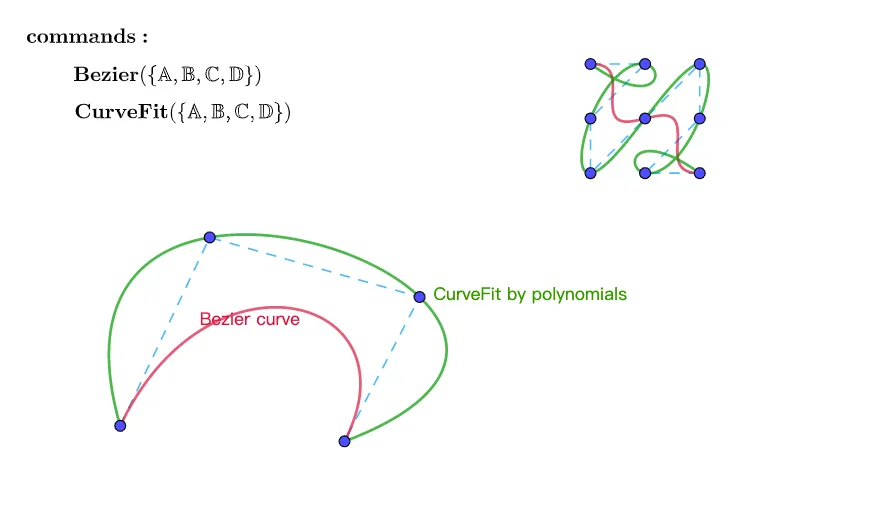
This applet demonstrates a custom GeoGebra tool designed for CurveFit and Bezier curves. Users can input a set of points, after which the tool automatically generates both a fitted curve and a Bezier curve that pass through or near those points. The construction relies on parametric equations and polynomial expressions, providing a mathematical foundation for how curves are shaped from discrete data.
The applet combines GeoGebra commands such as Sequence, Sum, and CurveCartesian to build these curves dynamically. By interacting with the control points, users can observe in real time how moving a single point alters the overall shape of both the fitted curve and the Bezier curve. This visual feedback makes abstract concepts like polynomial interpolation, parametric representation, and the influence of control points tangible and intuitive.
Key learning outcomes include understanding how parametric curves are defined by coordinate functions of a parameter, how polynomial fitting approximates a set of points, and how Bezier curves use control polygons to guide smooth curve design. The tool is particularly valuable for students studying advanced mathematics and analytic geometry, as it bridges the gap between algebraic formulas and geometric visualization.
Instructors can use this applet in classroom settings to demonstrate curve construction interactively, allowing students to experiment with different point configurations and immediately see the resulting curves. It is also relevant to students exploring computer graphics, where Bezier curves are fundamental tools for modeling smooth paths and shapes in design software. Overall, this custom GeoGebra tool provides an engaging, hands-on approach to mastering curve-fitting techniques and deepening conceptual understanding of parametric and polynomial mathematics.
Loading the math board and drawing, please wait…
<?xml version="1.0" encoding="utf-8"?>
<geogebra format="5.0" version="5.0.590.0" app="classic" platform="w" id="09116575-aed9-4397-8523-9e2281037bc7" xsi:noNamespaceSchemaLocation="http://www.geogebra.org/apps/xsd/ggb.xsd" xmlns="" xmlns:xsi="http://www.w3.org/2001/XMLSchema-instance" >
<gui>
<window width="798" height="469" />
<perspectives>
<perspective id="tmp">
<panes>
<pane location="" divider="1" orientation="1" />
</panes>
<views>
<view id="512" toolbar="0 | 1 501 5 19 , 67 | 2 15 45 18 , 7 37 | 514 3 9 , 13 44 , 47 | 16 | 551 550 11 , 20 22 21 23 , 55 56 57 , 12 | 69 | 510 511 , 512 513 | 533 531 , 534 532 , 522 523 , 537 536 , 535 | 521 520 | 36 , 38 49 560 | 571 30 29 570 31 33 | 17 | 540 40 41 42 , 27 28 35 , 6 , 502" visible="false" inframe="false" stylebar="false" location="1,1,1" size="500" window="100,100,600,400" />
<view id="4" toolbar="0 || 2020 , 2021 , 2022 , 66 || 2001 , 2003 , 2002 , 2004 , 2005 || 2040 , 2041 , 2042 , 2044 , 2043" visible="false" inframe="false" stylebar="true" location="1,1" size="291" window="100,100,600,400" />
<view id="8" toolbar="1001 | 1002 | 1003 || 1005 | 1004 || 1006 | 1007 | 1010 || 1008 1009 || 66 68 || 6" visible="false" inframe="false" stylebar="false" location="1,3" size="300" window="100,100,600,400" />
<view id="1" visible="true" inframe="false" stylebar="true" location="3" size="798" window="100,100,600,400" />
<view id="2" visible="false" inframe="false" stylebar="false" location="3" size="361" window="100,100,600,400" />
<view id="16" visible="false" inframe="false" stylebar="true" location="1" size="763" window="50,50,500,500" />
<view id="32" visible="false" inframe="false" stylebar="true" location="1" size="150" window="50,50,500,500" />
<view id="64" toolbar="0" visible="false" inframe="false" stylebar="true" location="1" size="150" window="50,50,500,500" />
<view id="128" visible="false" inframe="false" stylebar="false" location="1" size="480" window="50,50,500,500" />
<view id="4097" visible="false" inframe="false" stylebar="true" location="1" size="531" window="664,323,700,550" />
<view id="70" toolbar="0 || 2020 || 2021 || 2022" visible="false" inframe="false" stylebar="true" location="1" size="150" window="50,50,500,500" />
<view id="43" visible="false" inframe="false" stylebar="false" location="1" size="450" window="50,50,500,500" />
</views>
<toolbar show="false" items="0 39 73 62 | 1 501 67 , 5 19 , 72 75 76 | 2 15 45 , 18 65 , 7 37 | 4 3 8 9 , 13 44 , 58 , 47 | 16 51 64 , 70 | 10 34 53 11 , 24 20 22 , 21 23 | 55 56 57 , 12 | 36 46 , 38 49 50 , 71 14 68 | 30 29 54 32 31 33 | 25 17 26 60 52 61 | 40 41 42 , 27 28 35 , 6 | 100005 100004 100003 100002" position="1" help="false" />
<input show="false" cmd="true" top="algebra" />
<dockBar show="false" east="false" />
</perspective>
</perspectives>
<labelingStyle val="2"/>
<font size="16"/>
</gui>
<euclidianView>
<viewNumber viewNo="1"/>
<size width="798" height="469"/>
<coordSystem xZero="296.49999999999983" yZero="366.00000000000006" scale="49.999999999999986" yscale="50.000000000000064"/>
<evSettings axes="false" grid="false" gridIsBold="false" pointCapturing="3" rightAngleStyle="1" checkboxSize="26" gridType="3"/>
<bgColor r="255" g="255" b="255"/>
<axesColor r="0" g="0" b="0"/>
<gridColor r="192" g="192" b="192"/>
<lineStyle axes="1" grid="0"/>
<axis id="0" show="false" label="" unitLabel="" tickStyle="1" showNumbers="true"/>
<axis id="1" show="false" label="" unitLabel="" tickStyle="1" showNumbers="true"/>
</euclidianView>
<kernel>
<continuous val="false"/>
<usePathAndRegionParameters val="true"/>
<decimals val="2"/>
<angleUnit val="degree"/>
<algebraStyle val="0" spreadsheet="0"/>
<coordStyle val="0"/>
</kernel>
<tableview min="-2" max="2" step="1"/>
<scripting blocked="false" disabled="false"/>
<construction title="" author="" date="">
<expression label="pts" exp="{(1, 1), (2, 2), (-1, 3)}"/>
<element type="list" label="pts">
<show object="false" label="false" ev="4"/>
<objColor r="0" g="100" b="0" alpha="0"/>
<layer val="0"/>
<labelMode val="0"/>
<animation step="1" speed="1" type="0" playing="false"/>
<lineStyle thickness="5" type="0" typeHidden="1"/>
<pointSize val="5"/>
<angleStyle val="0"/>
</element>
<element type="numeric" label="t">
<value val="0.65"/>
<symbolic val="true" />
<show object="false" label="true"/>
<objColor r="0" g="0" b="0" alpha="0.10000000149011612"/>
<layer val="0"/>
<labelMode val="2"/>
<slider min="0" max="1" absoluteScreenLocation="true" width="200" x="30" y="50" fixed="true" horizontal="true" showAlgebra="true"/>
<lineStyle thickness="10" type="0" typeHidden="1"/>
<animation speed="1" type="0" playing="false"/>
</element>
<expression label="n" exp="Length[pts] - 1" />
<element type="numeric" label="n">
<value val="2"/>
<symbolic val="true" />
<objColor r="0" g="0" b="0" alpha="0.10000000149011612"/>
</element>
<command name="Sequence">
<input a0="((nCr[n, k] * (1 - t)^(n - k)) * t^(k))" a1="k" a2="0" a3="n"/>
<output a0="coef"/>
</command>
<element type="list" label="coef">
<objColor r="0" g="100" b="0" alpha="0.10000000149011612"/>
<lineStyle thickness="5" type="0" typeHidden="1"/>
<pointSize val="5"/>
<angleStyle val="0"/>
<symbolic val="true" />
</element>
<command name="Sum">
<input a0="(coef(k) * pts(k))" a1="k" a2="1" a3="n + 1"/>
<output a0="P"/>
</command>
<element type="point" label="P">
<show object="false" label="false" ev="4"/>
<objColor r="68" g="68" b="68" alpha="0"/>
<layer val="0"/>
<labelMode val="0"/>
<coords x="0.6099999999999999" y="2.3" z="1"/>
<pointSize val="4"/>
<pointStyle val="0"/>
</element>
<element type="point" label="A">
<show object="true" label="false" ev="4"/>
<objColor r="77" g="77" b="255" alpha="0"/>
<layer val="0"/>
<labelMode val="0"/>
<animation step="0.1" speed="1" type="1" playing="false"/>
<coords x="-3.7272203850214907" y="-0.48187611830878385" z="1"/>
<pointSize val="5"/>
<pointStyle val="0"/>
</element>
<element type="point" label="B">
<show object="true" label="false" ev="4"/>
<objColor r="77" g="77" b="255" alpha="0"/>
<layer val="0"/>
<labelMode val="0"/>
<animation step="0.1" speed="1" type="1" playing="false"/>
<coords x="-2.0884226076273675" y="2.9705245327348155" z="1"/>
<pointSize val="5"/>
<pointStyle val="0"/>
</element>
<element type="point" label="C">
<show object="true" label="false" ev="4"/>
<objColor r="77" g="77" b="255" alpha="0"/>
<layer val="0"/>
<labelMode val="0"/>
<animation step="0.1" speed="1" type="1" playing="false"/>
<coords x="1.7572895099908243" y="1.87799268113874" z="1"/>
<pointSize val="5"/>
<pointStyle val="0"/>
</element>
<element type="point" label="D">
<show object="true" label="false" ev="4"/>
<objColor r="77" g="77" b="255" alpha="0"/>
<layer val="0"/>
<labelMode val="0"/>
<animation step="0.1" speed="1" type="1" playing="false"/>
<coords x="0.3806993769797679" y="-0.7659343997237635" z="1"/>
<pointSize val="5"/>
<pointStyle val="0"/>
</element>
<command name="Sum">
<input a0="(((nCr[n, k] * (1 - x)^(n - k)) * x^(k)) * x(pts(k + 1)))" a1="k" a2="0" a3="n"/>
<output a0="bx"/>
</command>
<element type="function" label="bx">
<show object="false" label="false" ev="4"/>
<objColor r="153" g="51" b="255" alpha="0"/>
<layer val="0"/>
<labelMode val="0"/>
<fixed val="true"/>
<lineStyle thickness="5" type="0" typeHidden="1" opacity="178"/>
</element>
<command name="Sum">
<input a0="(((nCr[n, k] * (1 - x)^(n - k)) * x^(k)) * y(pts(k + 1)))" a1="k" a2="0" a3="n"/>
<output a0="by"/>
</command>
<element type="function" label="by">
<show object="false" label="false" ev="4"/>
<objColor r="204" g="0" b="0" alpha="0"/>
<layer val="0"/>
<labelMode val="0"/>
<fixed val="true"/>
<lineStyle thickness="5" type="0" typeHidden="1" opacity="178"/>
</element>
<command name="CurveCartesian">
<input a0="bx(s)" a1="by(s)" a2="s" a3="0" a4="1"/>
<output a0="a"/>
</command>
<element type="curvecartesian" label="a">
<show object="false" label="false" ev="4"/>
<objColor r="0" g="0" b="0" alpha="0"/>
<layer val="0"/>
<labelMode val="0"/>
<selectionAllowed val="false"/>
<lineStyle thickness="5" type="0" typeHidden="1" opacity="178"/>
</element>
<command name="Bezier">
<input a0="{A, B, C, D}"/>
<output a0="b"/>
</command>
<element type="curvecartesian" label="b">
<show object="true" label="false" ev="4"/>
<objColor r="220" g="20" b="60" alpha="0"/>
<layer val="0"/>
<labelOffset x="50" y="2"/>
<labelMode val="3"/>
<selectionAllowed val="false"/>
<lineStyle thickness="5" type="0" typeHidden="1" opacity="178"/>
<caption val="Bezier curve"/>
</element>
<command name="PolyLine">
<input a0="{A, B, C, D}"/>
<output a0="f"/>
</command>
<element type="polyline" label="f">
<lineStyle thickness="3" type="15" typeHidden="1" opacity="178"/>
<show object="true" label="false" ev="4"/>
<objColor r="0" g="153" b="255" alpha="0"/>
<layer val="0"/>
<labelMode val="0"/>
<selectionAllowed val="false"/>
</element>
<element type="point" label="E">
<show object="true" label="false" ev="4"/>
<objColor r="77" g="77" b="255" alpha="0"/>
<layer val="0"/>
<labelMode val="0"/>
<animation step="0.1" speed="1" type="1" playing="false"/>
<coords x="4.888746680102862" y="6.148102549203544" z="1"/>
<pointSize val="5"/>
<pointStyle val="0"/>
</element>
<element type="point" label="F">
<show object="true" label="false" ev="4"/>
<objColor r="77" g="77" b="255" alpha="0"/>
<layer val="0"/>
<labelMode val="0"/>
<animation step="0.1" speed="1" type="1" playing="false"/>
<coords x="5.888746680102862" y="6.148102549203544" z="1"/>
<pointSize val="5"/>
<pointStyle val="0"/>
</element>
<element type="point" label="G">
<show object="true" label="false" ev="4"/>
<objColor r="77" g="77" b="255" alpha="0"/>
<layer val="0"/>
<labelMode val="0"/>
<animation step="0.1" speed="1" type="1" playing="false"/>
<coords x="6.888746680102862" y="6.148102549203544" z="1"/>
<pointSize val="5"/>
<pointStyle val="0"/>
</element>
<element type="point" label="H">
<show object="true" label="false" ev="4"/>
<objColor r="77" g="77" b="255" alpha="0"/>
<layer val="0"/>
<labelMode val="0"/>
<animation step="0.1" speed="1" type="1" playing="false"/>
<coords x="4.888746680102862" y="5.148102549203544" z="1"/>
<pointSize val="5"/>
<pointStyle val="0"/>
</element>
<element type="point" label="I">
<show object="true" label="false" ev="4"/>
<objColor r="77" g="77" b="255" alpha="0"/>
<layer val="0"/>
<labelMode val="0"/>
<animation step="0.1" speed="1" type="1" playing="false"/>
<coords x="5.888746680102862" y="5.148102549203544" z="1"/>
<pointSize val="5"/>
<pointStyle val="0"/>
</element>
<element type="point" label="J">
<show object="true" label="false" ev="4"/>
<objColor r="77" g="77" b="255" alpha="0"/>
<layer val="0"/>
<labelMode val="0"/>
<animation step="0.1" speed="1" type="1" playing="false"/>
<coords x="6.888746680102862" y="5.148102549203544" z="1"/>
<pointSize val="5"/>
<pointStyle val="0"/>
</element>
<element type="point" label="K">
<show object="true" label="false" ev="4"/>
<objColor r="77" g="77" b="255" alpha="0"/>
<layer val="0"/>
<labelMode val="0"/>
<animation step="0.1" speed="1" type="1" playing="false"/>
<coords x="4.888746680102862" y="4.148102549203544" z="1"/>
<pointSize val="5"/>
<pointStyle val="0"/>
</element>
<element type="point" label="L">
<show object="true" label="false" ev="4"/>
<objColor r="77" g="77" b="255" alpha="0"/>
<layer val="0"/>
<labelMode val="0"/>
<animation step="0.1" speed="1" type="1" playing="false"/>
<coords x="5.888746680102862" y="4.148102549203544" z="1"/>
<pointSize val="5"/>
<pointStyle val="0"/>
</element>
<element type="point" label="M">
<show object="true" label="false" ev="4"/>
<objColor r="77" g="77" b="255" alpha="0"/>
<layer val="0"/>
<labelMode val="0"/>
<animation step="0.1" speed="1" type="1" playing="false"/>
<coords x="6.888746680102862" y="4.148102549203544" z="1"/>
<pointSize val="5"/>
<pointStyle val="0"/>
</element>
<command name="Bezier">
<input a0="{E, F, H, K, I, G, J, L, M}"/>
<output a0="c"/>
</command>
<element type="curvecartesian" label="c">
<show object="true" label="false" ev="4"/>
<objColor r="220" g="20" b="60" alpha="0"/>
<layer val="0"/>
<labelMode val="0"/>
<selectionAllowed val="false"/>
<lineStyle thickness="5" type="0" typeHidden="1" opacity="178"/>
</element>
<command name="Polynomial">
<input a0="Sequence[(k / n, x(pts(k + 1))), k, 0, n]"/>
<output a0="fx"/>
</command>
<element type="function" label="fx">
<show object="false" label="false" ev="4"/>
<objColor r="204" g="0" b="0" alpha="0"/>
<layer val="0"/>
<labelMode val="0"/>
<fixed val="true"/>
<lineStyle thickness="5" type="0" typeHidden="1" opacity="178"/>
</element>
<command name="Polynomial">
<input a0="Sequence[(k / n, y(pts(k + 1))), k, 0, n]"/>
<output a0="fy"/>
</command>
<element type="function" label="fy">
<show object="false" label="false" ev="4"/>
<objColor r="0" g="0" b="255" alpha="0"/>
<layer val="0"/>
<labelMode val="0"/>
<fixed val="true"/>
<lineStyle thickness="5" type="0" typeHidden="1" opacity="178"/>
</element>
<command name="CurveCartesian">
<input a0="fx(s)" a1="fy(s)" a2="s" a3="0" a4="1"/>
<output a0="d"/>
</command>
<element type="curvecartesian" label="d">
<show object="false" label="false" ev="4"/>
<objColor r="0" g="0" b="0" alpha="0"/>
<layer val="0"/>
<labelMode val="0"/>
<selectionAllowed val="false"/>
<lineStyle thickness="5" type="0" typeHidden="1" opacity="178"/>
</element>
<command name="CurveFit">
<input a0="{A, B, C, D}"/>
<output a0="e"/>
</command>
<element type="curvecartesian" label="e">
<show object="true" label="false" ev="4"/>
<objColor r="0" g="153" b="0" alpha="0"/>
<layer val="0"/>
<labelMode val="0"/>
<selectionAllowed val="false"/>
<lineStyle thickness="5" type="0" typeHidden="1" opacity="178"/>
</element>
<command name="CurveFit">
<input a0="{E, F, H, K, I, G, J, L, M}"/>
<output a0="g"/>
</command>
<element type="curvecartesian" label="g">
<show object="true" label="false" ev="4"/>
<objColor r="0" g="153" b="0" alpha="0"/>
<layer val="0"/>
<labelMode val="0"/>
<selectionAllowed val="false"/>
<lineStyle thickness="5" type="0" typeHidden="1" opacity="178"/>
</element>
<expression label="text1" exp=""Bezier curve""/>
<element type="text" label="text1">
<show object="true" label="false" ev="20"/>
<objColor r="220" g="20" b="60" alpha="0"/>
<layer val="0"/>
<labelMode val="0"/>
<startPoint exp="PinBezier"/>
<labelOffset x="-21" y="6"/>
</element>
<expression label="PinBezier" exp="b(0.3)" type="point" />
<element type="point" label="PinBezier">
<show object="false" label="false" ev="4"/>
<objColor r="68" g="68" b="68" alpha="0"/>
<layer val="0"/>
<labelMode val="0"/>
<coords x="-1.8570243614593203" y="1.4789781982988206" z="1"/>
<pointSize val="4"/>
<pointStyle val="3"/>
</element>
<expression label="PinCurveFit" exp="e(0.7)" type="point" />
<element type="point" label="PinCurveFit">
<show object="false" label="false" ev="4"/>
<objColor r="68" g="68" b="68" alpha="0"/>
<layer val="0"/>
<labelMode val="0"/>
<coords x="1.977216171717115" y="1.6340193933588205" z="1"/>
<pointSize val="4"/>
<pointStyle val="0"/>
</element>
<expression label="text2" exp=""CurveFit by polynomials""/>
<element type="text" label="text2">
<show object="true" label="false" ev="20"/>
<objColor r="51" g="153" b="0" alpha="0"/>
<layer val="0"/>
<labelMode val="0"/>
<startPoint exp="PinCurveFit"/>
<labelOffset x="2" y="-9"/>
</element>
<expression label="pts2" exp="{E, F, H, K, I, G, J, L, M}" />
<element type="list" label="pts2">
<show object="false" label="false" ev="4"/>
<objColor r="0" g="100" b="0" alpha="0"/>
<layer val="0"/>
<labelMode val="0"/>
<lineStyle thickness="5" type="0" typeHidden="1"/>
<pointSize val="5"/>
<angleStyle val="0"/>
</element>
<command name="PolyLine">
<input a0="pts2"/>
<output a0="h"/>
</command>
<element type="polyline" label="h">
<lineStyle thickness="3" type="15" typeHidden="1" opacity="178"/>
<show object="true" label="false" ev="4"/>
<objColor r="0" g="153" b="255" alpha="0"/>
<layer val="0"/>
<labelMode val="0"/>
<selectionAllowed val="false"/>
</element>
<expression label="text3" exp=""\mathbf{CurveFit}(\{\mathbb{A,B,C,D}\})""/>
<element type="text" label="text3">
<show object="true" label="false" ev="40"/>
<objColor r="0" g="0" b="0" alpha="0"/>
<layer val="0"/>
<labelMode val="0"/>
<selectionAllowed val="false"/>
<isLaTeX val="true"/>
<font serif="true" sizeM="1" size="0" style="0"/>
<absoluteScreenLocation x="64" y="90"/>
</element>
<expression label="text4" exp=""\mathbf{Bezier}(\{\mathbb{A,B,C,D}\})""/>
<element type="text" label="text4">
<show object="true" label="false" ev="40"/>
<objColor r="0" g="0" b="0" alpha="0"/>
<layer val="0"/>
<labelMode val="0"/>
<selectionAllowed val="false"/>
<isLaTeX val="true"/>
<font serif="true" sizeM="1" size="0" style="0"/>
<absoluteScreenLocation x="63" y="56"/>
</element>
<expression label="text5" exp=""\mathbf{commands:}""/>
<element type="text" label="text5">
<show object="true" label="false" ev="40"/>
<objColor r="0" g="0" b="0" alpha="0"/>
<layer val="0"/>
<labelMode val="0"/>
<selectionAllowed val="false"/>
<isLaTeX val="true"/>
<font serif="true" sizeM="1" size="0" style="0"/>
<absoluteScreenLocation x="20" y="21"/>
</element>
</construction>
</geogebra>