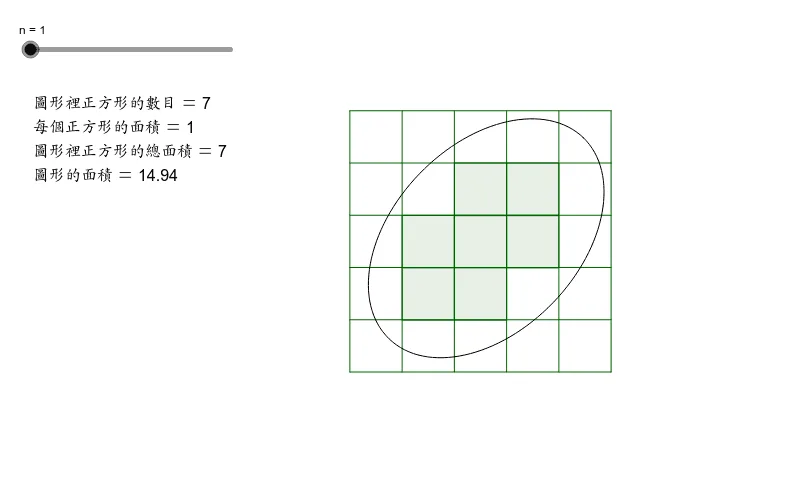
<?xml version="1.0" encoding="utf-8"?>
<geogebra format="5.0" version="5.0.24.0" id="66dff428-c0ee-4cdc-b91a-688eb6dd0419" xsi:noNamespaceSchemaLocation="http://www.geogebra.org/ggb.xsd" xmlns="" xmlns:xsi="http://www.w3.org/2001/XMLSchema-instance" >
<gui>
<window width="800" height="600" />
<perspectives>
<perspective id="tmp">
<panes>
<pane location="" divider="0.25" orientation="1" />
</panes>
<views>
<view id="4097" visible="true" inframe="true" stylebar="true" location="1,1,1,1" size="400" window="110,250,787,550" />
<view id="512" toolbar="0 | 1 501 5 19 , 67 | 2 15 45 18 , 7 37 | 514 3 9 , 13 44 , 47 | 16 | 551 550 11 , 22 , 23 , 55 56 57 , 12 | 69 | 510 511 , 512 513 | 533 531 , 534 532 , 522 523 , 537 536 , 535 | 521 520 | 36 , 38 49 560 | 571 30 29 570 31 33 | 17 | 540 40 41 42 , 27 28 35 , 6 , 502" visible="false" inframe="false" stylebar="false" location="1,1,1" size="500" window="100,100,600,400" />
<view id="4" toolbar="0 || 2020 , 2021 , 2022 , 66 || 2001 , 2003 , 2002 , 2004 , 2005 || 2040 , 2041 , 2042 , 2044 , 2043" visible="false" inframe="false" stylebar="false" location="1,1" size="300" window="100,100,600,400" />
<view id="8" toolbar="1001 | 1002 | 1003 || 1005 | 1004 || 1006 | 1007 | 1010 || 1008 1009 || 66 68 || 6" visible="false" inframe="false" stylebar="false" location="1,3" size="300" window="100,100,600,400" />
<view id="1" visible="true" inframe="false" stylebar="true" location="1" size="789" window="100,100,600,400" />
<view id="2" visible="false" inframe="false" stylebar="false" location="3" size="200" window="100,100,250,400" />
<view id="16" visible="false" inframe="false" stylebar="false" location="1" size="150" window="50,50,500,500" />
<view id="32" visible="false" inframe="false" stylebar="true" location="1" size="150" window="50,50,500,500" />
<view id="64" visible="false" inframe="true" stylebar="true" location="1" size="150" window="50,50,500,500" />
<view id="70" toolbar="0 || 2020 || 2021 || 2022" visible="false" inframe="true" stylebar="true" location="1" size="150" window="50,50,500,500" />
</views>
<toolbar show="true" items="0 39 | 1 501 67 , 5 19 , 72 | 2 15 45 , 18 65 , 7 37 | 4 3 8 9 , 13 44 , 58 , 47 | 16 51 64 , 70 | 10 34 53 11 , 24 20 22 , 21 23 | 55 56 57 , 12 | 36 46 , 38 49 50 , 71 | 30 29 54 32 31 33 | 17 26 62 73 , 14 68 | 25 52 60 61 | 40 41 42 , 27 28 35 , 6" position="1" help="false" />
<input show="true" cmd="true" top="false" />
<dockBar show="true" east="true" />
</perspective>
</perspectives>
<labelingStyle val="0"/>
<font size="12"/>
<graphicsSettings javaLatexFonts="false"/>
</gui>
<euclidianView>
<size width="789" height="463"/>
<coordSystem xZero="349.86978735898595" yZero="372.0042661109913" scale="52.24722458837457" yscale="52.24722458837455"/>
<evSettings axes="false" grid="false" gridIsBold="false" pointCapturing="3" rightAngleStyle="2" checkboxSize="26" gridType="0"/>
<bgColor r="255" g="255" b="255"/>
<axesColor r="0" g="0" b="0"/>
<gridColor r="192" g="192" b="192"/>
<lineStyle axes="1" grid="10"/>
<axis id="0" show="false" label="" unitLabel="" tickStyle="1" showNumbers="true"/>
<axis id="1" show="false" label="" unitLabel="" tickStyle="1" showNumbers="true"/>
</euclidianView>
<kernel>
<continuous val="false"/>
<usePathAndRegionParameters val="true"/>
<decimals val="2"/>
<angleUnit val="degree"/>
<algebraStyle val="0"/>
<coordStyle val="0"/>
<angleFromInvTrig val="false"/>
</kernel>
<scripting blocked="false" disabled="false"/>
<construction title="Irregular shape" author="" date="">
<element type="point" label="A">
<show object="false" label="false"/>
<objColor r="0" g="0" b="255" alpha="0.0"/>
<layer val="0"/>
<labelMode val="0"/>
<animation step="0.1" speed="1" type="1" playing="false"/>
<coords x="4.0" y="4.0" z="1.0"/>
<pointSize val="3"/>
<pointStyle val="0"/>
</element>
<element type="point" label="B">
<show object="false" label="false"/>
<objColor r="0" g="0" b="255" alpha="0.0"/>
<layer val="0"/>
<labelMode val="0"/>
<animation step="0.1" speed="1" type="1" playing="false"/>
<coords x="1.22" y="1.12" z="1.0"/>
<pointSize val="3"/>
<pointStyle val="0"/>
</element>
<element type="point" label="C">
<show object="false" label="false"/>
<objColor r="0" g="0" b="255" alpha="0.0"/>
<layer val="0"/>
<labelMode val="0"/>
<animation step="0.1" speed="1" type="1" playing="false"/>
<coords x="4.28" y="1.8" z="1.0"/>
<pointSize val="3"/>
<pointStyle val="0"/>
</element>
<command name="Ellipse">
<input a0="A" a1="B" a2="C"/>
<output a0="c"/>
</command>
<element type="conic" label="c">
<show object="true" label="false"/>
<objColor r="0" g="0" b="0" alpha="0.0"/>
<layer val="0"/>
<labelMode val="0"/>
<fixed val="true"/>
<lineStyle thickness="2" type="0" typeHidden="1"/>
<eigenvectors x0="0.6945053411039606" y0="0.7194875476184919" z0="1.0" x1="-0.7194875476184919" y1="0.6945053411039606" z1="1.0"/>
<matrix A0="83.67878847932447" A1="81.41478847932446" A2="313.93299680246105" A3="-32.025600000000004" A4="-136.41610193103682" A5="-124.83504250707065"/>
<eqnStyle style="implicit"/>
</element>
<element type="numeric" label="n">
<value val="1.0"/>
<show object="true" label="true"/>
<objColor r="0" g="0" b="0" alpha="0.1"/>
<layer val="0"/>
<labelMode val="1"/>
<slider min="1" max="10" absoluteScreenLocation="true" width="200.0" x="30.0" y="50.0" fixed="true" horizontal="true"/>
<lineStyle thickness="10" type="0" typeHidden="1"/>
<animation step="1" speed="1" type="0" playing="false"/>
</element>
<command name="Sequence">
<input a0="Segment[(i / n, 0), (i / n, 5)]" a1="i" a2="0" a3="(5 * n)"/>
<output a0="list1"/>
</command>
<element type="list" label="list1">
<show object="true" label="false"/>
<objColor r="0" g="100" b="0" alpha="0.0"/>
<layer val="0"/>
<labelMode val="0"/>
<lineStyle thickness="2" type="0" typeHidden="1"/>
<pointSize val="3"/>
<pointStyle val="-1"/>
</element>
<command name="Sequence">
<input a0="Segment[(0, i / n), (5, i / n)]" a1="i" a2="0" a3="(5 * n)"/>
<output a0="list2"/>
</command>
<element type="list" label="list2">
<show object="true" label="false"/>
<objColor r="0" g="100" b="0" alpha="0.0"/>
<layer val="0"/>
<labelMode val="0"/>
<lineStyle thickness="2" type="0" typeHidden="1"/>
<pointSize val="3"/>
<pointStyle val="-1"/>
</element>
<command name="Sequence">
<input a0="Sequence[If[IsInRegion[(i / n, j / n), c] ∧ IsInRegion[((i + 1) / n, j / n), c] ∧ IsInRegion[(i / n, (j + 1) / n), c] ∧ IsInRegion[((i + 1) / n, (j + 1) / n), c], Polygon[(i / n, j / n), (i / n, (j + 1) / n), ((i + 1) / n, (j + 1) / n), ((i + 1) / n, j / n)]], i, 0, (5 * n) - 1]" a1="j" a2="0" a3="(5 * n) - 1"/>
<output a0="list3"/>
</command>
<element type="list" label="list3">
<show object="true" label="false"/>
<objColor r="0" g="100" b="0" alpha="0.1"/>
<layer val="0"/>
<labelMode val="0"/>
<lineStyle thickness="2" type="0" typeHidden="1"/>
<pointSize val="3"/>
<pointStyle val="-1"/>
</element>
<command name="Area">
<input a0="c"/>
<output a0="aa"/>
</command>
<element type="numeric" label="aa">
<value val="14.936834713526292"/>
<objColor r="0" g="0" b="0" alpha="0.1"/>
</element>
<command name="Sum">
<input a0="Sequence[Sum[Sequence[IsInRegion[(i / n, j / n), c] ∧ IsInRegion[((i + 1) / n, j / n), c] ∧ IsInRegion[(i / n, (j + 1) / n), c] ∧ IsInRegion[((i + 1) / n, (j + 1) / n), c], i, 0, (5 * n) - 1]], j, 0, (5 * n) - 1]"/>
<output a0="m"/>
</command>
<element type="numeric" label="m">
<value val="7.0"/>
<objColor r="0" g="0" b="0" alpha="0.1"/>
</element>
<expression label="square" exp="(1 / n * 1 / n)" />
<element type="numeric" label="square">
<value val="1.0"/>
<objColor r="0" g="0" b="0" alpha="0.1"/>
</element>
<expression label="estimate" exp="(m * square)" />
<element type="numeric" label="estimate">
<value val="7.0"/>
<objColor r="0" g="0" b="0" alpha="0.1"/>
</element>
<expression label="text1" exp=""圖形裡正方形的數目 = " + m + " 每個正方形的面積 = " + square + " 圖形裡正方形的總面積 = " + estimate + " 圖形的面積 = " + aa + """ />
<element type="text" label="text1">
<show object="true" label="false"/>
<objColor r="0" g="0" b="0" alpha="0.0"/>
<layer val="0"/>
<labelMode val="0"/>
<fixed val="true"/>
<font serif="false" sizeM="1.4" size="5" style="0"/>
<startPoint x="-6.064815688401026" y="5.033841858262304" z="1.0"/>
</element>
</construction>
</geogebra>